

- Version
- 26.3.0
- Studio or maker
- Codeweavers
- Languages
- Russian, English, German, Amharic, Belarusian, Bulgarian, Danish, Spanish, Catalan, Czech, Estonian
- Activation
- K'ed by TNT team
- Runs on macOS
- macOS 10.15 or later
- Chip type
- Intel 64-bit
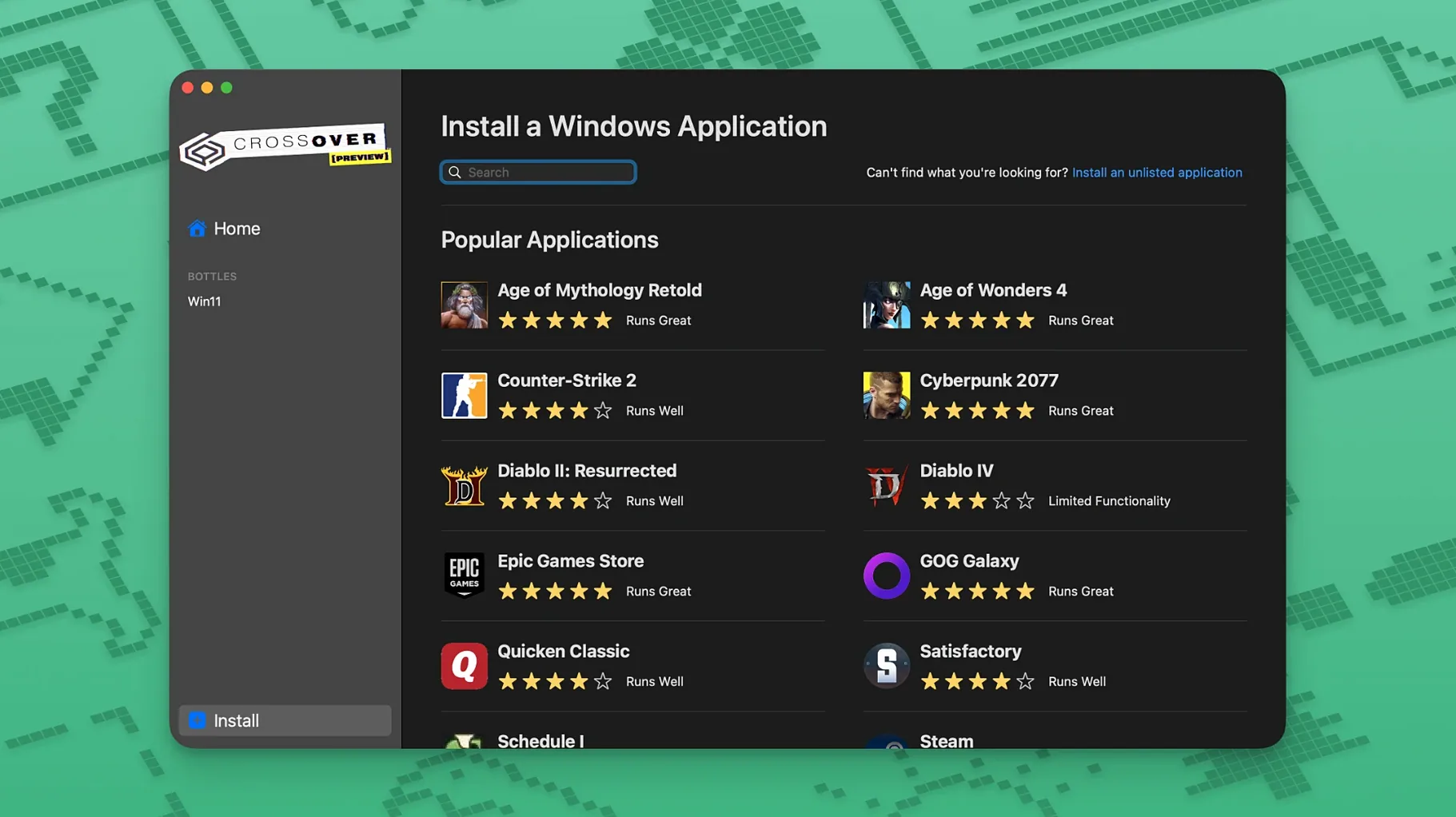
Windows software on a Mac usually means installing Windows first. CrossOver sidesteps that entirely. It uses Wine-based technology to run many Windows productivity tools, utilities, and games directly in macOS, with no operating system to manage.
Check your Mac's processor and macOS version
CrossOver 26.3.0 needs macOS 10.15 Catalina or newer, and an Intel processor. If your Mac has Apple Silicon, this version is not the one for you.
Know what you get
Each application runs inside its own bottle, complete with a C drive, subfolders, and registry. That keeps programs isolated from each other. The current release fixes Diablo IV after a game update, Epic Games Launcher downloads on Mac, and GOG Galaxy loading. Unsupported Wine applications may still be unstable or fail entirely.
Set it up
Installation takes a few steps: mount the disk image, bypass Gatekeeper in Terminal, drag the app into Applications, then run the license tool from the Extra folder. If activation hiccups, grant Terminal full disk access and try again.
Check an app's compatibility before installing
The most common mistake is treating CrossOver like a universal translator. Not every Windows application will work, and expecting it to is a quick route to frustration. Before you install anything, check the application's compatibility rating on the CodeWeavers website. If a program is rated Gold or Platinum, it is likely to run well. If it shows as Garbage or unsupported, save yourself the time.
Another trap is using a single bottle for everything. People drop multiple applications into one bottle because it seems simpler. That works for a while, then one program's update or registry change breaks another. I recommend a fresh bottle per application, especially for games. It keeps the environment clean and makes troubleshooting far easier.
Beginners also forget that some Windows applications need their own installer. CrossOver can launch the installer, but the software itself might require a separate setup process. Read the documentation or community forums for the specific program before you start.
Finally, many users ignore the "Debug" settings in the bottle configuration. When an application fails to launch, the debug output often shows exactly what is missing: a DLL, a font, a library.
Run Windows apps on a separate macOS desktop
CrossOver does not replace macOS features; it works alongside them. I use macOS Spaces to keep my CrossOver bottles on a separate desktop, so Windows applications do not clutter my main workflow. The macOS Dock shows each running Windows program as its own icon, and you can switch between them with standard Command+Tab.
Copy and paste between Windows applications and native Mac apps works well for text, though formatting can sometimes drop out. I have moved spreadsheet data from a Windows program into Numbers without trouble. For file transfers, the macOS Finder sees the C drive inside each bottle as a regular folder, so dragging files in and out is straightforward.
You can also use macOS Automator or Shortcuts to launch a specific bottle and application with one click. I set up a simple Automator workflow that opens my school's grade-tracking tool inside CrossOver whenever I plug in my external monitor. It is not a feature CodeWeavers advertises, but it works because CrossOver responds to the same Apple Events as native apps.
Diablo IV crashing fixed in the latest update
The 26.3.0 update is a maintenance release, so the changes are targeted rather than sweeping. Three fixes stand out in everyday use:
- Diablo IV would stop launching after a game update. That is now resolved, which matters if you play the title through CrossOver.
- Epic Games Launcher downloads stopped working on Mac after an update of the launcher itself. The fix means you can install and update Epic games again without workarounds.
- GOG Galaxy client would hang after loading. That is also fixed, so the library and downloads function normally.
These are the only changes CodeWeavers lists for this version. If you already had earlier 26.x builds running, the upgrade is worthwhile for these fixes alone. If you do not use Diablo IV, Epic, or GOG Galaxy, the release may not change your daily experience.
Settings I adjust first
After installation, I go into the CrossOver preferences and make two changes. First, I disable automatic updates for bottles. Updates can sometimes break a working configuration, and I prefer to apply them manually after checking community reports. Second, I increase the number of visible bottles in the sidebar. The default shows only a few, but I work with many different programs, so seeing them all at once saves clicks.
Inside each bottle, I open the "Configure" panel and switch the Windows version to match what the application expects. Most modern Windows programs expect Windows 10, but older utilities sometimes need Windows 7 or even XP. Matching the version reduces strange errors. I also install the core fonts package if the program displays text oddly.
For games, I enable DXVK in the bottle settings if the game uses DirectX 10 or 11. It is a toggle inside the bottle configuration, and it often makes the difference between unplayable stutter and smooth performance.
Rename bottles and set custom icons
CrossOver lets you rename bottles. I name mine by application name and purpose, like "School_Admin" or "Age_of_Empires_2". That makes finding the right bottle instant.
You can also set a custom icon for each bottle. Right-click the bottle, choose "Get Info," and drag any icon file onto the bottle icon in the info window. It helps when you have several bottles open and want to distinguish them at a glance.
The "Run Command" feature inside a bottle is handy for one-off tasks. If you only need to run a small utility or a repair tool, you can do it without creating a launcher entry. Just type the path to the executable inside the bottle's C drive.
CrossOver remembers your window positions and sizes per bottle. If you always keep your accounting software at a specific size and location, the next launch will restore it. That is not something most users notice, but it adds up over weeks of daily use.
For those exploring other versions, you might see references to crossover mac free or crossover 26 tnt in community discussions. The TNT release is the one described in this article's setup section. Similarly, crossover 26 mac crack and crossover preview download mac are terms that appear in user forums. If you search for crossover mac rutracker, you will find community archives of older builds.
- Fix for Diablo IV not launching after a game update.
- Fix for Epic Games Launcher downloads not working on Mac after an update.
- Fix for GOG Galaxy client not loading after an update.
- macOS 10.15 Catalina or later
- Intel processor
Questions I keep getting
Does CrossOver work on Apple Silicon Macs?
No. Version 26.3.0 requires an Intel processor and macOS 10.15 Catalina or later.
How to install
- Mount the disk image and run Open Gatekeeper friendly to prepare the installer.
- Press Enter in Terminal to bypass Gatekeeper, so macOS lets the app run.
- Drag the app into the Applications folder to install it.
- Open the Extra folder and copy the croslic folder to the desktop for easier access.
- In the croslic folder, right-click license.tool, choose Open With, then Terminal to activate.
- Enter your Mac password in Terminal and wait for the process to finish.
- If activation problems occur, grant Terminal full disk access and repeat the last step.
Similar apps
Sign in or join the club to leave a comment.
Nobody has commented yet.