

- Version
- 10.13.6 (17G66)
- Studio or maker
- Apple
- Languages
- Russian, English, German, Arabic, Hungarian, Vietnamese, Greek, Danish, Hebrew, Indonesian, Spanish, Italian, Catalan, Chinese (Traditional), Chinese (Simplified), Korean, Malay, Dutch, Norwegian, Polish, Portuguese, Romanian, Slovak, Thai, Turkish, Ukrainian, Finnish, French, Hindi, Croatian, Czech, Swedish, Japanese
- Activation
- DRM-free
- Chip type
- Intel 64-bit
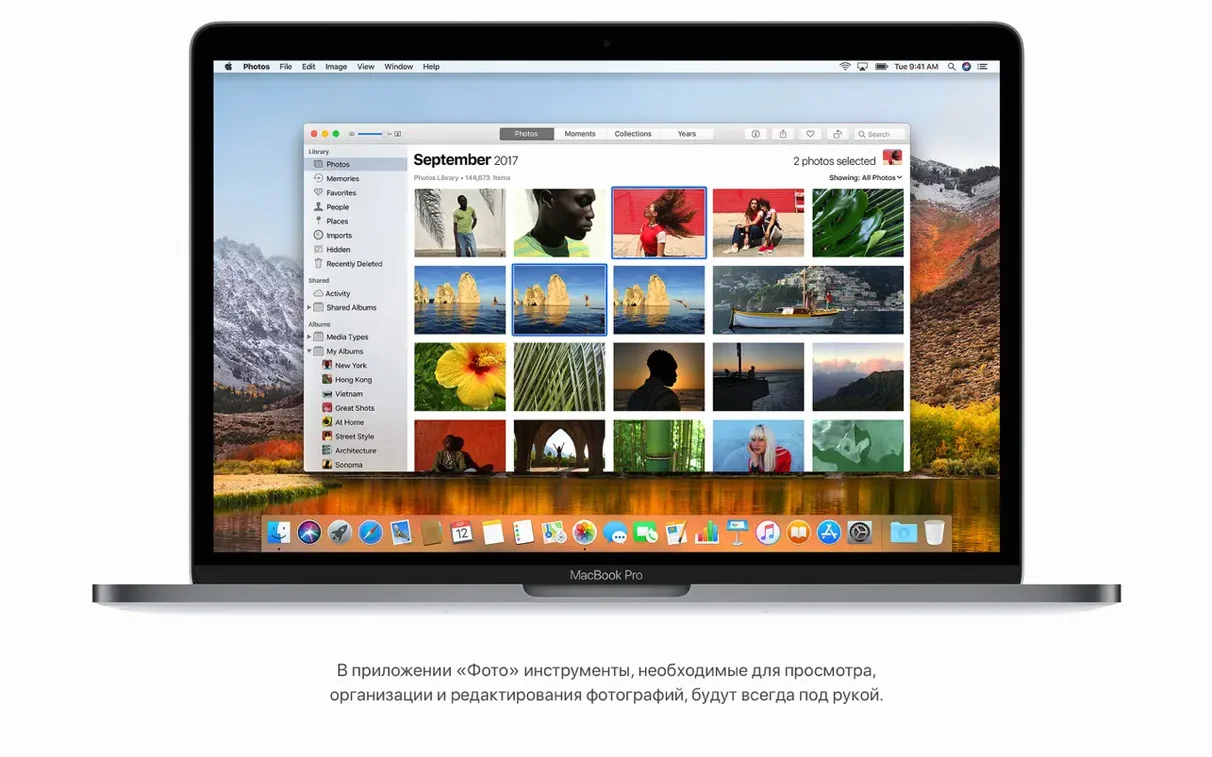
macOS High Sierra 10.13.6 runs on a wide range of Macs, from late 2009 iMacs and 2010 MacBooks to the latest Intel models. If your Mac supports it, this version brings a set of refinements that make daily work smoother and safer.
Why does APFS matter for my files?
APFS, the new file system, is built into High Sierra. It includes native encryption, so your data is protected without extra steps. It also handles disk space more efficiently, which can help older drives feel a bit more responsive.
How does Safari make browsing easier?
Safari now blocks autoplay of sound media, so videos won't start blaring without your say-so. It can also automatically open articles in Reader mode, which strips away clutter and lets you focus on the text. For heavy readers, this is a quiet blessing.
Photos adds curves and selective color; Notes gets simple tables
Photos adds Curves and Selective Color tools, giving you finer control over edits without needing a separate app. The sidebar is fixed, with albums and sorting tools right where you expect them. Notes now supports simple tables, handy for lesson plans or packing lists.
Any improvements to Mail and iTunes?
Mail search includes Top Hits, so the message you want often appears first. iTunes gains AirPlay 2 multi-room audio support, letting you play music on multiple speakers around the house. The 10.13.6 update also improves overall stability and security, and fixes a Photos issue with AVCHD media and a Mail issue with Gmail messages.
A reliable choice for teachers and secondary machines
This system works well for anyone running a supported Intel Mac who doesn't need the latest macOS features. People who keep a second machine for writing, browsing, or older software find it a reliable choice. Teachers and school IT staff sometimes prefer High Sierra on lab Macs because it supports a broad range of hardware without introducing interface changes that confuse students. Developers who test software against older macOS versions also keep a High Sierra partition handy — APFS and Metal 2 give them modern foundations without jumping to a newer OS.
For home users, it suits those who value stability over novelty. If your Mac is a few years old and you mainly check email, edit photos in the built-in Photos app, or stream video, High Sierra handles these tasks without pushing you toward new workflows. The same applies to families sharing a computer: fewer major version changes means fewer "where did that button go" questions.
Don't start the upgrade with less than 14.3 GB free
The biggest one I see is assuming the upgrade requires less storage than it does. The system needs 14.3 GB of free space to install. People often start the process with only a few gigabytes free, then wonder why the installer stalls. Before you begin, check your available storage and clear out old downloads or move files to an external drive.
Another mistake is updating from an older macOS directly without backing up first. While High Sierra itself is stable, any major OS upgrade carries a small risk of data loss. A Time Machine backup or a clone on an external drive takes fifteen minutes and saves hours of frustration. I also see people ignore the architecture requirement — High Sierra supports only 64-bit Intel Macs. If your machine is a 2008 or earlier model, or any PowerPC system, this installer will not run. Checking your Mac's model year against the list (MacBook late 2009 or later, MacBook Pro mid 2010 or later, etc.) saves a wasted download.
Finally, some beginners try to install High Sierra on a drive with a case-sensitive file system. The installer does not support that layout. If you use a case-sensitive volume, you will need to reformat to standard APFS or HFS+ before proceeding.
Lighter on resources than Mojave, runs on older Macs
Compared to macOS Mojave (10.14), High Sierra is lighter on resources. Mojave adds Dark Mode, dynamic desktop backgrounds, and a few iOS ported apps, but it also drops support for some older Macs that High Sierra still runs on. If your Mac is a mid-2010 MacBook or a late-2009 iMac, Mojave will not install at all — High Sierra is your best official option.
Against macOS Sierra (10.12), High Sierra brings APFS and Metal 2, which are meaningful if you use modern apps or care about encryption. Sierra uses the older HFS+ file system and does not support HEVC video playback. For video editors or anyone who works with 4K content, High Sierra's HEVC support is a clear step forward. The Photos app in High Sierra also adds Curves and Selective Color, tools that Sierra lacks entirely.
macOS Big Sur (11) and later versions require a newer Mac and demand more RAM and storage. They also change the interface significantly. For users who value familiarity and do not need the latest app compatibility, High Sierra remains a practical choice — it runs older 64-bit software that Big Sur cannot launch at all.
Needs an Intel Mac, 2 GB RAM, and 14.3 GB of storage
Before you install, know the requirements. Your Mac needs an Intel processor, at least 2 GB of memory, and 14.3 GB of free storage for the upgrade. The system supports a broad range of languages — 32 in total, including English, German, French, Spanish, Arabic, Chinese, Japanese, Korean, Hindi, and Russian. The installer itself works on any compatible Mac listed earlier, from the 2009 iMac to the 2010 MacBook and later.
After installation, your drive will use APFS by default. The system boots from this file system and manages encryption automatically if you turn on FileVault. High Sierra also includes Metal 2 for graphics and HEVC for efficient video streaming. These features do not require configuration — they work as soon as the system is running. Safari blocks autoplay videos out of the box, and Reader mode is ready to use on article pages. Mail search shows Top Hits immediately. Notes tables are available from the toolbar. Everything behaves predictably, which is what you want from a daily driver on older hardware.
- Adds AirPlay 2 multi-room audio support for iTunes.
- Improves the stability and security of the Mac.
- Fixes an issue that may prevent Photos from recognizing AVCHD media from some cameras.
- Fixes an issue that may prevent Mail users from moving a message from Gmail to another account.
- macOS 10.13.5 or later
- Intel processor
- 2GB of memory
- 14.3GB of available storage
Questions I keep getting
Which Macs can run macOS High Sierra?
High Sierra supports Macs from late 2009 onward, including iMac, MacBook, MacBook Pro, MacBook Air, Mac mini, and Mac Pro models. Check Apple's compatibility list for your specific machine.
Does High Sierra support virtual reality?
Yes, High Sierra includes support for virtual reality content creation, making it possible for developers to work with VR tools on compatible Macs.
What are the system requirements for the upgrade?
You need a Mac running macOS 10.13.5 or later, at least 2GB of memory, and 14.3GB of available storage. It requires an Intel processor.
How to install
- Open the downloaded disk image. This mounts a virtual drive on your desktop.
- Extract the installer app to the Applications folder. This ensures the installer is in the standard location before you run it.
Similar apps


Sign in or join the club to leave a comment.
Nobody has commented yet.