

- Version
- 10.14.6 (18G103)
- Studio or maker
- Apple
- Languages
- Russian, English, German, Arabic, Hungarian, Vietnamese, Greek, Danish, Hebrew, Indonesian, Spanish, Italian, Catalan, Chinese (Traditional), Chinese (Simplified), Korean, Malay, Dutch, Norwegian, Polish, Portuguese, Romanian, Slovak, Thai, Turkish, Ukrainian, Finnish, French, Hindi, Croatian, Czech, Swedish, Japanese
- Activation
- DRM-free
- Chip type
- Intel 64-bit
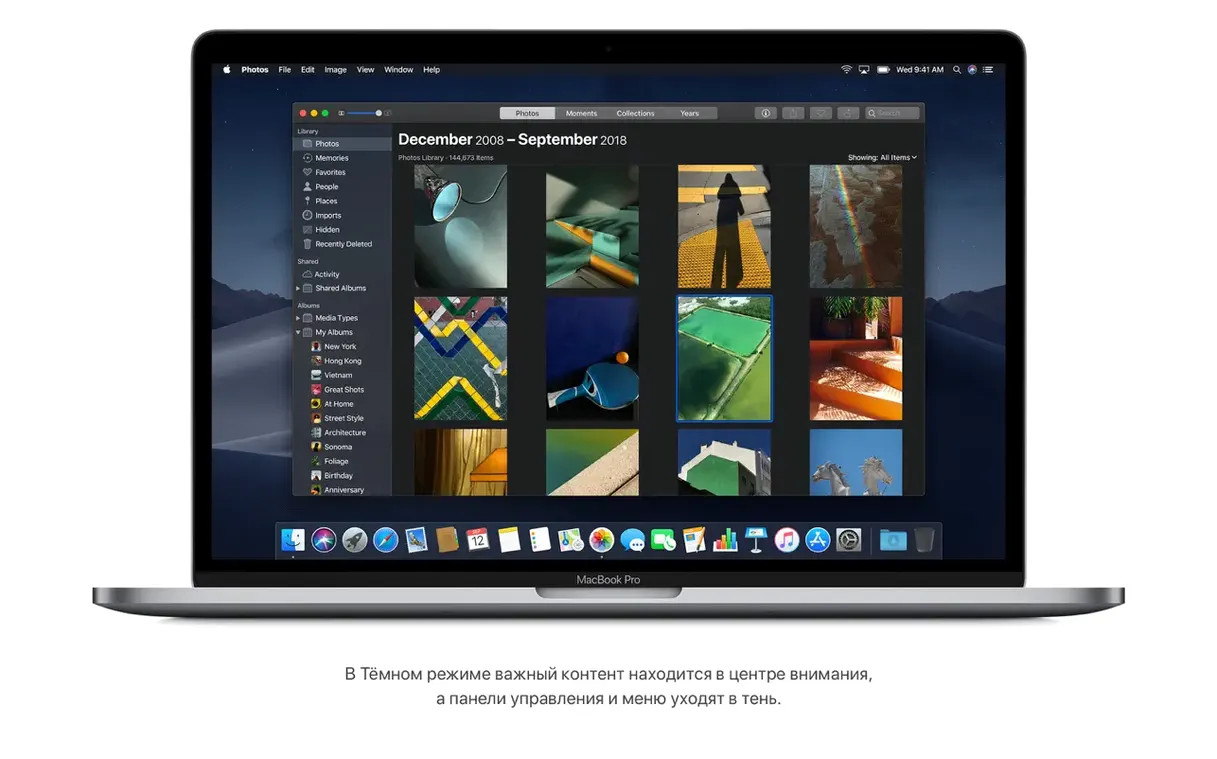
The current version, 10.14.6, focuses on stability and reliability, but the real draw for experienced users lies in the tools underneath. Mojave isn't just a polished face; it's a workhorse for those who want more from their Mac.
Finder tools you'll actually use
- Quick media editing: Rotate or trim videos and images directly in Finder without opening another app. Great for quick cleanups before a presentation.
- Password-protect documents: Secure a file from the Finder context menu without launching the source app. It's a fast way to keep notes and drafts private.
- Gallery View with metadata: Previews and file details side by side, so you can spot the right version of a file at a glance.
Beyond the basics
Continuity brings photos, scans, and screenshots from your iPhone or iPad straight to the Mac — a smooth workflow for mixed-device classrooms. FaceTime group calls support up to 32 participants, which helps for remote study sessions. The Stocks app is included, and Safari remains the built-in browser. With support for older Intel Macs like the MacBook Air (mid 2012 or later) and iMac (late 2012 or later), Mojave is a solid choice for extending the life of capable hardware.
Fixing Dark Mode in third-party apps
Even a well-tested OS can trip people up. Here are a few hiccups I've seen come up with Mojave, along with practical fixes.
Dark Mode doesn't apply to all apps. Not every third-party app was updated to honor the system-wide dark appearance. If a window stays bright, check the app's own preferences — some have a separate dark theme toggle. For Apple's own apps, Dark Mode should work everywhere.
Stacks stops grouping after you move files around. Stacks sorts files by kind or date, but if you manually drag a file out of a stack, it won't re-enter automatically. Right-click the desktop, choose "Use Stacks" again to reset the grouping. It's a quick refresh.
Gallery View feels slow on older Macs. If you're on a mid-2012 MacBook Pro or similar, previews of large photo libraries may take a moment to load. This is normal behavior. Try narrowing the folder view to show fewer items at once, or switch back to List View for browsing and only use Gallery View when you need the preview.
FaceTime group calls show a "weak connection" message. Mojave supports up to 32 participants, but real-world performance depends on your internet speed and the other callers' connections. If the call stutters, ask participants to turn off their video temporarily. The audio-only participants still see the active speaker.
Password-protecting a document fails. This feature works only with certain file types — mostly Pages, Numbers, Keynote, and some PDFs. If the option is grayed out, open the file in its native app and set the password there instead.
How Stacks and Gallery View help a school lab
Lea manages a computer lab with twenty iMacs from late 2012. Her school can't afford new hardware, but the old machines still run well. She installed Mojave across the lab to get Stacks for organizing student project folders and Gallery View for quickly checking photo submissions. The Continuity feature lets her scan permission slips from her iPhone straight to each iMac without extra software. FaceTime group calls let her host after-school homework help sessions with up to a dozen students at once. For Lea, the stability of version 10.14.6 means fewer helpdesk tickets, and the built-in apps cover everything her staff needs without additional licenses.
Turning on Dark Mode for less eye strain
After you install, a few quick adjustments can save you time later.
- Turn on Dark Mode. Open System Preferences, go to General, and select Dark. It reduces eye strain during evening work and makes the Dock and menus less distracting.
- Enable Stacks on the desktop. Right-click an empty spot on the desktop and choose "Use Stacks." This automatically groups files by kind — documents, images, screenshots — so your desktop stays tidy without manual sorting.
- Set Gallery View as the default in Finder. Open any folder, click View in the menu bar, and choose "Show View Options." Select "Gallery View" and click "Use as Defaults." You'll see previews and file info side by side every time you open a folder.
- Review Safari's privacy settings. Go to Safari > Preferences > Privacy. Enable "Prevent cross-site tracking" and "Block all cookies" if you want stronger protection. The Intelligent Tracking Prevention in Mojave is good out of the box, but these extra checks help.
64-bit Intel Macs only: check your model
Mojave is built for 64-bit Intel Macs only. If you're running a compatible model — MacBook early 2015 or later, MacBook Air mid 2012 or later, MacBook Pro mid 2012 or later, Mac mini late 2012 or later, iMac late 2012 or later, iMac Pro 2017, or Mac Pro late 2013 (or mid 2010/mid 2012 with a Metal-capable graphics card) — the installation process is straightforward. You'll need at least 2 GB of memory and 12.5 GB of available storage. For those looking to install from a disk image, a macos mojave download iso is available, and some users prefer a mojave torrent for offline access. If you're searching for a mac os mojave 10.14 6 download dmg, the same disk image works on all supported hardware. A mac os mojave torrent is another option for those who want to keep a local copy handy.
- Improves the stability and reliability of the Mac.
- Refines overall system performance for a smoother experience.
- Intel-based Mac (see supported models).
- macOS 10.8 or later.
- 2 GB of memory.
- 12.5 GB of available storage.
- Compatible models: MacBook Early 2015 or newer, MacBook Air Mid 2012 or newer, MacBook Pro Mid 2012 or newer, Mac mini Late 2012 or newer, iMac Late 2012 or newer, iMac Pro 2017, Mac Pro Late 2013 or mid 2010/mid 2012 with recommended Metal-capable graphics.
Questions I keep getting
What Macs are compatible with macOS Mojave?
Mojave supports MacBook Air models from mid 2012 or later, iMac models from late 2012 or later, and several other Macs from that era, as long as they meet the 2 GB memory and 12.5 GB storage requirements.
Can I password-protect a file without opening it?
Yes, Finder allows you to password-protect documents directly from the context menu, without opening the file in its source app.
How many participants can join a FaceTime group call?
Mojave supports FaceTime group calls with up to 32 participants.
How to install
- Open the downloaded disk image to mount it.
- Copy the installer app into your Applications folder before running it.
Similar apps


Sign in or join the club to leave a comment.
Nobody has commented yet.