- Version
- 1.4.0.4b (47486)
- Studio or maker
- Triumph Studios
- Languages
- Russian, English, German, Spanish, Chinese (Simplified), Korean, Polish, French, Japanese
- Activation
- DRM-free
- Chip type
- Intel 64-bit
- Tried out on
- macOS Sequoia, MacBook Air (M1. 2020)
- First released
- 6.08.2019
- Voice languages
- English
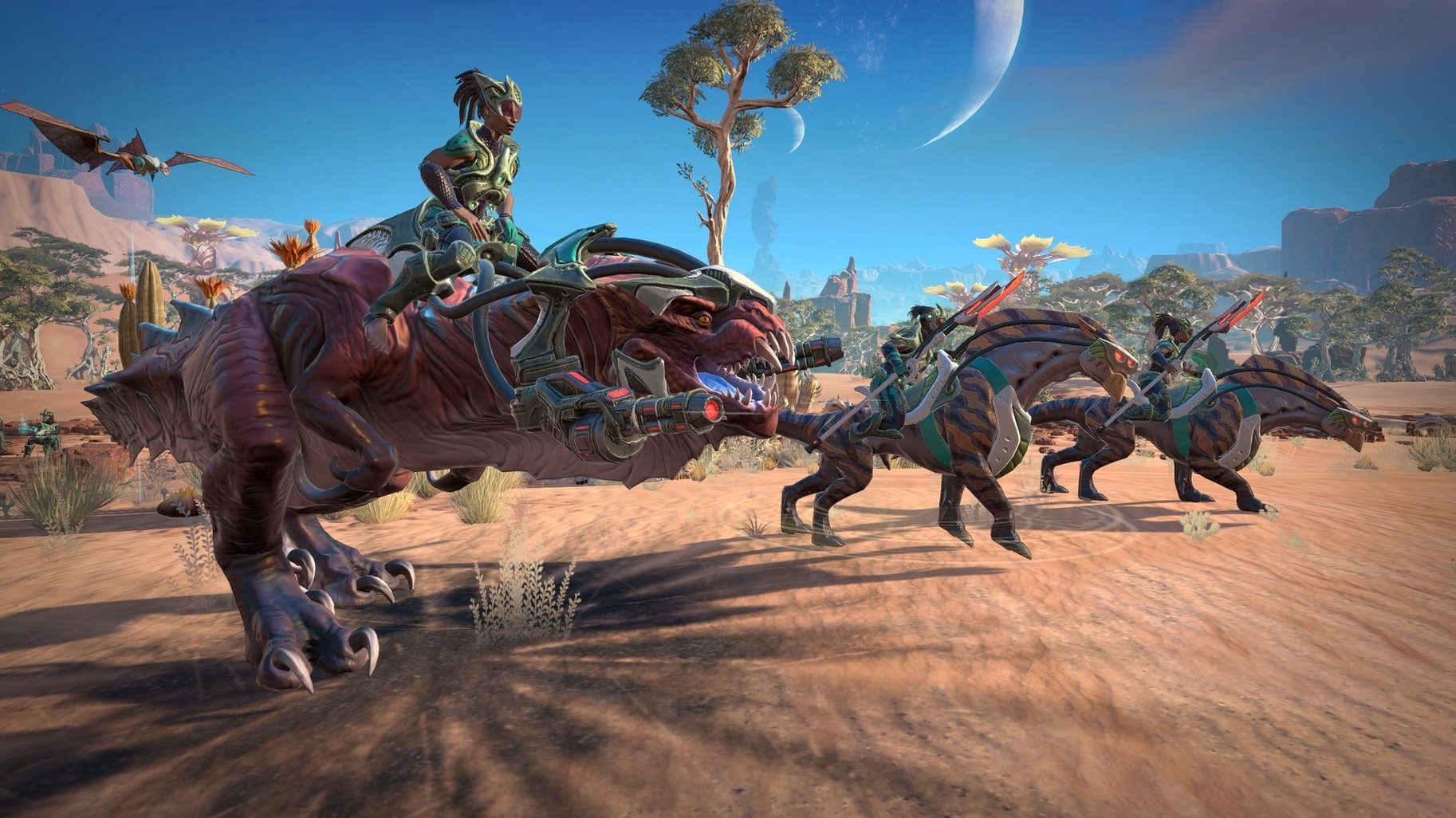
The current build, labeled 1.4.0.4b (47486), is the version you will find in the download. It runs on Intel Macs, and it is the same turn-based sci-fi strategy that Triumph Studios has been polishing since release. Nothing new landed in this specific build, but the game itself is a settled, complete package.
Age of Wonders: Planetfall on Mac
At its core, this is a game about reclaiming the future by exploring the past. You build an empire with one of six factions — the Vanguard, the Assembly (described as cyborg zombies), and the Amazons (dinosaur riders) among them. Empire development sits at the center, and the randomly generated worlds keep every campaign and skirmish feeling fresh.
On a Mac, expect a strategy game that rewards patience. The interface is mouse-driven, and the menu systems are dense but learnable. The first launch can take a while, so do not panic if it sits on a loading screen for a bit. Once in, turns move briskly, though late-game battles with many units will test an older Intel machine. The game includes a deep single-player campaign, random skirmish maps, and multiplayer, and it is fully playable in English, German, or any of the other six interface languages.
For players who enjoy thoughtful turn-based strategy
If you are someone who enjoys thoughtful, turn-based strategy rather than fast reflexes, Age of Wonders: Planetfall suits you well. It appeals to players who like to weigh options, manage a growing empire, and plan several moves ahead. Teachers and parents who play strategy games themselves will appreciate that the combat happens on a separate tactical map, so you can stop at any point and pick up later without losing momentum. That suits a busy schedule.
Players who enjoy world-building and faction identity will find plenty to explore here. Each of the six factions plays differently, not just in unit types but in how they approach diplomacy, research, and colony management. The Assembly, for example, treat population growth differently than the Amazons. Replaying the campaign with a different faction changes how you solve problems, which adds longevity without relying on random content alone.
The game also works well for small group play. The multiplayer mode, while not the main draw for everyone, allows two or more players to test their strategies against each other. This makes it a plausible choice for a strategy game night, if that is something you organize. The turn-based nature means no one needs to be fast with controls.
Interface language options include Russian, English, and more
The interface language list is one of the first things you notice during setup. You can choose from Russian, English, German, Spanish, Simplified Chinese, Korean, Polish, French, and Japanese. That is useful in a classroom setting if you teach a language, or if you share the computer with someone who prefers a different language. The voice language stays in English, so you get consistent voiceover across all interface choices.
The game is DRM-free, which means no online check or launcher is required after installation. That matters on a Mac that may not always be connected to the internet, or if you prefer to keep your gaming setup simple. You install it once, and it runs without additional software.
The single-player campaign is structured around faction missions. You can progress through each faction's story at your own pace, and the game does not force you to complete everything before trying a random skirmish map. That flexibility lets you switch between structured storytelling and freeform exploration without restarting.
Common questions before installing on a Mac
Designed for Intel Macs, runs on Apple Silicon via Rosetta 2
The build is designed for Intel architecture. If you have an Intel-based Mac running macOS 10.13 or later, it should work. Users on Apple Silicon Macs can run it through Rosetta 2, but the game itself remains Intel-native. The first launch can take a noticeably long time, so be patient.
No internet needed for single-player or skirmish maps
No. The game is DRM-free, so there is no online activation requirement. You can play the single-player campaign and skirmish maps entirely offline. Multiplayer does require a connection, but it is not forced.
How long is the single-player campaign?
That depends on how thoroughly you explore each planet and manage your empire. The campaign offers a series of faction missions, and each mission can take several hours. Randomly generated worlds add replay value, so the total playtime can stretch well beyond the main storyline.
Can I save mid-battle?
Yes, you can save at any point during a tactical battle or on the world map. The turn-based structure means saving and reloading does not break the flow. This is especially helpful if you need to step away unexpectedly.
- Architecture: Intel
- Interface languages: Russian, English, German, Spanish, Simplified Chinese, Korean, Polish, French, Japanese
Questions I keep getting
Is Age of Wonders: Planetfall playable on Apple Silicon Macs?
The build is labeled for Intel architecture, so it runs natively on Intel Macs. On Apple Silicon, you would need Rosetta 2 translation, and performance will vary depending on the game's load.
How to install
- Download the game and run the standard installer. This copies the game files to your system.
- Choose the installation location when setup finishes. The Applications folder is recommended because it keeps the game with your other apps and avoids permission quirks.
- Launch the game. The first launch may take a long time as it sets up configuration files, so give it a few minutes before assuming something is wrong.
Similar games
Sign in or join the club to leave a comment.
Nobody has commented yet.