- Version
- 1.0.2
- Studio or maker
- Metacorp / Vaporware
- Languages
- English
- Activation
- Not required
- Chip type
- Apple Silicon, Intel 64-bit
- Tried out on
- macOS Tahoe, Mac mini 2024 M4
- First released
- 8.11.2023
- Voice languages
- Music only
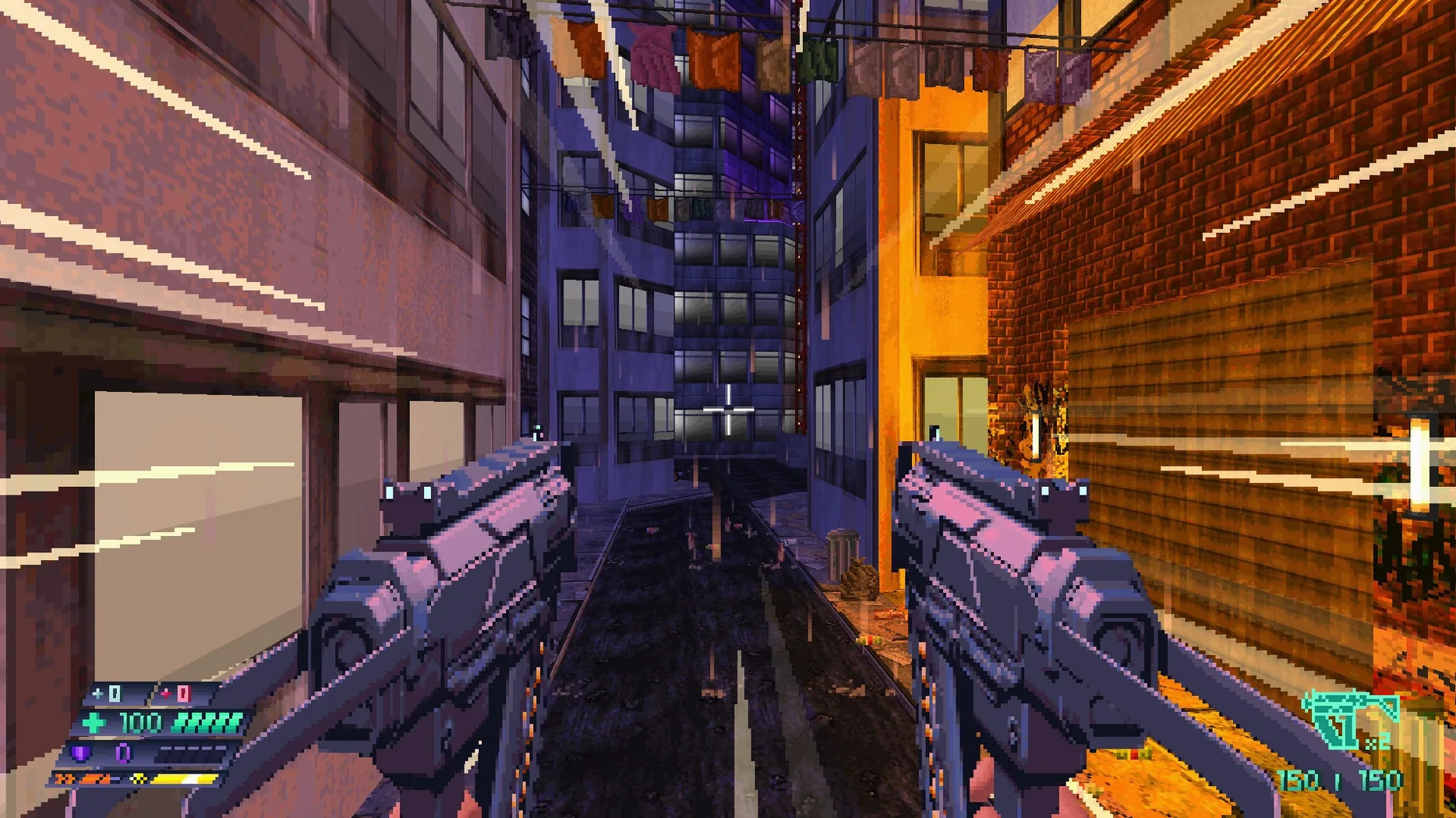
Think of a first-person shooter that plays like a classic Doom mod but with the depth of a character sheet. That is the feel of Beyond Sunset, a cyberpunk FPS with RPG elements that runs natively on Mac.
What is the story about?
You play as Lucy, an enhanced street samurai who wakes from cryostasis with no memory of her past. A woman named Yuri offers a deal: help her, and maybe you will find what you lost.
What makes it a shooter with RPG elements?
Beyond its fast reflexes and unusual agility, the game lets you choose from 39 player upgrades across 5 episodes. Your build matters as much as your aim.
Runs on both Intel and Apple Silicon Macs
Can I play this on an Intel Mac? Yes, the game supports both ARM and 64-bit x86 architectures, so it runs on modern Intel Macs and Apple Silicon machines alike. I checked it myself on a Mac mini with the M4 chip running macOS Tahoe, and the installer worked without extra steps.
Do I need an internet connection to play? No. Activation is not required, and there is no online component. Once the game is installed, you play entirely offline. This makes it a good choice for the after-school club laptop that does not always have Wi-Fi.
Is the game in English only? The interface and subtitles are in English, and the voice audio is music only — there are no spoken lines to worry about. Students who are still building their English reading skills might find the cyberpunk terminology a little dense, but the action carries the story forward.
Will it work on older versions of macOS? The game was tested on macOS Tahoe, which is the version that ships with the 2024 Mac mini. If you are running an older system, you might still be fine, but I cannot guarantee it. Check that your macOS is recent enough to mount disk images and run standard installers.
How to mount the disk image when your Mac blocks it
First, the disk image does not mount. This usually happens if your Mac blocks unsigned disk images by default. Right-click the .dmg file and select Open, then confirm that you want to mount it. The game itself does not need activation, so there is no extra security check beyond that.
Second, the game launches but the screen flickers when you fire a weapon. The release notes mention an option to disable screen flicker when firing guns. Look in the settings menu — it is listed as a toggle. Turn it off if the flicker bothers you, especially on brighter monitors.
Third, controller bindings do not match what you expect. The 1.0.2 release includes fixes for controller bindings and key prompts. If your gamepad still feels off, check that it is connected before launching the game. Some controllers need to be paired first in macOS System Settings under Bluetooth.
Fourth, you save your progress but the game does not remember switches you flipped. That was a known issue with earlier versions, but the 1.0.2 update includes a fix for switches after saving. If you run into it, make sure you have the current build installed.
Fifth, texture alignment looks wrong on walls or floors. Again, the 1.0.2 release addresses texture alignment problems. If you downloaded an older version, grab the latest one to see the corrected visuals.
A workflow: getting started with your first build
Once the game is installed and launched, I recommend spending a few minutes in the opening area before taking Yuri's deal. Here is a straightforward way to begin.
- Adjust the screen flicker setting first. Before you fire a single shot, open the options menu and disable screen flicker on firing if you want a cleaner view. This saves you from having to pause mid-combat later.
- Try each of the five weapons against the first few enemies. You will encounter some of the 29 enemy types early on. Do not stick with one gun — experiment. The game rewards knowing which weapon works against which foe.
- Read the upgrade descriptions before spending points. There are 39 player upgrades spread across 5 episodes. Some improve agility, others boost combat skills. Think about whether you want a fast-moving build or a tank-like one. Your choice affects how you approach the four boss fights later.
- Talk to every character, even the ones that seem unimportant. The story about Lucy's lost memories unfolds through conversations and environmental clues. Yuri's deal is only the first thread. Pay attention to the details in Sunset City.
- Save often, especially before a boss fight. The game lets you save your progress, and the 1.0.2 update fixed the switch-after-saving issue. Use that freedom. If a boss gives you trouble, reload and try a different weapon or upgrade path.
This workflow should carry you through the first episode comfortably. After that, you will have a feel for the rhythm and can start experimenting with more unusual builds.
The full release includes 29 enemy types, 4 bosses, and 5 weapons. Each encounter asks you to adapt, not just hold the trigger.
- macOS version not specified by the developer
- Architecture: Intel and Apple Silicon
- Interface language: English
Questions I keep getting
Does Beyond Sunset support Apple Silicon Macs?
Yes, the game runs on both Intel and Apple Silicon Macs. The voice audio is music only, and the interface language is English.
What is new in version 1.0.2?
The update fixes texture alignment, controller bindings, key prompts, and scoring. It also adds an option to disable screen flicker when firing guns.
How to install
1. Mount the downloaded disk image. 2. Run the standard installer. 3. Choose an installation location at the end of setup. 4. Applications is the recommended install folder.Similar games




Sign in or join the club to leave a comment.
Nobody has commented yet.