- Version
- 2.7.0
- Studio or maker
- Paladin Studios
- Languages
- Russian, English, German, Arabic, Spanish, Italian, Chinese (Traditional), Chinese (Simplified), Korean, Dutch, Portuguese, French, Japanese
- Activation
- Not required
- Chip type
- Apple Silicon, Intel 64-bit
- Tried out on
- macOS Sonoma, MacBook Air (M1. 2020)
- First released
- 2.04.2021
- Voice languages
- Music only
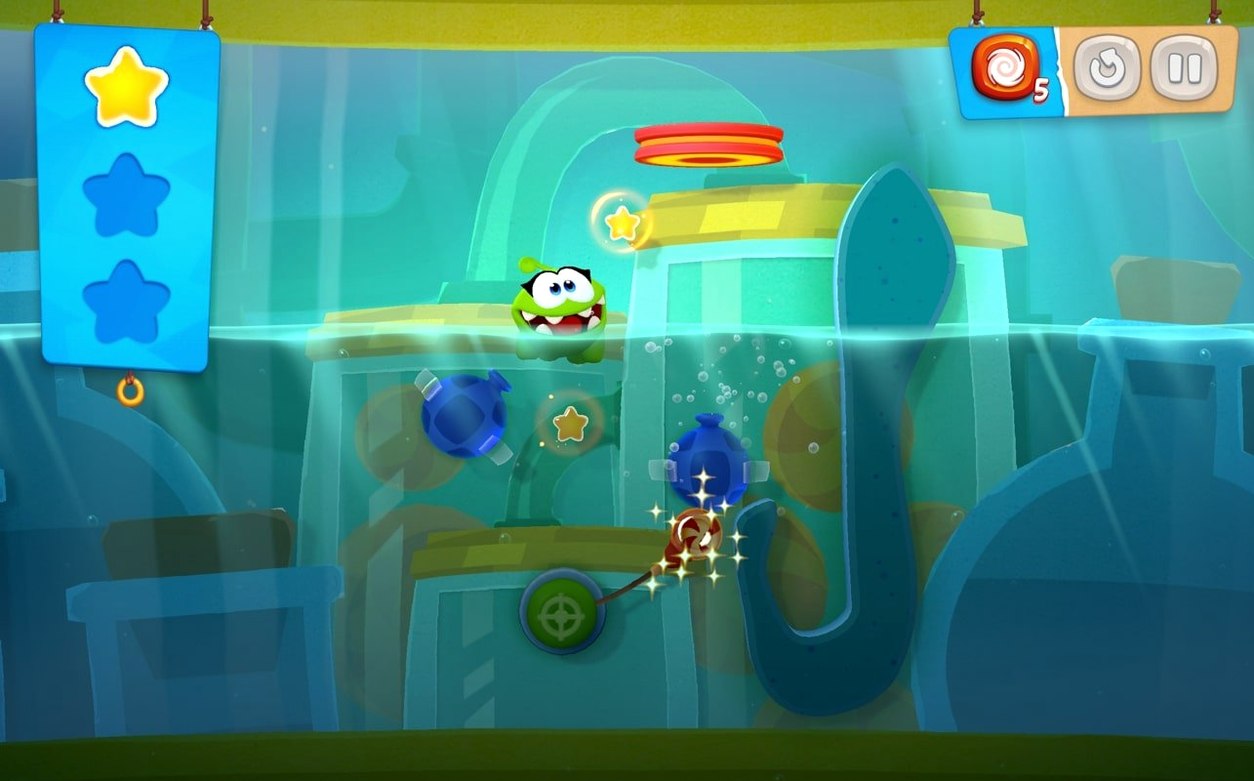
After a long day of grading papers, there's something soothing about slicing a rope and watching candy land in Om Nom's mouth. Cut the Rope Remastered is the polished version of that classic puzzle, now running natively on macOS 11 or later, including Apple Silicon Macs.
Where it fits on your Mac
It sits comfortably next to your other tools — a quick break between lesson plans, a five-minute round during a school break. The bright 3D levels are easy on the eyes, and the physics feel responsive on a MacBook Air (M1, 2020) under macOS Sonoma. The game adds new animations for Om Nom, plus obstacles and boosters like magic hats and air cushions to keep the puzzles interesting. Interface languages include English, German, Spanish, French, and more, so students can play in their own language.
Puzzle fans who enjoy physics-based thinking
I see three kinds of Mac users who tend to enjoy Cut the Rope Remastered most. Second, anyone who played the original on an older device and wants the same game without the dated look. The 3D levels and overhauled visual presentation keep the experience fresh without changing what worked. Third, teachers who run a game club or need a quiet activity for a few minutes between tasks. The game does not require an internet connection once installed, and each puzzle takes roughly thirty seconds to a minute, so it fits naturally into a break slot.
Cutting every rope immediately misses the target
The most common slip I see is cutting every rope immediately. New players often slice left and right without looking at how the candy will swing, then watch it miss the target entirely. A better approach is to pause a moment, study the position of obstacles and boosters, and plan one or two cuts. Another mistake is ignoring the magic hats and air cushions. Those boosters are not decorations — they change the candy's path, and working out how they redirect the candy is how you get three stars on harder levels. Beginners also sometimes skip the option to rotate the camera angle. On a Mac, you can adjust your view to see behind an obstacle before cutting.
Redesigned main menu shows stars at a glance
The game includes a redesigned main menu that makes level selection clearer than the original. You can see which levels you have completed and which stars you earned at a glance. The new animations for Om Nom are not just cosmetic — they give you feedback when you deliver the candy successfully, which helps you know your solution worked. If you play in a language other than English, the interface supports German, Spanish, French, Italian, Dutch, Portuguese, Russian, Arabic, Traditional Chinese, Simplified Chinese, Korean, Japanese. That is helpful if you want to practice a language while you play, or if you share the game with someone who prefers reading in their native tongue.
If you've played the original, the core stays the same: cut ropes, avoid obstacles, feed the candy. The remastered visuals make it feel new again.
- macOS 11.0 or later
- Works on both Intel and Apple Silicon Macs
Questions I keep getting
Does Cut the Rope Remastered work on Apple Silicon Macs?
Yes, the game supports both Intel and Apple Silicon architectures. It was tested on a MacBook Air with the M1 chip running macOS Sonoma.
How to install
- Mount the downloaded disk image by double-clicking it. This makes the game's files accessible for copying.
- Drag the game to the Applications folder alias. This keeps the game organized with your other apps.
- After copying finishes, open the game from Launchpad. Launchpad scans your Applications folder and shows the new icon.
- If the game does not start, run the Terminal command to remove extended attributes and re-sign the app. This clears the quarantine flag that can block unsigned apps.
Similar games



Sign in or join the club to leave a comment.
Nobody has commented yet.