- Version
- 2.03.02 Native
- Studio or maker
- Pearl Abyss
- Languages
- Russian, English, German, Spanish, Italian, Chinese (Traditional), Chinese (Simplified), Korean, Polish, Portuguese, Turkish, French, Japanese
- Activation
- Not required
- Chip type
- Apple Silicon
- Tried out on
- macOS Tahoe, Mac mini 2024 M4
- First released
- 20.03.2026
- Voice languages
- English, Chinese (Simplified), Korean
Cross-save arrives in version 2.02.00, so you can carry your progress between machines. The rest of the box is just as generous.
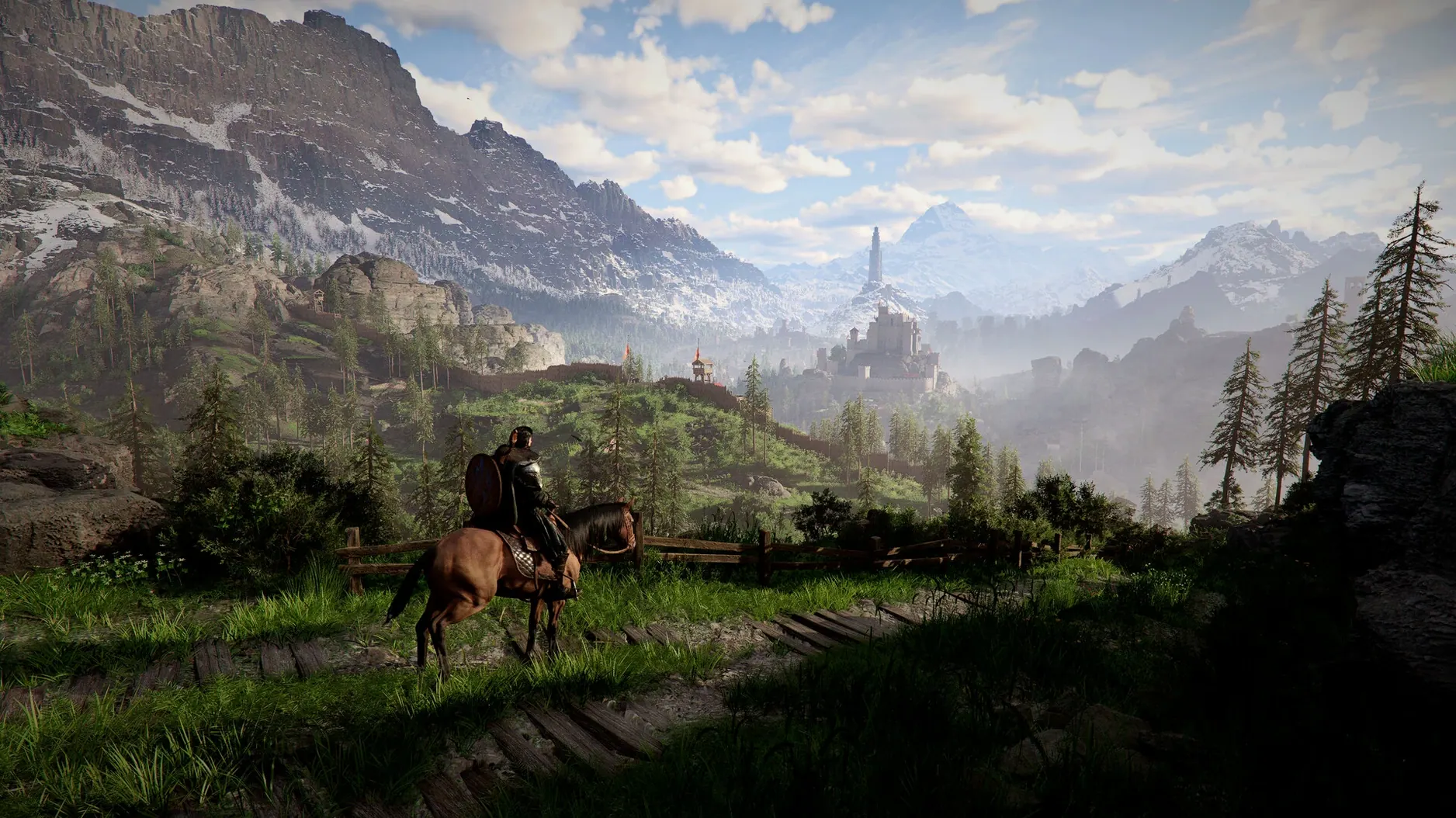
Open world — Plains, forests, a desert, mountains, cities, villages, ruins, and the Abyss. The map is built for wandering.
Playable characters — Kliff, Unca, and Damiana each bring their own style to combat and exploration.
Story — Kliff tries to reunite surviving comrades and rebuild the Greymanes after a fall.
Travel — Ride a horse, take to the sky on a dragon, or pilot a robot. Each changes how you see Pywel.
Customization — Hairstyles, tattoos, and clothing colors let you make a character that feels yours.
Version 2.02.00 fixes — UI text shaking, a missing letter in The Words of Alustin, a crash when starting a new game with DLSS Frame Generation, lantern lighting on NPC belongings, and a Force Palm chain that did not connect properly.
Can you play Crimson Desert offline?
One common question is whether the game can be played offline. Crimson Desert is a single-player experience, so no persistent internet connection is needed after the initial download. You explore Pywel, fight battles, and progress through the story entirely on your own time.
Another frequent concern is the language and voice options. The game offers text in thirteen languages, including English, German, French, Spanish, Italian, Polish, Portuguese, Turkish, Russian, Japanese, Korean, and both Simplified and Traditional Chinese. Voice acting is available in English, Korean, and Simplified Chinese. That range should cover most players in a school setting or at home.
People often ask whether the game is a direct sequel or a spin-off. It is a standalone open-world action-adventure title set on the continent of Pywel. You do not need prior knowledge of the developer's other work to follow the story or enjoy the exploration.
Some wonder about controller support. The game is designed for action combat, so most controllers recognized by macOS will work. If you prefer keyboard and mouse, the controls map well to that setup too because the combat includes weapon attacks, punches, kicks, grabs, sliding, dodging, and counterattacks — all actions that benefit from quick input.
Cross-save lets you switch between Macs
The big addition for Mac players is cross-save. You can start a game on one Mac and continue on another without losing progress. That matters if you switch between a desktop and a laptop, or share a save file between machines.
Several bug fixes affect daily play directly. The lantern issue that prevented NPC belongings from appearing after lighting them is resolved. That means a side activity that may have been frustrating now works as intended. The housing unlock at Howling Hill Camp no longer fails when your inventory is full, so you can settle into camp building without reloading an earlier save. Thornbriar Fortress can finally be liberated, closing a quest that some players could not finish. Items that vanished from Trade Goods Storage when loading certain save files now stay where they belong. And the letter during The Words of Alustin no longer disappears, so that story moment plays out properly.
Combat feels tighter with the fix to Descending Force Palm chaining after Aerial Force Palm — a specific combo that could break mid-fight now flows correctly. The UI text shaking that could be distracting during menus or dialogue is gone. And localization improvements across all languages mean cleaner writing and fewer odd translations, which helps when the story and quest text matter most.
Fix a game that won't open after installation
If the game does not open after installation, check that you copied it to the Applications folder before launching. The disk image mounts a virtual drive; dragging the app to the shortcut in the installer is the intended step. Opening it directly from the mounted image can cause permission errors.
Cross-save not showing your progress? Make sure both machines are signed into the same account platform. The feature syncs saves between devices, but it needs a consistent identity to match them. If you have saves from an older version, load them once on 2.02.00 before counting on cross-save.
Missing quest items or NPCs not reacting? Some of the version's fixes address exactly these cases. If you encounter a stuck quest, check whether you have a full inventory — the Howling Hill housing fix is a good example. Clear a slot or two and try again.
Performance concerns are common with open-world games. The requirements call for Apple Silicon hardware, so the game relies on that architecture. If you see stutter in crowded areas, lowering graphic settings or checking that no other heavy app is running in the background may help. The developers have included bug fixes for stability, which should reduce unexpected crashes over time.
Controls feeling unresponsive? The combat system uses weapon attacks, punches, kicks, grabs, sliding, dodging, and counterattacks. If a specific move does not land, it might be a timing issue rather than a bug. The chain fix for Force Palm in this version suggests the developers are refining combo responsiveness with each update.
Requires an Apple Silicon processor
Crimson Desert requires an Apple Silicon processor — that means any Mac with an M1 chip or newer. It does not run on older Intel-based Macs. The game is built for ARM architecture natively, so translation layers are not needed.
Storage space will be significant because open worlds with high-resolution assets typically are. Make room before starting the download. The game includes multiple biomes — plains, forests, desert, mountains, cities, villages, ruins, and the Abyss — each with its own textures and models.
The interface and menus support thirteen languages, so you can set the text to your preferred one. Voice acting stays in English, Korean, or Simplified Chinese regardless. That mix is common in games produced in Asia but aimed at a global audience.
Installation itself is straightforward: open the disk image, drag the app to the Applications folder shortcut, wait for the copy to finish, then launch from Launchpad. No extra activation steps are required.
Expect updates to continue refining the experience. The current version 2.02.00 addresses a broad set of issues, from combat chains to UI stability to localization quality. Future patches will likely follow the same pattern.
- Added cross-save for Mac.
- Added various bug fixes and stability improvements.
- macOS version: not specified
- Architecture: Apple Silicon
Questions I keep getting
Does Crimson Desert support cross-save on Mac?
Yes, version 2.02.00 adds cross-save for Mac, so your progress carries over between devices.
How to install
- Open the downloaded disk image.
- Drag the app to the Applications folder shortcut. This keeps it in the usual spot for Mac apps.
- After copying finishes, open the app from Launchpad. You can also launch it from the Applications folder.
Similar games




Sign in or join the club to leave a comment.
Nobody has commented yet.