- Version
- 1.4.2 + Russian language
- Studio or maker
- Firaxis Games, Aspyr (Mac)
- Languages
- Russian, English, German, French
- Activation
- Not required
- Chip type
- Intel 64-bit
- Tried out on
- macOS Sonoma, MacBook Air (M1. 2020)
- First released
- 24.09.2010
- Voice languages
- Russian, English, German, French
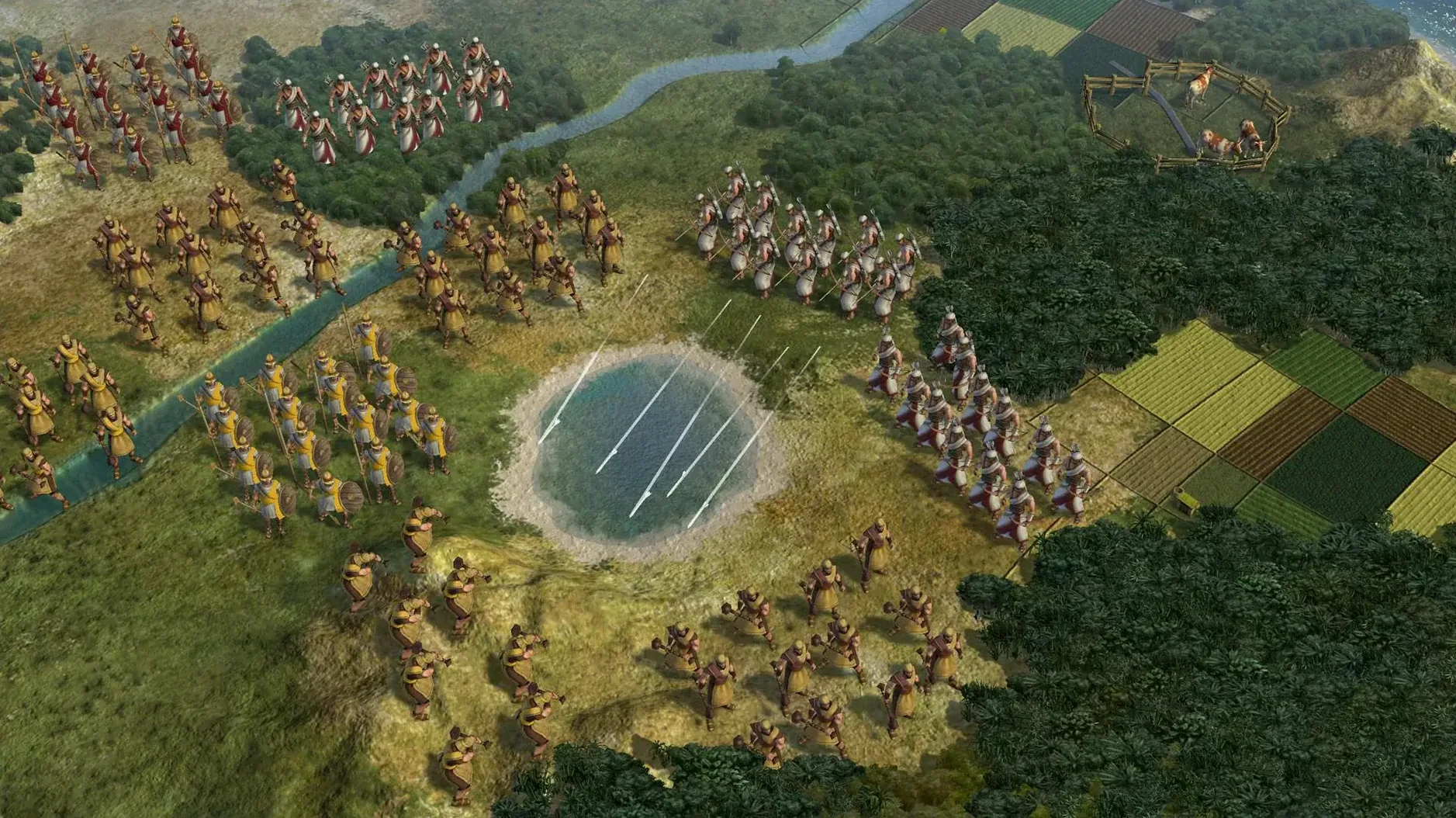
Civilization V is a turn-based strategy game where you build and manage a civilization from the ancient era to the near future. The Mac port, released on September 21, 2010, supports both single-player and multiplayer, so you can play solo or with friends. This version, 1.4.2, is the Russian-language build, though it also includes English, German, and French.
Who will enjoy it:
- Players who like long, thoughtful sessions where every decision matters, from city placement to research priorities.
- Fans of historical settings who enjoy guiding a culture through centuries, managing diplomacy, trade, and warfare.
- People who prefer turn-based pacing over real-time action; there is no rush, and you can take your time to plan.
- Those who appreciate strategic depth in city management, including choosing to annex, puppet, raze, or liberate captured cities.
- Multiplayer fans who want to test their strategies against other human players on the same Mac.
Who might not enjoy it: players who want fast-paced gameplay or action-heavy combat. Civilization V is a slow burn, and a single game can take many hours. If you do not enjoy juggling many systems at once, the depth may feel overwhelming. Also, the game is Intel-only, so it will not run natively on newer Apple Silicon Macs without translation layers.
Fitting into your macOS setup
Because Civilization V is an Intel-only title, it runs through Rosetta 2 on Apple Silicon Macs. The process is automatic — macOS prompts you to install Rosetta the first time you open an Intel app, and after that the game works as expected. I have had several students at the game club ask about this, and the short answer is: on a modern Mac, you barely notice the translation layer. The game loads and runs just like any other app.
The game integrates well with macOS features you already use. Mission Control and full-screen mode work normally, so you can switch between the game and a browser for tech-tree research or a map reference. I often keep a Notes window pinned to the side to jot down diplomacy notes or city-state requests. For multiplayer games over a local network, the game uses standard macOS networking, so if your Mac is on the same Wi-Fi as a friend's, LAN games show up without extra configuration. Hot Seat multiplayer — where you pass the same Mac around — works from the main menu and does not require any network setup.
For players who prefer keyboard control, the game respects standard macOS shortcuts for copy, paste, and save. You can also use Spotlight to launch the game if you do not want to dig through the Applications folder. Save files are stored in the usual Documents or Application Support folders, so Time Machine backups include your progress without extra steps.
Runs under Rosetta on an M1 MacBook Air
The game is 64-bit Intel code, and it runs under Rosetta on macOS Sonoma. I tested it on an M1 MacBook Air from 2020 and it worked. I do not give performance numbers, but you can expect a playable experience for a turn-based game of this era.
Do I need an internet connection? Not for single-player or LAN multiplayer. The game does not require an online check to start. If you want to play over the internet with friends, you will need a connection, but the game itself does not phone home.
Which languages are available? The build includes Russian, English, German, and French for both text and voice. You can switch between them in the game's options menu. The Russian voice work is fully recorded, so leaders speak in Russian if you choose that setting.
Can I play with friends who have the Steam version? Possibly, but it depends on how they are connecting. Cross-platform play with Windows users is not officially supported in this build; it depends on the game's server setup for online matches.
Will my saved games from an older version work? Probably, but I recommend backing up your saves before updating. Version 1.4.2 is a later build, so older saves should load, but save compatibility is always something to check first if you are switching versions.
Russian voice acting and full localization
This build is especially suited for three kinds of Mac users. First, Russian-speaking players who want the game in their native language with full voice acting. The Russian localization is complete, and hearing Catherine or Alexander speak in Russian adds a layer of immersion that text-only translations cannot match.
Second, players who want a complete, self-contained version without needing an internet connection or an external store account. The disk image installs directly to Applications, and there is no launcher or extra software required. That simplicity matters if you are setting up a classroom machine or a secondary laptop where you do not want extra accounts.
Third, people who play local multiplayer with friends. The Hot Seat mode is straightforward — you start a game, pick your civilization, and when your turn ends, you hand the keyboard over. It works well for a game club setting, where students gather around one Mac and take turns. LAN games are equally simple: everyone on the same network selects "LAN" from the multiplayer menu, and the host's game appears in the list.
A scenario from the classroom
On a rainy Friday afternoon, the game club had five students who wanted to play together but only had one Mac available. We set up a Hot Seat game with six civilizations (the AI filled the remaining slots). Each student picked a civ — Rome, Greece, Egypt, China, and Japan — and we agreed on a three-hour session. The first hour was exploration and city placement; the second hour saw the first wars break out between Rome and Greece. By the third hour, the students were negotiating peace treaties and trading strategic resources. Because the game is turn-based, everyone had time to think during other players' turns, and the conversation moved naturally between strategy and history. The Russian voice setting added a small bonus: one student recognized some of the leader dialogue from a language course and tried to translate Catherine's greetings for the group. It was not a full game — we only reached the Renaissance era — but for an afternoon, it worked exactly as intended. The Hot Seat mode kept everyone engaged because each player had a personal stake in their civilization, and the turn order gave natural pauses for discussion.
- Russian language is included in this build.
- The build is labeled as the Russian version.
- The build is also labeled as multilingual without Russian, so the language options are broad.
- macOS Sonoma
- Intel architecture (64-bit)
- Tested on MacBook Air (M1, 2020)
Questions I keep getting
Can I control puppet cities directly?
No, puppet cities cannot be directly controlled by the player. They still grant access to territory and resources, but you manage them indirectly.
What can I do with a captured city?
You can annex it, turn it into a puppet state, raze it, or liberate it. Razing takes several turns, and original capitals cannot be razed.
Does the Mac version support multiplayer?
Yes, the Mac version supports both single-player and multiplayer modes.
How to install
- Open the downloaded disk image to mount it.
- Drag the app icon into the Applications folder shortcut. This keeps the game in your standard app location.
- After copying finishes, open the app from Launchpad and start playing.
Similar games





Sign in or join the club to leave a comment.
Nobody has commented yet.