- Version
- 1.04 [Wineskin]
- Studio or maker
- OMOCAT LLC
- Languages
- English
- Activation
- Not required
- Chip type
- Intel 64-bit
- Tried out on
- macOS Monterey, MacBook Air (M1. 2020)
- First released
- 22.09.2003
- Voice languages
- Music only
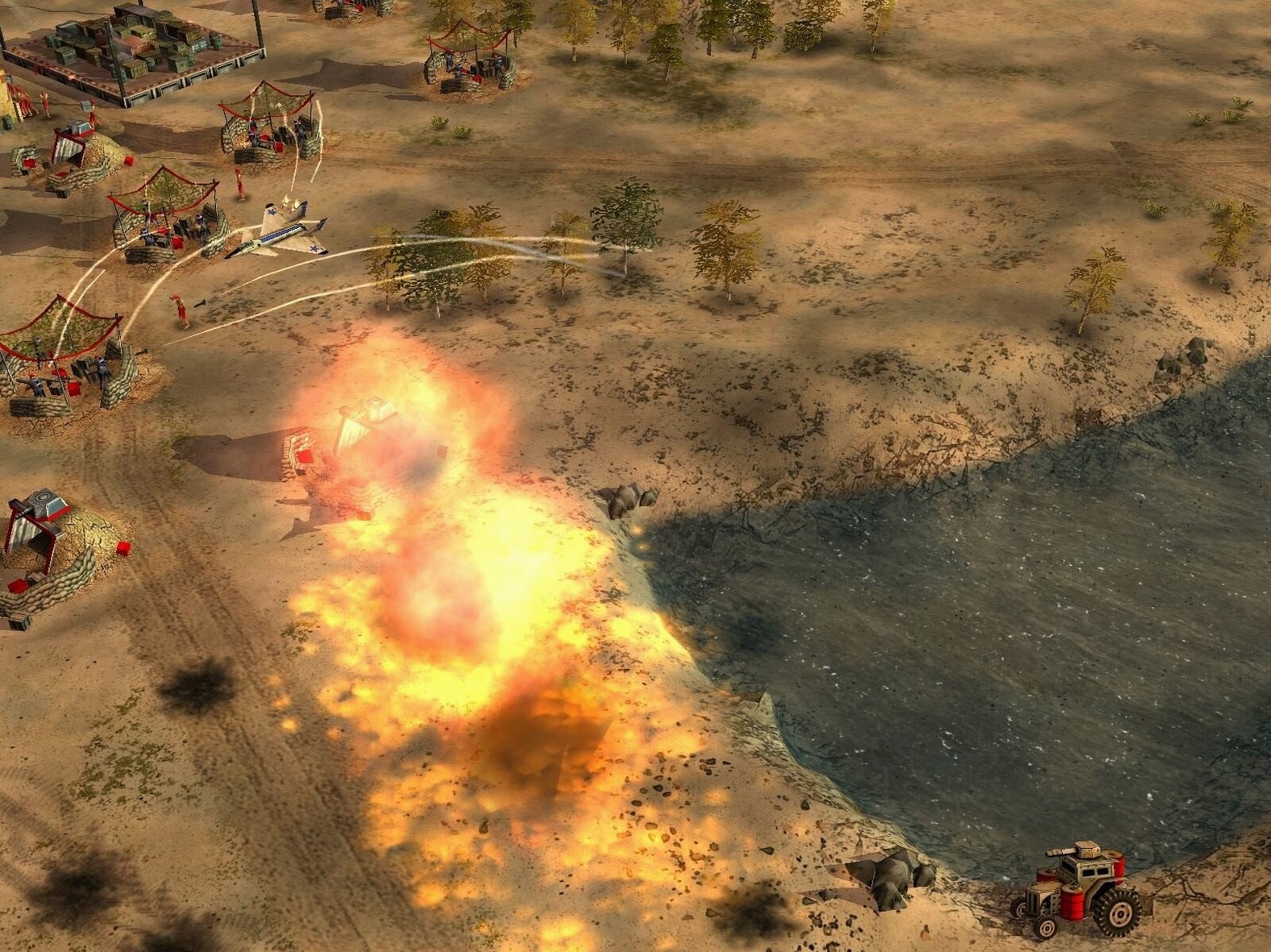
Three factions, each with a general who brings unique active or passive abilities to the battlefield. That is the core of Command & Conquer: Generals Zero Hour, a standalone expansion released on 2003-09-22. It continues the original storyline with new missions and events, and it adds new units and buildings for all three factions.
Generals who favor stealth, brute force, or timing
If you like real-time strategy but prefer variety over pure base building, Zero Hour gives you reasons to experiment. The generals change how you play: some favor stealth, others brute force, and a few reward careful timing. Because some missions do not require capturing bases, you can focus on combat and tactics rather than resource management. That makes it a good fit for players who want shorter, mission-driven sessions.
Base-light missions and dated 2003 graphics
If your enjoyment of RTS games comes from building sprawling bases and defending them, the base-light missions may feel thin. Also, the game is from 2003, so the graphics and interface show their age. Players who need modern quality-of-life features, like detailed tooltips or polished pathfinding, may find it frustrating.
Still, for anyone curious about classic RTS design, Zero Hour offers a solid, self-contained experience that runs well on an M1 MacBook Air under macOS Monterey.
Practical tips for the first few days
The first time you launch the expansion, do not skip the tutorial mission. It introduces the general abilities and the new units in a controlled setting, so you see how each faction plays before the real pressure starts. I recommend playing through at least one mission per faction early on, even if you have a favorite. The generals differ enough that a build order that works for one side can fail completely for another.
Save often in the first few missions. The game does not auto-save between objectives, and a surprise attack from an enemy general with an area-of-effect ability can undo ten minutes of careful unit placement. I also suggest turning off the music in the audio settings for the first session. The 2003 soundtrack loops aggressively, and keeping it low helps you hear the unit response sounds, which matter more for reacting to ambushes.
When you start a mission, look at the briefing text for any mention of base construction or capture. If the briefing says "no base," you can spend your resources entirely on units from the start. That changes how you value early generals: a general with a passive resource bonus is less useful when you cannot build an economy.
Who gets the most out of Zero Hour
Mac users who already own the original Command & Conquer: Generals and want closure on its story will find Zero Hour satisfying. It assumes familiarity with the base game and does not re-teach core mechanics, so returning players can jump straight into the new campaigns.
Players who like asymmetrical faction design will enjoy the expanded unit rosters. Each faction gains new buildings and units that encourage different tactics, and the generals add another layer of asymmetry on top. If you enjoy figuring out how to counter a specific general ability with the right mix of units, Zero Hour gives you plenty of room for that kind of thinking.
The expansion also suits people who have limited play time. Because some missions skip base building, you can finish a session in thirty to forty minutes without feeling like you left an economy half-built. That makes it a practical choice for a lunch break or an evening when you do not want a two-hour commitment.
Common snags and how to sort them out
The most frequent problem people hit is the game failing to launch after installation. If the icon does nothing, check that you mounted the disk image correctly. The Wineskin wrapper needs the image mounted to find its assets. If it is already mounted, try unmounting and mounting again. On macOS Monterey, I have seen the system cache a bad mount the first time; remounting clears it.
Another common snag is the game running at a very low resolution, making the interface hard to read. The 2003 engine does not know about modern Retina displays automatically. You can adjust display settings inside the game launcher window before starting a mission. If the launcher does not show a resolution option, check that the wrapper is set to use the Mac's native display, not a virtual desktop.
A few players report that unit pathfinding feels sluggish on certain maps, especially maps with narrow chokepoints and many structures. This is not a problem with your computer; the 2003 engine has limited pathfinding logic. Your best workaround is to micro-manage movement through tight corridors by clicking short waypoints, rather than giving a single move order across the whole map.
Finally, if the game freezes during a mission transition or after a cutscene, try lowering the shadow quality in the graphics options. The engine handles shadows poorly on modern hardware, and reducing them to medium or off usually stops the freeze without making the game look much worse.
How it compares with similar Mac RTS expansions
Zero Hour sits in a small group of standalone RTS expansions that run on modern Macs through Wineskin. Compared to the Star Wars: Empire at War expansion, Forces of Corruption, Zero Hour feels more focused on infantry and vehicle tactics and less on space combat. Forces of Corruption adds a third faction and a corrupting mechanic that spreads through planets. Zero Hour's generals are more straightforward: each one modifies your existing units rather than introducing a whole new gameplay system.
Compared to Age of Empires II: The Conquerors, Zero Hour has a narrower scope. The Conquerors adds new civilizations and technologies that fit into the existing economic loop. Zero Hour sometimes removes the economic loop entirely, which changes the pacing. If you like The Conquerors for its build-order optimization, Zero Hour may feel too combat-heavy. If you prefer decisive battles over long economy management, Zero Hour will feel more direct.
Compared to Warcraft III: The Frozen Throne, Zero Hour is less polished in controls but more open in mission design. The Frozen Throne has tightly scripted campaigns with clear objectives. Zero Hour's base-light missions leave more room for your own strategy, but they also lack the same level of storytelling. Both expansions add new units and heroes, but Zero Hour's generals replace a whole building type, which is a bigger structural change than The Frozen Throne's hero system.
- Standalone expansion with new missions and events.
- New units and buildings for all three factions.
- Unique generals replace the Super Strike ability.
- macOS: Monterey (tested)
- Architecture: Intel
- Tested on MacBook Air (M1, 2020)
- Interface language: English
How to install
- Mount the downloaded disk image. This makes the game files available to macOS.
- Drag the game into the Applications folder. That keeps it in a standard location and makes launching easy.
Similar games



Sign in or join the club to leave a comment.
Nobody has commented yet.