- Version
- 3.6.117.3735 fix
- Studio or maker
- Larian Studios
- Languages
- Russian, English, German, Spanish, Italian, Chinese (Simplified), Korean, Polish, French, Czech, Japanese
- Activation
- DRM-free
- Chip type
- Intel 64-bit
- Tried out on
- macOS Sequoia, MacBook Air (M1. 2020)
- First released
- 14.09.2017
- Voice languages
- English
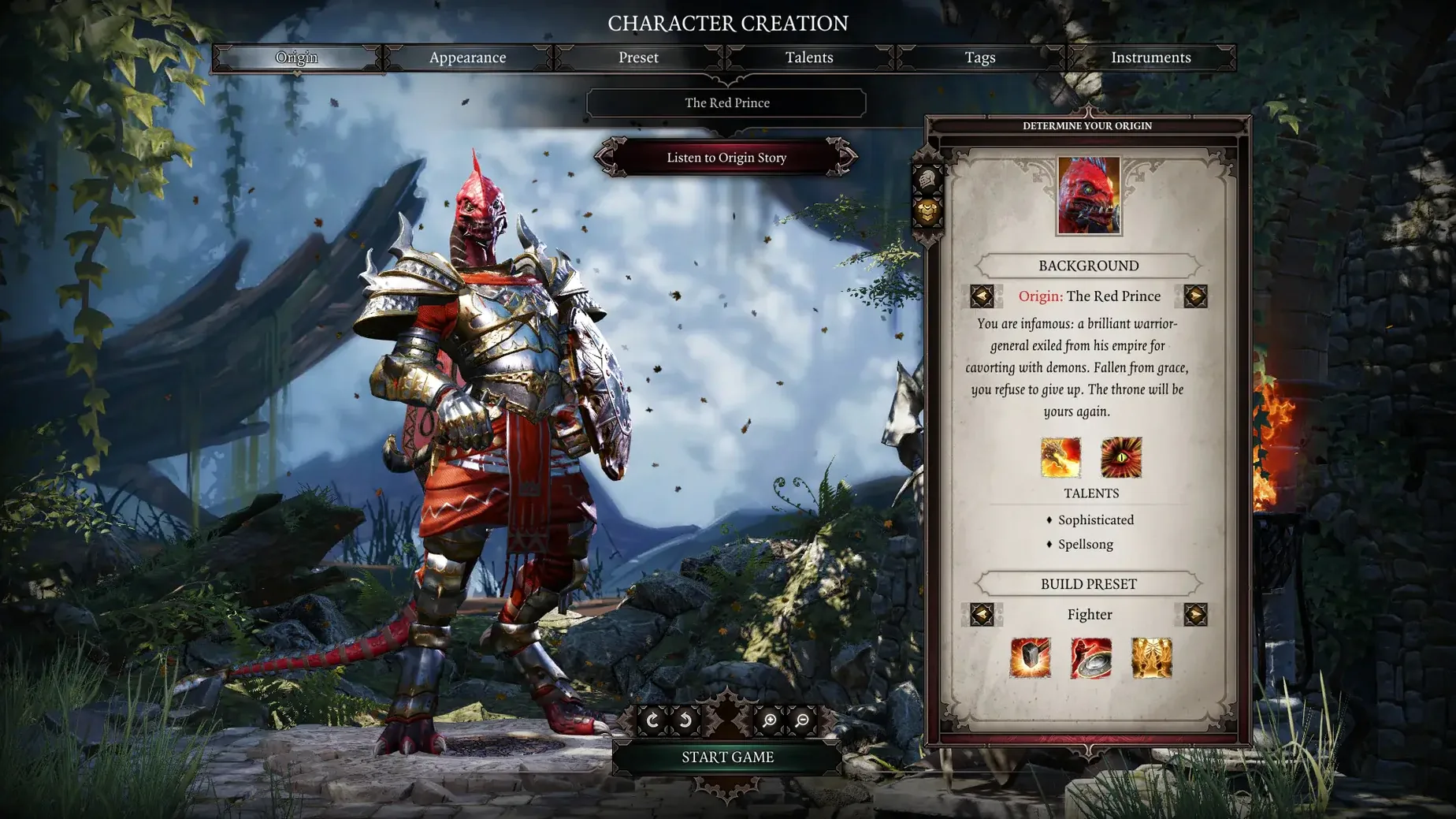
Divinity: Original Sin 2 is like a well-worn teacher’s edition of a classic novel — full of notes, alternate readings, and paths you can take in any order. It’s a turn-based role-playing game from Larian Studios, and it rewards patience. If you like planning a move, watching it unfold, then adjusting when the dice roll against you, this will feel familiar. The tactical combat is chess with fire traps; every encounter asks a question and lets you answer it your way.
The Definitive Edition adds a Story Mode for those who want the world and characters without the constant threat of death, and the third act has been reworked with new dialogue and re-scripted events. There’s also a Game Master mode, which lets one player design adventures for others — a bit like running a tabletop campaign without needing a table. Up to four players can cooperate, and a PvP arena adds a competitive edge for those who prefer to test their builds against friends.
That said, this isn’t for everyone. If you want fast action or instant gratification, the turn-based combat and dense dialogue will feel slow. The interface is busy, and managing inventory, skills, and quests takes effort. But if you enjoy unraveling systems at your own pace, Divinity: Original Sin 2 is a deep, rewarding world to get lost in.
Runs natively on Intel Macs and via Rosetta on Apple Silicon
The copy you find here is the Definitive Edition, version 3.6.117.3735 fix, and it is built as a 64-bit Intel application. That means it will run on Intel Macs natively. On Apple Silicon Macs — like the M1 MacBook Air used during testing — it runs under Rosetta 2 translation. The test system was running macOS Sequoia, so you can expect it to work on that version of the operating system and likely on earlier compatible versions as well.
Because it is an Intel binary, you may notice the game uses a little more energy on Apple Silicon hardware than a native version would. That is normal for translated apps. The install process is straightforward: mount the disk image, then drag the application to your Applications folder using the alias provided. After copying finishes, launch it from Launchpad.
If you prefer to play in Russian, the language files are included separately. Open the downloaded files, go to the Languages folder, and run the Russian language patch package. Other supported languages — German, Spanish, Italian, French, Polish, Czech, Japanese, Simplified Chinese, and Korean — are available as text options. The voice language is English only.
Revised third act with new dialogue and re-scripted events
Version 3.6.117.3735 is not a small patch. The most noticeable change for returning players is the revised third act. Dialogue has been added, events have been re-scripted, and some characters behave differently than they did before. That means a playthrough you started in an earlier version will feel different once you reach that part of the story.
Story Mode is the other major addition. If you found the original combat too punishing or simply wanted to explore Rivellon without worrying about party wipes, this mode lowers the pressure considerably. It does not remove combat entirely, but it makes encounters more forgiving. For classroom club use, this is the mode I would recommend for new players who are not used to tactical RPGs.
The PvP arena received new heroes, new maps, and additional ways to eliminate opponents. If you and your group enjoy testing builds against each other, there is more variety now. These adjustments are subtle — you may not notice them right away — but they make the game feel more consistent across its long runtime.
Shares DNA with Baldur's Gate 3: turn-based combat and reactive world
If you have played Baldur's Gate 3 on Mac, you will recognize the DNA. Both are Larian titles built on similar principles: turn-based combat, deep dialogue trees, and a world that reacts to your choices. Baldur's Gate 3 is the newer, more polished sibling, but it asks for a newer Mac and more storage. Divinity: Original Sin 2 runs on older hardware and still offers that same tactical depth. For a school game club with mixed equipment, the older title is the safer choice.
Pillars of Eternity II: Deadfire is another option for Mac RPG fans. It uses real-time-with-pause combat rather than pure turn-based action, which changes the pace considerably. Its story is more linear, and the party size is smaller. Divinity: Original Sin 2 gives you more freedom to approach problems sideways — talk your way past a boss, teleport a crate onto an enemy, or set the ground on fire before a fight begins. The flexibility is hard to match.
Pathfinder: Wrath of the Righteous offers a similarly massive campaign, but its ruleset is based on tabletop Pathfinder, which means a steeper learning curve. Divinity: Original Sin 2 uses a simpler attribute system that is easier to explain to new players in a club setting. Both games reward experimentation, but Larian's game is more forgiving of mistakes and faster to pick up for a session that lasts only an hour or two.
- The third act was revised with additional dialogue, re-scripted events, and altered characters.
- Story Mode was added for a less punishing experience.
- New heroes, maps, and ways to kill enemies were added to the PvP arena.
- Balance changes were made to skills, armor prices, the quest journal, the interface, and the map.
- macOS: Sequoia (tested)
- Architecture: 64-bit Intel
- Tested on 2020 MacBook Air with M1
Questions I keep getting
What languages does Divinity: Original Sin 2 support?
The game includes text in Russian, English, German, Spanish, Italian, Simplified Chinese, Korean, Polish, French, Czech, and Japanese.
Can I play Divinity: Original Sin 2 with friends?
Yes, up to four players can play together in cooperative mode, and there is also a PvP mode.
Does the game run on Apple Silicon Macs?
The system requirements list 64-bit Intel architecture, but it was tested on macOS Sequoia using a 2020 MacBook Air with M1, so it can run on Apple Silicon via Rosetta.
How to install
- Mount the downloaded disk image and drag the app to the Applications folder alias. This keeps the game files organized and makes launching easy.
- After copying finishes, open the app from Launchpad. That's where you'll find it ready to run.
- To install Russian, open the downloaded files, go to the Languages folder, and run the Russian language patch package. This adds the Russian text option.
Similar games
Sign in or join the club to leave a comment.
Nobody has commented yet.