- Version
- 1.0.0.12208 [Wineskin]
- Studio or maker
- Tribute Games Inc.
- Languages
- Russian, English, German, Spanish, Italian, Chinese (Traditional), Chinese (Simplified), Korean, Portuguese, Ukrainian, French, Japanese
- Activation
- Not required
- Chip type
- Apple Silicon
- Tried out on
- macOS Tahoe, Mac mini 2024 M4
- First released
- 1.12.2025
- Voice languages
- English
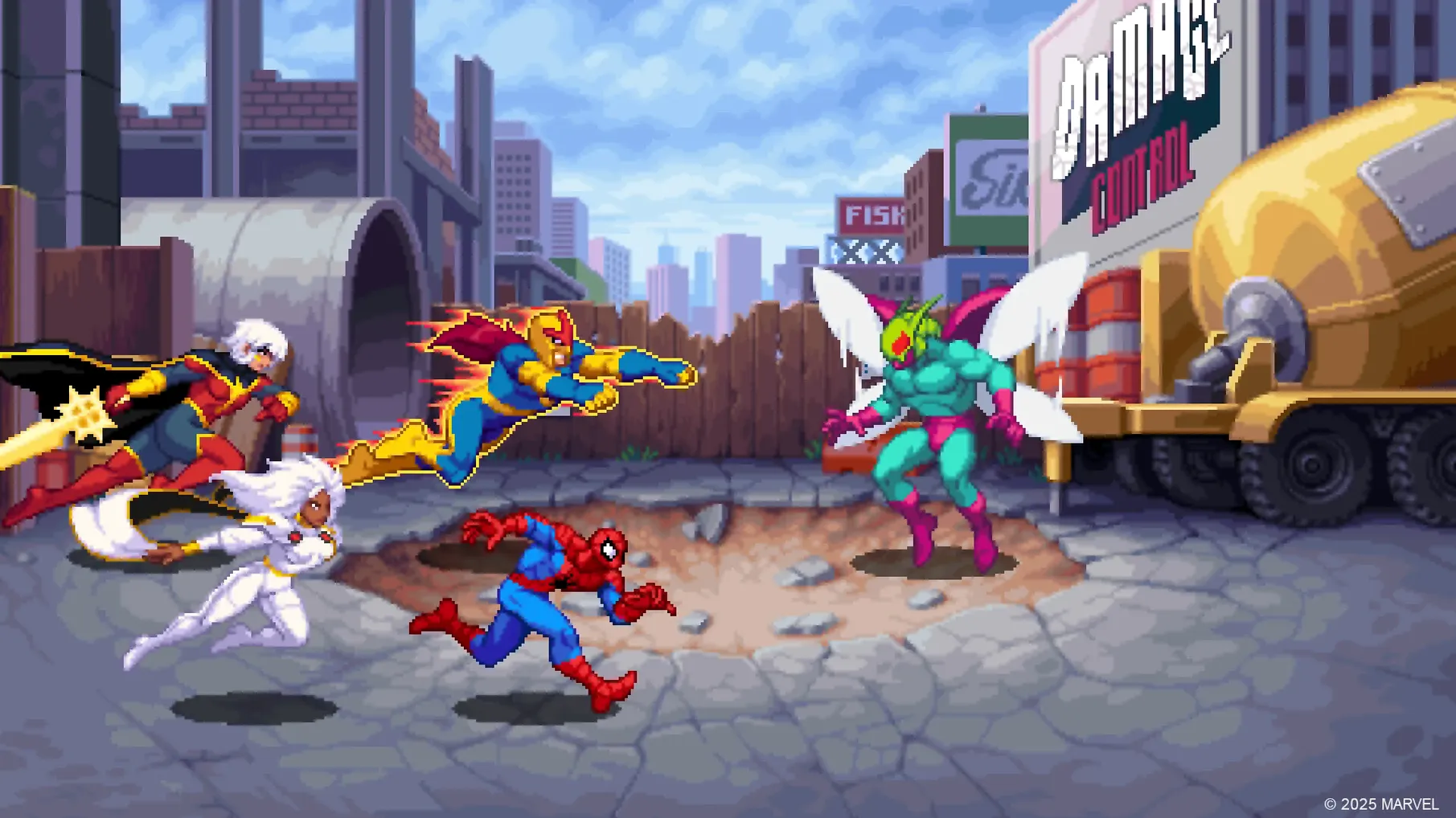
Two heroes per level, a galaxy under attack by Annihilus, and pixel art that pops. That’s the setup for Marvel Cosmic Invasion, a side-scrolling beat ’em up from Tribute Games. It supports both local and online play, so you can team up on the couch or across the distance.
Arcade brawler fans who miss tag-team combat
If you grew up on arcade brawlers and miss the rhythm of punch, dodge, and special move, this one is for you. The tag-team mechanic adds a layer of strategy: pick two fighters like Rocket Raccoon or Silver Surfer, swap mid-combo, and keep the pressure on. The roster is deep, and the comic-book art style suits the genre well.
Not for players wanting deep story or tactical pace
Players who prefer deep single-player campaigns or slow, tactical combat may find this repetitive. There’s no story depth beyond the alien threat, and the focus stays on action. If you’re not into classic beat ’em ups, this won’t change your mind.
Runs on Apple Silicon via Wineskin at version 1.0.0.12208
The version you’ll find here is 1.0.0.12208, built with Wineskin to run on Apple Silicon. That means it’s designed for the M-series chips — M1, M2, M3, and M4 — and was tested on macOS Tahoe using a Mac mini 2024 M4. If you’re on an Intel Mac, this build won’t run, so check your system before downloading.
The game itself is a side-scrolling beat ’em up with pixel art. You pick two heroes per level and switch between them instantly mid-battle. The roster includes Spider-Man, Wolverine, She-Hulk, Captain America, Phoenix, Black Panther, Storm, Iron Man, Rocket Raccoon, Beta Ray Bill, Venom, Cosmic Ghost Rider, Nova, Phyla-Vell, and Silver Surfer. That’s fifteen characters, each with their own move set. You can play locally on the same screen, online with friends, or mix both with drop-in and drop-out co-op.
Languages supported are Russian, English, German, Spanish, Italian, Traditional Chinese, Simplified Chinese, Korean, Portuguese, Ukrainian, French, and Japanese. Voice audio is in English only. No activation is needed — once it’s on your Mac, you can play.
Drag the app into Applications after installing
After you install, here’s a quick sequence that helps avoid common hiccups.
- Drag the app into Applications. Open the downloaded disk image and drag the app folder into the Applications shortcut that appears inside the image. This copies the game to the right location.
- Launch from Launchpad. Once the copy finishes, open Launchpad and click the game icon. The first launch may take a moment while the Wineskin wrapper sets up.
- Keep the Fix file handy. If the game shows an error on startup, go back to the disk image and run the Fix file. That usually resolves the issue without needing a reinstall.
- Start with one hero. The tag-team mechanic is easy to pick up, but try a level with just Spider-Man or Wolverine to get the feel for movement and attacks before swapping mid-combo.
- Check your controller. The game works well with a gamepad. If you’re using a PlayStation or Xbox controller, connect it via Bluetooth or USB before launching — macOS picks it up automatically in most cases.
If you run into trouble, the Wineskin build is self-contained, so deleting the app and re-copying from the disk image is a clean reset.
Stays as a standalone app without system modifications
Marvel Cosmic Invasion runs as a standalone app in your Applications folder. It doesn’t install background services or modify system files, so it behaves like any other game you drag onto your Mac. When you’re done, just quit it — no uninstaller needed, just drag to Trash.
On macOS Tahoe, the game sits well alongside other apps. You can have Discord or a browser open in the background while playing, though keeping those to a minimum is good practice. The Wineskin wrapper handles the game’s window and full-screen mode, so you can use Mission Control to switch between the game and other windows if needed.
For online co-op, you’ll need an internet connection. macOS manages network permissions per app, so the first time you try online play, you may see a firewall prompt — allow it, and you’re set. Local co-op works without any extra setup; just plug in additional controllers and the game recognizes them.
If you use Game Center, this title doesn’t rely on it — online matchmaking is handled internally by the game. That keeps things simple: no sign-ins, no extra accounts.
Intel Macs won't launch this build
Will this run on my Intel Mac?
No. The build is made for Apple Silicon only. If you have an Intel Mac, this version won’t launch. You’d need a different build or a translation layer that isn’t included here.
Can I play alone?
Yes. The game supports single-player. You control two heroes and switch between them, so you get the full tag-team experience without needing a partner.
Does it need an internet connection?
Only for online co-op. Local play and single-player work offline. The first online session may trigger a macOS firewall prompt, but after that, it’s straightforward.
How do I switch heroes mid-level?
The game lets you swap instantly between your two selected heroes. The exact button depends on your controller or keyboard mapping, but it’s explained in the game’s controls. It becomes second nature after a few fights.
What if the game crashes at launch?
Run the Fix file from the disk image. That’s the most common solution. If that doesn’t work, delete the app, re-copy it from the image, and try again. The Wineskin build is stable once it’s set up correctly.
Is this a port of the console version?
It’s the same game — Marvel Cosmic Invasion, version 1.0.0.12208 — running on Mac via Wineskin. The content, roster, and features match what you’d find on other platforms. The difference is the wrapper that lets it run on Apple Silicon.
- Wineskin build for Apple Silicon Macs.
- macOS Tahoe or later
- Apple Silicon (M1 or newer)
- Tested on Mac mini 2024 M4
Questions I keep getting
Can I play Marvel Cosmic Invasion with friends online?
Yes, the game supports online play, so you can team up with others over the internet.
Which characters are in the roster?
The roster includes Rocket Raccoon, Beta Ray Bill, Venom, Cosmic Ghost Rider, Nova, Phyla-Vell, and Silver Surfer, among others.
How to install
- Open the downloaded disk image and drag the app into the Applications folder shortcut. This keeps the game accessible from your Mac’s main app list.
- After copying finishes, launch the app from Launchpad. It should start like any other Mac app.
- If the game shows an error at startup, run the Fix file from the disk image. That clears common permission issues.
Similar games





Sign in or join the club to leave a comment.
Nobody has commented yet.