
- Version
- 0.11.1 Native
- Studio or maker
- inZOl Studio
- Languages
- Russian, English, German, Spanish, Italian, Chinese (Traditional), Chinese (Simplified), Korean, Polish, Portuguese, French, Japanese
- Activation
- Not required
- Chip type
- Apple Silicon
- Tried out on
- macOS Tahoe, Mac mini 2024 M4
- First released
- 28.03.2025
- Voice languages
- Music only
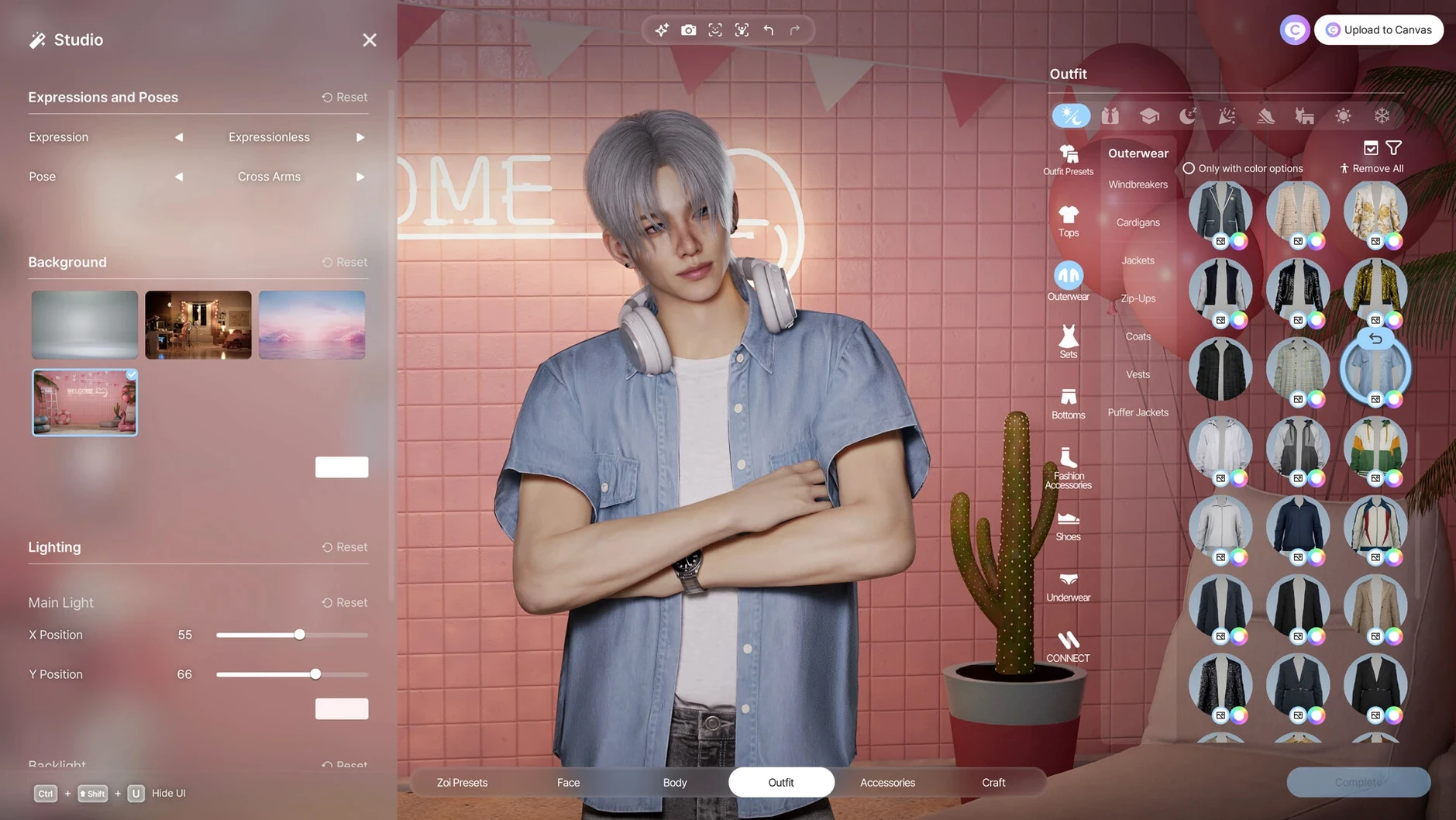
InZOI includes more than 250 customization options for characters, buildings, and city elements. It is a life simulation game where you shape the world according to your vision, with Zois acting based on personality traits and life experience. This early access title runs on macOS Tahoe and Apple Silicon.
Who will enjoy inZOI
Players who love deep character creation — hair, skin, body shape, clothing, accessories, even manicure — will find plenty to explore. If you enjoy generative AI tools, you can use text prompts to create patterns and images for clothing and furniture, or upload videos to generate character movements. City builders and storytellers who like managing weather, lots, streets, rumors, and trends will also feel at home.
When a tight story or polished finish matters
If you prefer a tight, goal-driven narrative or a polished, finished game, the early access nature may feel incomplete. Players who dislike generative AI features or want a simpler, less customizable simulation might find the options overwhelming. The game requires Apple Silicon and macOS Tahoe, so older Intel Macs are not supported.
Create Zois, build lots, and watch rumors spread
You can create Zois with personality traits that shape their relationships and life experiences. Build and modify lots, streets, and weather. Use the local generative AI model to customize clothing and furniture patterns. Watch as rumors, trends, and even diseases spread through the simulation.
Start with character creator, skip city worries
When you first launch inZOI, take some time to explore the character creator without worrying about city management. Start with one Zoi and a small lot. The customization options can feel overwhelming at first, so it helps to focus on one area — try building a single room or adjusting your Zoi's clothing using the text prompt feature.
Spend your first session learning how weather and city tools work. Change the season or time of day and watch how the simulation responds. Pay attention to how Zois interact based on their traits. You might notice that a creative Zoi reacts differently to a rainy day than a practical one.
Save early and often. Early access games sometimes behave in unexpected ways, and you will want to keep your progress. Try the facial capture or motion capture features with a short video to see how they translate into the game world.
Best for creative builders and storytellers
Creative builders and storytellers are the natural audience for inZOI. If you enjoy shaping environments and watching characters live out their personalities, this game gives you room to do that. Mac users who already work with generative AI tools in other apps will find the text prompt and 2D-to-3D features especially familiar and useful.
Life simulation fans who have played games like The Sims will recognize the core loop but will find a different pace here. inZOI focuses more on community-wide events — rumors, trends, diseases — rather than individual household management. If you like observing how a whole city changes over time, this approach suits you.
Players who enjoy modding or creating content will appreciate the local generative AI model. It allows you to generate patterns and objects without needing external software. And if you prefer a more hands-off experience, you can set up city elements and let the simulation run, watching how Zois respond to your design choices.
Generative AI runs offline on your Mac
Does inZOI require an internet connection?
No. The generative AI features run locally on your Mac. You do not need to be online to customize characters, build lots, or manage the city. The game works entirely offline once downloaded.
If you have an Intel Mac, even a recent one, inZOI will not run. The early access version is optimized for Apple Silicon, so performance should be consistent on supported hardware.
Can I use a controller?
The game is designed for a keyboard and mouse setup on Mac. There is no mention of controller support in the current version. If you prefer playing on a larger screen, connecting a keyboard and trackpad or mouse works well.
Is the game finished?
No. Version 0.10.4 is an early access release. That means you will encounter missing features, occasional quirks, and updates over time. If you want a polished, final product, waiting for a later version might be better. If you enjoy watching a game grow and providing feedback, early access is a good fit.
- macOS Tahoe
- Apple Silicon
- Interface languages: Russian, English, German, Spanish, Italian, Traditional Chinese, Simplified Chinese, Korean, Polish, Portuguese, French, Japanese
Questions I keep getting
Can I play inZOI on an Intel Mac?
No, inZOI requires Apple Silicon and macOS Tahoe. It was built and tested on a 2024 Mac mini with M4.
Does inZOI have a story mode?
InZOI is a life simulation sandbox rather than a story-driven game. Zois act based on personality traits and life experience, and you shape events as they unfold.
How to install
- Open the downloaded disk image file.
- Drag the app icon into the Applications folder alias to install it.
- After copying finishes, launch the app from Launchpad.
- If the app does not start, run the listed Terminal commands or allow it in Privacy & Security settings.
Similar games






Sign in or join the club to leave a comment.
Nobody has commented yet.