- Version
- 3.3.1
- Studio or maker
- 7th Beat Games
- Languages
- Russian, English, German, Vietnamese, Spanish, Italian, Chinese (Traditional), Chinese (Simplified), Korean, Polish, Portuguese, Romanian, French, Czech, Japanese
- Activation
- Not required
- Chip type
- Apple Silicon, Intel 64-bit
- Tried out on
- macOS Tahoe, Mac mini 2024 M4
- First released
- 25.01.2019
- Voice languages
- Music only
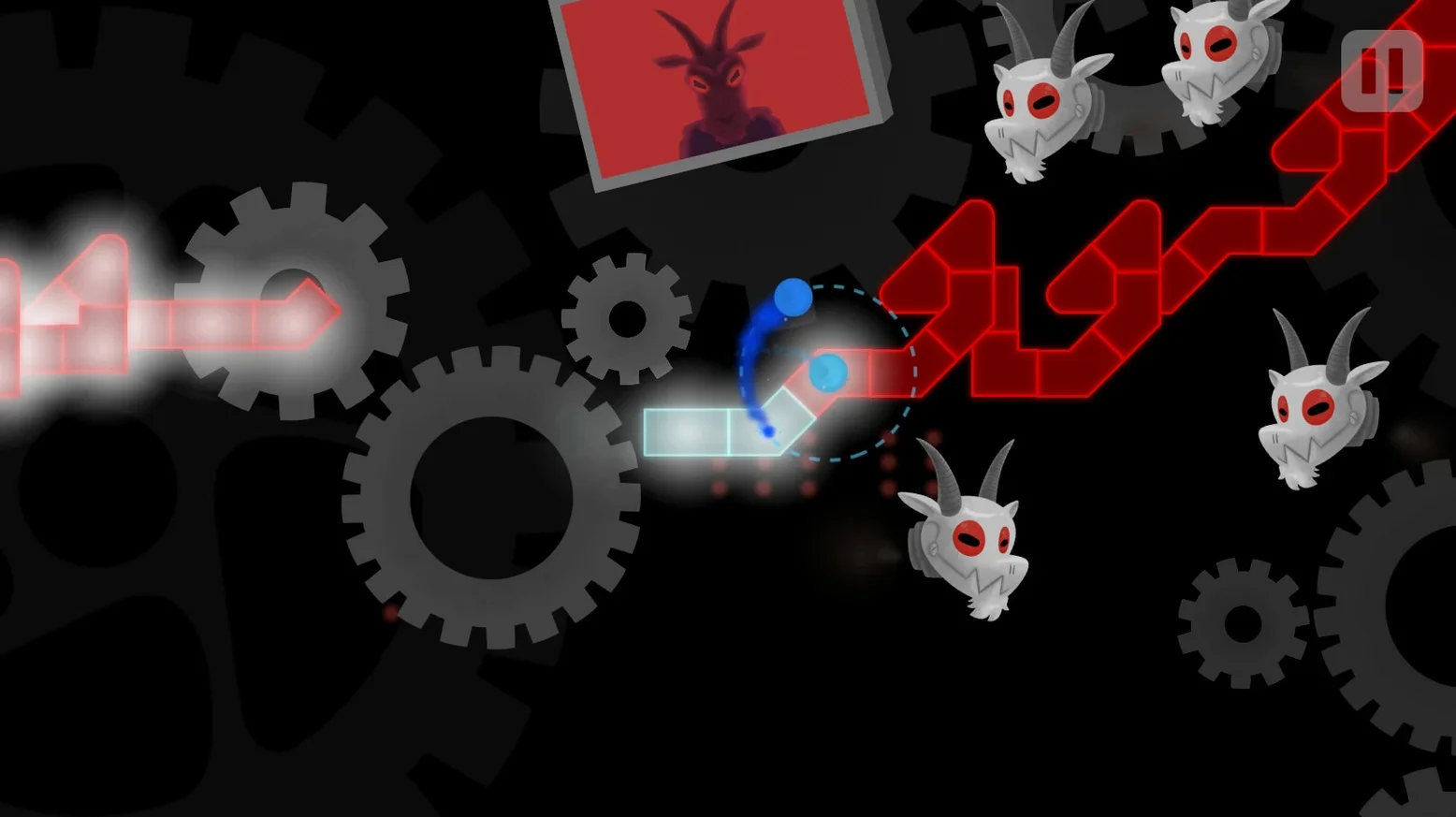
Students in my game club often ask about rhythm games that don't need a lot of setup. A Dance of Fire and Ice fits that bill. It's a one-button game where you tap along to the beat, moving along a winding line. Each track shows the beats ahead, so you can plan your taps. The music spans different genres, set against colorful fantasy landscapes. There's even a space-themed presentation for some levels.
Tested on a Mac Mini M4 from 2024
Good news: the game supports both Apple Silicon and Intel Macs. The current build is tested on macOS Tahoe using a Mac mini 2024 M4. If you have a Mac from the last few years, it should run fine. The game also supports Steam Workshop, so you can download custom levels created by others or make your own.
Manual Calibration and 14 Language Options Included
Beyond the core rhythm gameplay, A Dance of Fire and Ice offers manual calibration, which you can adjust on the fly if the timing feels off. The interface is available in 14 languages, including English, German, Spanish, and Japanese. The music itself is the only audio language, which makes sense for a rhythm game.
Run Auto Calibration Before Starting Levels
Before you start tapping through levels, open the settings menu and look for the calibration option. A Dance of Fire and Ice gives you two ways to handle timing: automatic and manual. I usually let the automatic calibration run once when I first start, then check if the taps feel right during the first level. If the beat seems slightly off, pause and adjust the manual slider by a small step while the music is still playing. You can make changes on the fly without restarting the track.
Another early setting to consider is the language. The interface defaults to English, but with 13 other languages available, you might prefer something else. Switch it before you get deep into the menus so everything reads naturally from the start.
Check for Background Audio Apps If Taps Feel Off
Most trouble I see in the game club comes from timing, not the game itself. If your taps feel out of sync even after calibration, check whether your Mac is running other audio-heavy apps in the background. Video calls or music players can shift the audio delay. Close those, run the calibration again, and the beat usually lines up better.
Another snag involves custom levels from Steam Workshop. Sometimes a downloaded level doesn't show up in the game menu. The fix is to make sure the level file matches the game version. If you or a friend made a level in an older patch, it may not appear in version 3.3.1. Re-export the level with the current build, or find an updated version in the workshop.
A few players forget that the game is entirely rhythm-based. You might be tempted to watch the visuals and react, but the trick is to listen to the music pattern instead. The track shows each beat in advance for a reason: let your ear guide your finger, not your eye.
- New level: Dramatic Entrance.
- Full visual overhaul of 3-X.
- Architecture: Apple Silicon or Intel
- macOS: Tahoe (tested)
Questions I keep getting
Does A Dance of Fire and Ice work on Intel Macs?
Yes, the game supports both Apple Silicon and 64-bit Intel x86 architectures, so it should run on most Macs.
Can I play custom levels in A Dance of Fire and Ice?
Yes, the game has Steam Workshop support, allowing you to create, share, and play custom levels.
How to install
- Open the downloaded disk image.
- Drag the app into the Applications folder alias.
- After copying finishes, launch the app from Launchpad.
Similar games





Sign in or join the club to leave a comment.
Nobody has commented yet.