- Version
- 1.0.6
- Studio or maker
- Rovio Entertainment Toronto
- Languages
- Russian, English, German, Arabic, Danish, Spanish, Italian, Chinese (Traditional), Chinese (Simplified), Korean, Portuguese, Turkish, French, Japanese
- Activation
- Not required
- Chip type
- Apple Silicon, Intel 64-bit
- Tried out on
- macOS Sequoia, Mac mini 2024 M4
- First released
- 3.07.2025
- Voice languages
- Music only
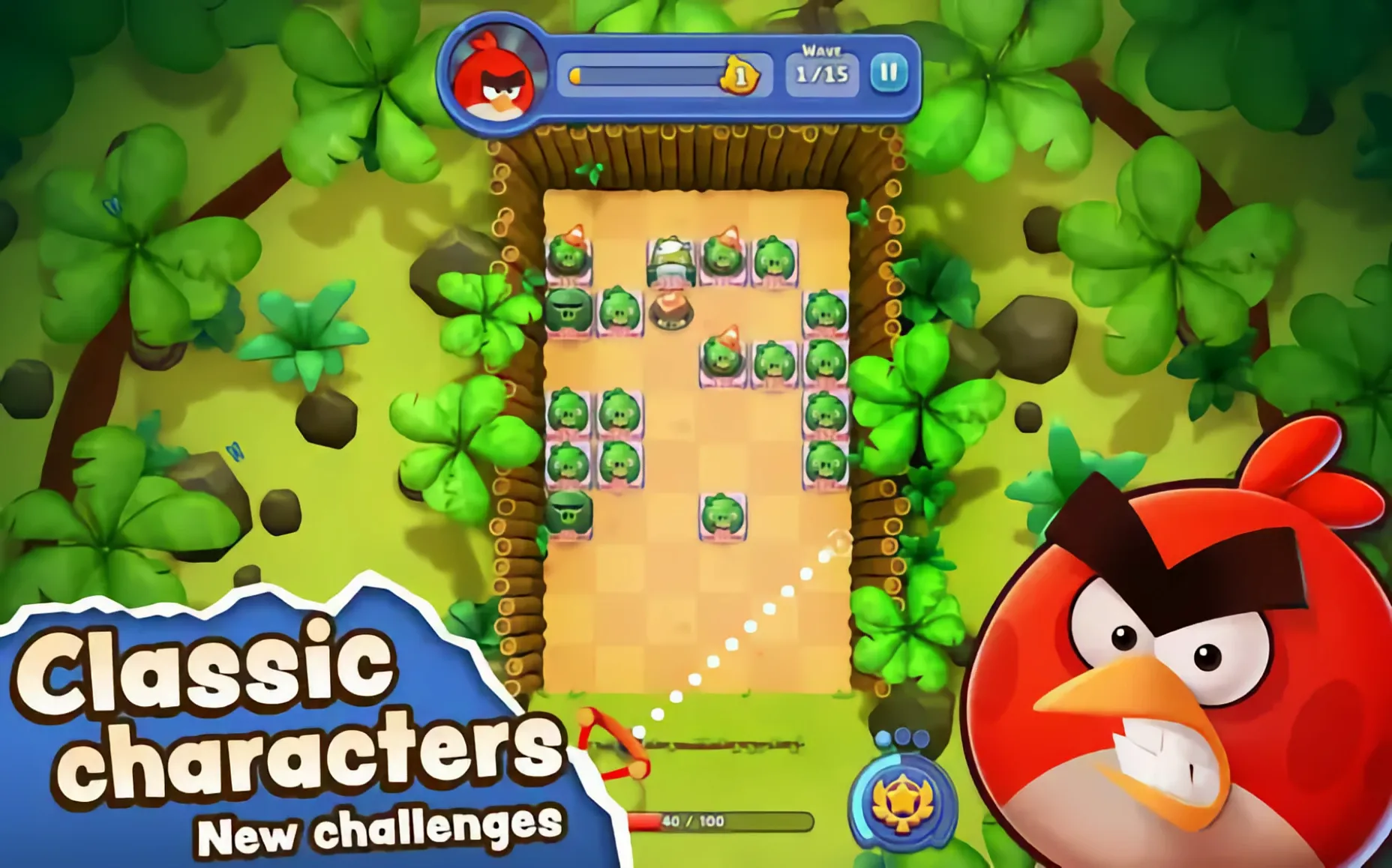
The latest version brings the global launch of Angry Birds Bounce, so everyone can finally play it.
Brick-breaker gameplay — You aim and bounce birds off blocks to clear each level.
Angry Birds characters — Red, Chuck, Bomb, and others appear as your playable birds.
Collecting and flocking — You gather birds during play and combine them into larger flocks for stronger shots.
Pig enemies — The birds fight pigs that have taken over their islands.
Level variety — Each stage is described as a new challenge, so the puzzle keeps changing.
Languages — The game supports English, German, Spanish, French, Italian, Portuguese, Russian, Turkish, Arabic, Danish, Korean, Japanese, and both Chinese variants.
Arcade-style puzzle fans get the global launch
The current version 1.0.6 is the global public launch of Angry Birds Bounce, so any Mac user who enjoys arcade-style puzzles can jump in without waiting. Action game players who like a bit of planning before each shot will appreciate the strategic angle — you don't just tap, you aim, bounce, and watch how your flock interacts with the blocks. Long-time Angry Birds fans will recognize Red, Chuck, Bomb and the others, but the brick-breaker format feels different from the classic slingshot levels, so even experienced players have new patterns to learn.
Because the game runs on both ARM and 64-bit x86 architectures, owners of Intel Macs and Apple Silicon Macs can both play it. That means a school like mine, where the computer lab has a mix of older iMacs and newer MacBooks, can offer the same game to everyone. The rogue-lite element — unlocking power-ups during runs and building unique combos each time — gives it replay value for students who might otherwise finish a puzzle game in one sitting.
The Apple Arcade launch means the game was designed with mobile-style pick-up-and-play sessions in mind, so it fits well into short breaks or the last few minutes of a club meeting. The language support is broad: fourteen languages in the interface, with music listed as the only audio language, so dialogue or voice narration is not a factor. That makes it easy to recommend to students who prefer the game in German, Turkish, Arabic, or any of the other supported languages.
Runs on any modern Mac with ARM or Intel
The tested system was macOS Sequoia on a Mac mini 2024 M4, and the supported architectures are both ARM and 64-bit x86, so the game should run on any modern Mac that meets the general macOS requirements. No activation is required — you mount the disk image, drag the app into Applications, and launch it from Launchpad. You do need to run one Terminal command after copying: sudo codesign --force --deep --sign - /Applications/AB\ Bounce.app. That signs the app locally so macOS lets it open.
The game takes up a reasonable amount of disk space — nothing unusual for a modern puzzle title. The install process is straightforward, and because there is no online activation or account sign-in, it works offline once it is copied to your Mac. That is a nice detail for classrooms with restricted internet access or for portable Macs used on trips.
Since the game is designed for both architectures, you do not need to check whether your Mac is Intel or Apple Silicon before downloading. The disk image handles both.
Global launch ends Apple Arcade exclusivity
The key change in version 1.0.6 is the global launch of Angry Birds Bounce. Before this version, the game was available only through Apple Arcade. Now it is accessible to a wider audience, and the release marks the first time Mac users outside of Arcade subscribers can play it.
The gameplay itself remains the same as the Arcade version: you still collect birds, combine them into flocks, and fight pigs across islands. The rogue-lite structure means each run feels slightly different because you unlock power-ups as you go and build combos that match the level layout. The global launch did not change the mechanics — it simply made the game available to everyone with a compatible Mac.
For new players, it means you can jump straight into a polished brick-breaker with familiar characters and a strategic edge.
- Global launch of Angry Birds Bounce.
- macOS: not specified
- Architectures: ARM (Apple Silicon) and 64-bit x86 (Intel)
Questions I keep getting
What kind of game is Angry Birds Bounce?
It is a strategic brick-breaker that combines Angry Birds characters with arcade-style bouncing gameplay. You collect birds, build flocks, and fight pigs across many levels.
How to install
- Mount the downloaded disk image to access the app.
- Drag the app into the Applications folder shortcut to install it.
- Launch the app from Launchpad after copying is complete.
- Run the command
sudo codesign --force --deep --sign - /Applications/AB\ Bounce.appin Terminal so the game can start properly on your Mac.
Similar games



Sign in or join the club to leave a comment.
Nobody has commented yet.