- Version
- 1.5 Native
- Studio or maker
- Naiive
- Languages
- Russian, English, German, Spanish, Italian, Chinese (Simplified), Korean, Polish, Portuguese, French, Japanese
- Activation
- Not required
- Chip type
- Apple Silicon, Intel 64-bit
- Tried out on
- macOS Tahoe, Mac mini 2024 M4
- First released
- 18.02.2026
- Voice languages
- Music only
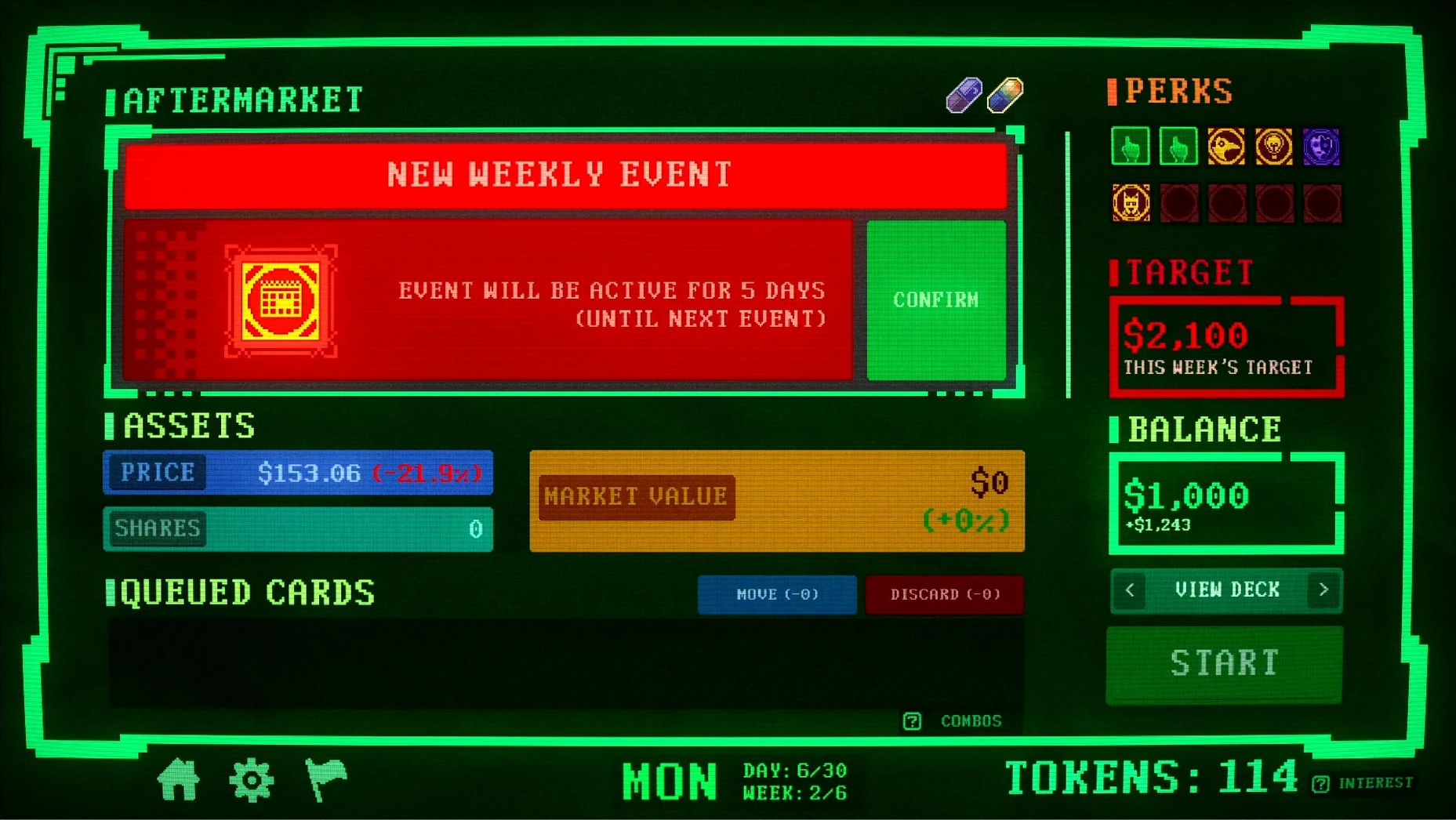
Insider Trading runs on both Apple Silicon and Intel Macs, as long as you're on macOS Tahoe or later. I checked it on a Mac mini 2024 M4, and it was smooth. The game is a roguelike deckbuilder where you manipulate the stock market.
Each run puts you in the shoes of a trader with a unique strategy
Each run puts you in the shoes of a trader with a unique strategy and starting deck. You play cards to influence market conditions, trade stocks, and try to reach a weekly financial goal. Timing is key — you need to cash out before the market swings against you.
A good fit if you enjoy deckbuilders with a financial twist
If you enjoy deckbuilders like Slay the Spire but want a financial twist, this is a good fit. It's also for anyone curious about how markets work, though you don't need finance knowledge to play. The varied characters and cards keep each run fresh.
How much content is there?
There are over 120 cards across 12 types, plus 50 perks to mix in. Between trading days, you visit a secondary market to pick cards from different sets. A combo system rewards clever card order, and multiple playable characters each have their own mechanics.
Settings I change before the first run
Insider Trading starts with defaults that work, but a few adjustments make the early runs more comfortable. The first thing I do is check the difficulty levels. The game offers several, and starting one step below the standard option gives you room to learn the card types without pressure. You can always bump it up later.
I also set the music volume early. The game has music accompaniment, which sets the mood for trading days, but during longer sessions I prefer it a notch lower so card sounds stand out. The secondary market between trading days is where you make decisions that matter, and hearing card effects clearly helps.
Language is another easy change. Insider Trading supports twelve languages, from English to Korean to Russian. If you teach or share a Mac, setting it to the player's language removes a barrier. In my game club, students switch between German and English depending on who is playing.
Holding protective cards can prepare you for recessions
Destructive events such as recessions appear during runs. They shake up market conditions and can end a promising streak. What took me a few runs to notice: you can prepare for them by holding cards that protect your portfolio. The deck you build matters, but so does the order you play it.
The combo system is another detail that rewards attention. Linking cards in the right sequence amplifies their effect, and the game gives visual feedback when a combo triggers. Once you learn which card types chain together, the weekly financial goal becomes more reachable.
Unlockable characters with unique decks and mechanics are part of the loop. Each character plays differently, so trying them all is worth the time. You do not need to win a run to unlock a new trader — progress carries over between attempts.
Choosing a trader with a distinct deck to show the game's rhythm
Here is how a typical run plays out when I want to show a student the rhythm of the game.
- Pick a trader. I choose one of the playable characters. Each starts with a different deck and a distinct strategy. Some favor aggressive trading, others focus on long-term investments.
- Play the first trading day. Cards in hand let me influence market conditions. I might raise a stock's value, lower another, or buy shares directly. The goal is to increase my portfolio before the day ends.
- Visit the secondary market. Between trading days, I pick cards from different sets. Some cards strengthen my deck and some weaken it. Choosing wisely sets up the next day's opportunities.
- Cash out at the right moment. Timing the exit is the core challenge. If I wait too long, a recession or a market swing can erase gains. Locking in profit means hitting the weekly financial goal before everything shifts.
- Repeat until the week ends. Each run lasts a set number of days. Reaching the goal advances me, while falling short ends the run and unlocks progress for the next attempt.
Strategy players who enjoy resource management get the most from it
Insider Trading suits more than just deckbuilder fans. Strategy game players who enjoy resource management will find the stock market mechanics familiar. The need to balance risk and reward, plan ahead, and adapt to random events maps well onto strategy thinking.
Roguelike players who like repeated runs with unlockable content will have plenty to explore. The over 120 cards and 50 perks mean each run can play differently. The unlockable characters add variety without requiring constant wins.
Mac gamers who want something that runs on both Apple Silicon and Intel hardware benefit here. The game works on macOS Tahoe and later, and the install process is straightforward: open the disk image, drag the app to Applications, and launch from Launchpad. No extra configuration needed.
I also find it works well in a teaching context. The secondary market introduces card selection as a decision point, and the combo system rewards pattern recognition. Students in my game club pick up the basics quickly, and the difficulty levels let them adjust the challenge as they improve.
Version 1.5 Native has been released. The developer hasn't published a public change log for this update, so I can't detail what's different under the hood, but the build is fresh and ready for current Macs.
- Apple Silicon Macs
- Intel Macs (64‑bit)
Questions I keep getting
How many perks are in the current version?
The current release includes 50 perks. These modify your run, adding another layer of strategy beyond the cards.
How to install
Here’s a free financial simulation that brings corporate intrigue to your desk, and the Mac version weighs in around 270 MB.
- Open the disk image you downloaded. A Finder window will appear with the app inside.
- Drag the app icon onto the Applications folder shortcut shown in that same window — this copies the program to your Mac.
- Launch it from Launchpad once copying finishes. The app is ready to use right away.
Similar games





Sign in or join the club to leave a comment.
Nobody has commented yet.