- Version
- Build (13606106) [Wineskin]
- Studio or maker
- Mob Entertainment
- Languages
- English
- Activation
- Not required
- Chip type
- Apple Silicon
- Tried out on
- macOS Sequoia, MacBook Air (M1. 2020)
- First released
- 6.05.2022
- Voice languages
- English
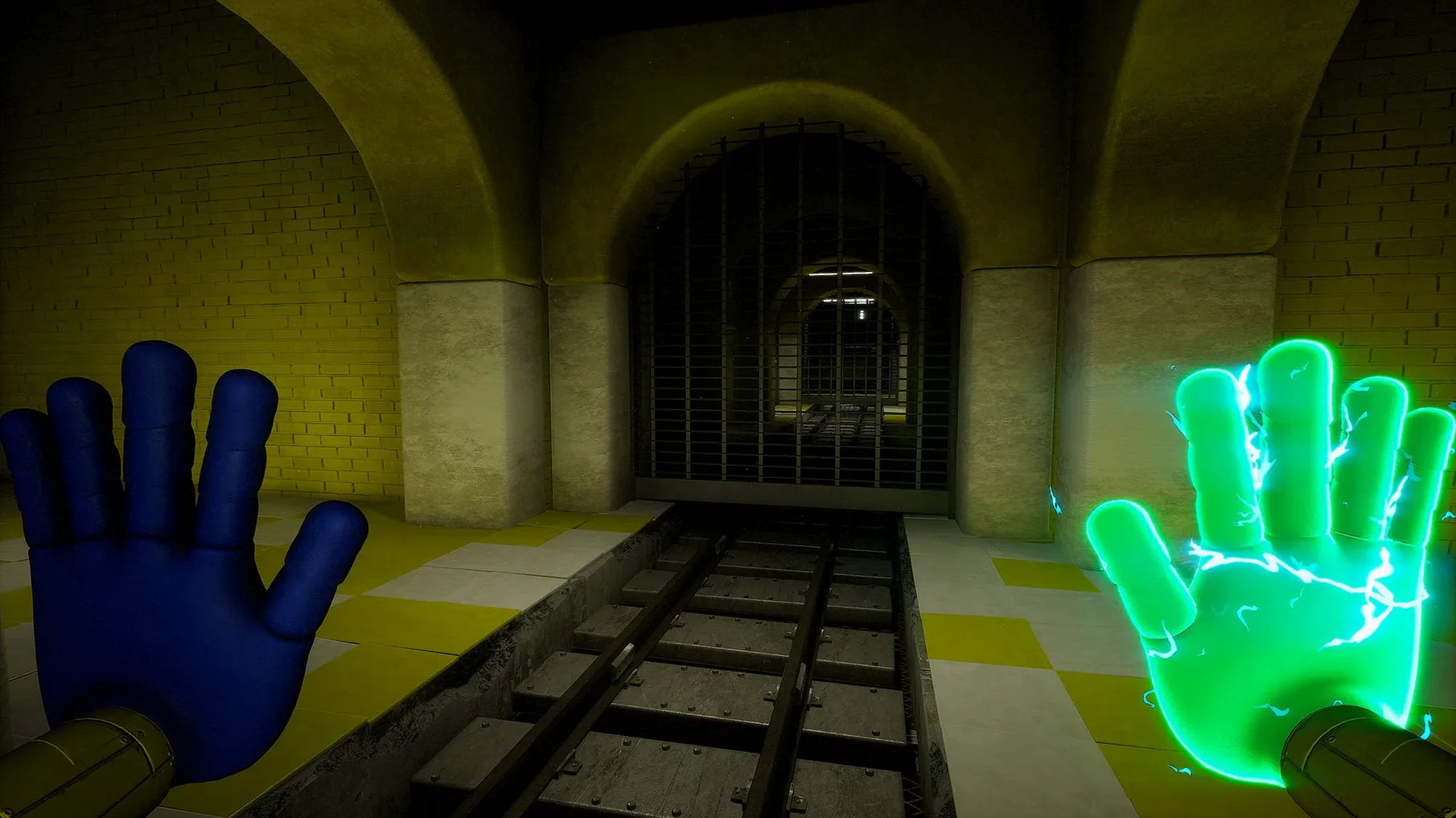
Poppy Playtime Chapter 2 runs on Macs with Apple Silicon and macOS Sequoia. The Windows version is listed on Steam, but this build comes as a Wineskin wrapper, so it boots on recent Mac hardware without extra setup.
Explore the Game Station
A train leaves directly from the factory and takes you to the Game Station, a new location filled with puzzles and dangers. You'll need to find your way through its halls while avoiding Mommy, the chapter's main threat.
Use the Green Hand
The GrabPack gains a Green Hand. It transfers energy remotely and lets you grab pipes to swing across missing floors. That opens up new paths and makes some of the platforming tricks feel fresh.
Meet the New Toys
Bunzo Bunny is one of the new toys you'll come across. Like the first chapter, the horror comes from these twisted playthings and the factory's broken machinery.
Do you need to own the first chapter to play this one?
Do I need to own the first chapter to play this one? The story picks up where the first game leaves off, so knowing the backstory helps. But the game does a decent job of introducing the factory and its rules again. You can jump straight into Chapter 2 if you prefer, though parts of the story will feel less connected.
Will the Wineskin wrapper slow the game down? The wrapper translates Windows calls so the game runs on macOS. For a game like this one, which is not graphically heavy, the performance is very close to the Windows version. You are not losing anything noticeable by using the Wineskin build.
Can I use a controller? Yes. The game supports most common controllers on macOS once they are paired. The Green Hand's grabbing and swinging motions work well with a controller's analog sticks. Keyboard and mouse work fine too, but many players prefer the controller for the platforming sections.
Does it have subtitles? The game is in English with English voice acting. Subtitles are available in the settings menu, so you can read along if you want. That helps with some of the quieter audio cues during chase sequences.
This game fits horror fans and puzzle solvers on Mac
Poppy Playtime Chapter 2 fits best for a few kinds of Mac users. Horror game fans who enjoy exploring an abandoned building with jump scares and creepy atmosphere will find plenty here. Puzzle solvers get a fair amount too, because the Green Hand gives you new ways to interact with the environment, and the Game Station includes several small puzzles that block your progress.
Adventure game players who like a clear objective and linear story will appreciate the chapter structure. You always know what the next door or the next puzzle expects from you. That keeps the experience focused.
Owners of Apple Silicon Macs who want a horror game that does not require Bootcamp or Parallels also benefit. The Wineskin wrapper lets you play without partitioning your drive or running a virtual machine. You install and go.
A full walkthrough for a specific task: getting through the Game Station
Once you arrive at the Game Station, you need to find the exit while avoiding Mommy and using the Green Hand. Here is a step-by-step workflow for that part of the chapter.
- After the train stops, exit the carriage and enter the main hall. Look for a control panel near the ticket booth. It activates the first set of lights and opens the door to the playground area.
- Cross the playground. Bunzo Bunny appears here. Stay behind the climbing frames and slides, and wait for his patrol pattern to move away before you dash to the next cover.
- You reach a gap in the floor with pipes above. Use the Green Hand to grab a pipe and swing across. Aim for the pipe that is brightest — that one holds your weight. Swing and release when you are over the solid ground on the other side.
- Inside the next room, a power box is jammed. Use the Green Hand's remote energy transfer on the box to restore power to the nearby door lock. That opens the path forward.
- Now you enter the arcade area. PJ Pug-a-Pillar blocks a narrow corridor. Wait until he moves to the far end, then run past him. Do not stop running until you reach the exit sign at the other end.
- The final puzzle in the Game Station is a series of pipes that lead to a high platform. One pipe is broken. Use the Green Hand to swing across the gap, then grab the ledge above and pull yourself up. From there you can exit the Game Station and board the train that continues deeper into the factory.
Use the Fix file if the game fails to launch
One common snag is the game failing to launch after the first copy. If you see an error message right after starting the app, run the Fix file that is included in the disk image. That file repairs permissions and adjusts the Wineskin configuration. After you run it once, the game should boot normally from then on.
Another snag involves the Green Hand not responding during the pipe-swinging sections. This usually happens if you are too far from the pipe. Walk a step closer and aim again. The Green Hand has a reach limit, and the game expects you to be within a certain distance before the grab prompt appears.
Audio dropouts can occur if your system has multiple audio output devices connected. Unplug any headphones or external speakers before launching the game. The Wineskin wrapper sometimes defaults to the wrong audio device, and the game loses sound. Starting with a single audio device avoids that entirely.
Finally, some players report the game window is too small on larger screens. The in-game settings menu does not always offer a fullscreen toggle. Instead, press Command + F to force the window to fullscreen in the Wineskin environment. That makes the image fit the whole display without stretching it poorly.
- The Green Hand was added to the GrabPack.
- The Game Station is included as a new location.
- macOS Sequoia
- Apple Silicon
Questions I keep getting
Does Poppy Playtime Chapter 2 run on Intel Macs?
No, this build is for Apple Silicon Macs only. It requires macOS Sequoia.
What is the Green Hand?
It's a new addition to the GrabPack that can transfer energy remotely and grab pipes to swing across gaps.
Where does the game take place?
You ride a train from the factory to the Game Station, a new location in the game.
How to install
- Mount the downloaded disk image and drag the app to the Applications folder shortcut.
- After copying finishes, launch the app from Launchpad.
- If the game shows an error at startup, run the Fix file in the disk image.
Similar games


Sign in or join the club to leave a comment.
Nobody has commented yet.