
- Version
- 1.28b
- Studio or maker
- Ludokultur
- Languages
- Russian, English, German, Spanish, Italian, Chinese (Simplified), Portuguese, French, Japanese
- Activation
- Not required
- Chip type
- Apple Silicon, Intel 64-bit
- Tried out on
- macOS Tahoe, Mac mini 2024 M4
- First released
- 27.05.2024
- Voice languages
- Music only
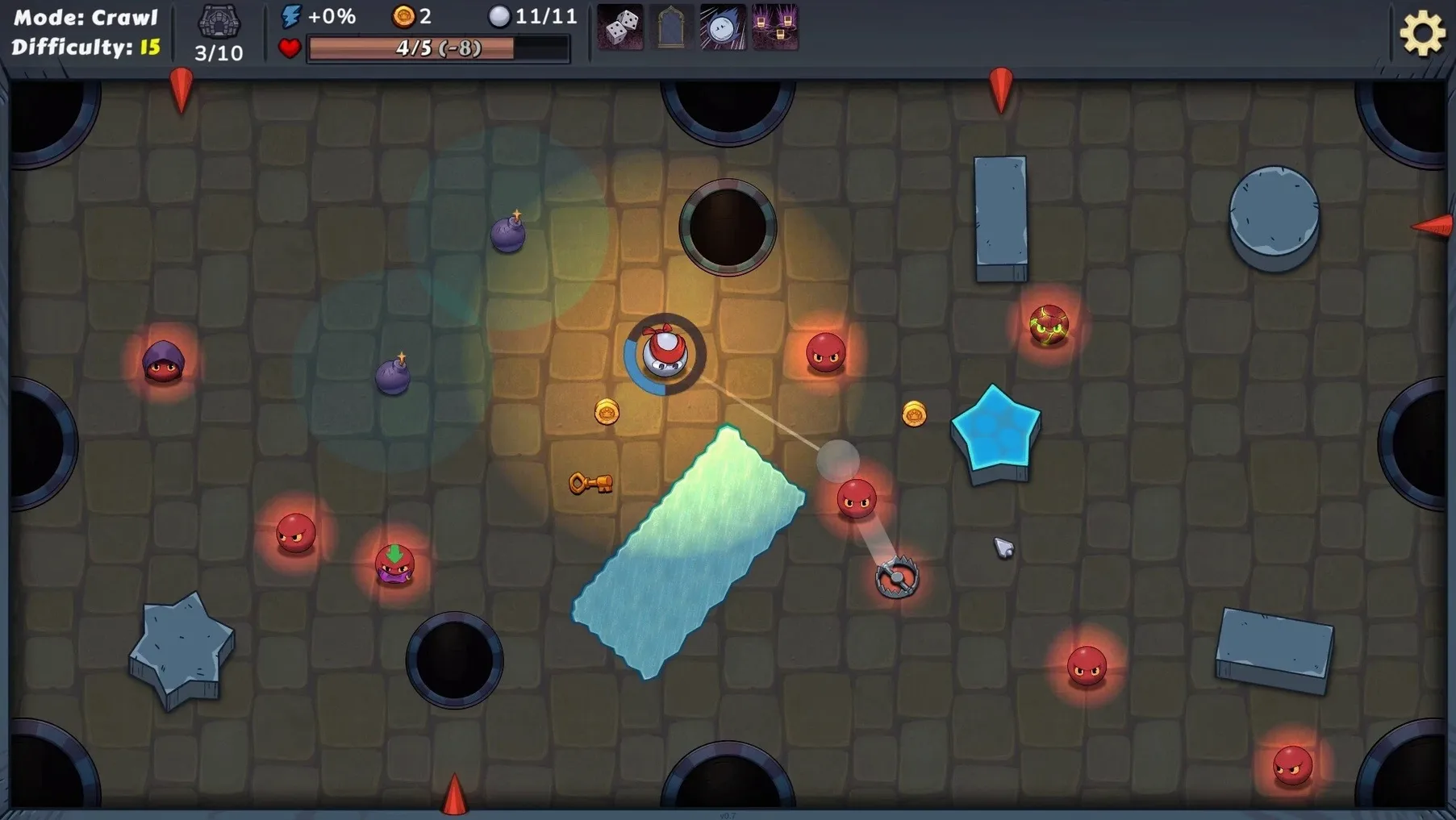
Think of a game of billiards where the table fights back. Rack and Slay takes that familiar cue-and-ball logic and drops it into a roguelike dungeon crawler, so every shot you line up is also a decision about survival. You control a single billiard ball, and the levels are packed with enemy balls, traps, and collectible bonuses that reward a steady hand and a bit of foresight.
The developer, Ludokultur, released it on Steam on May 27, 2024, and it supports a wide spread of languages, from English and German to Russian, Japanese, and Simplified Chinese. Between levels you pick from more than 100 items, and since effects stack, you can layer them into synergies that change how the game plays. One run might turn you into a ricochet monster; the next, a slow, heavy hitter.
So who will enjoy it? Players who like pool games but wish they had more consequence, and roguelike fans who enjoy build-crafting over twitch reflexes. Who might not? Anyone who wants a fast-paced shooter or a deep narrative. The pace is deliberate, and the joy comes from planning angles and watching the combos multiply.
Adjust these options before a new run
A few options in Rack and Slay make a real difference once you know where to find them. I usually adjust these before starting a new run, and I recommend my game club students do the same.
First, check the camera sensitivity. The default works for most people, but if you find yourself overshooting when you glance around the table, dial it down a notch. A steady view helps you line up shots without extra movement.
Second, look at the aim assist setting. It is not cheating, it is a teaching tool. New players often leave it off, thinking they should learn without help. I keep it on for the first dozen runs, then turn it off when I want more of a challenge.
Third, the sound slider for music versus effects. The music is pleasant but repetitive across many runs. I lower it to about 30 percent and keep the sound effects higher. You hear trap triggers and enemy movement much better that way, and those audio cues save you from walking into something nasty.
A scenario: a strategy game planner's first evening
Imagine someone who enjoys turn-based tactical games and is curious about Rack and Slay. They are not a speed player, they like to think two moves ahead. That is exactly the kind of player this game rewards.
In their first run, they pick an item called the Splitter, which makes the ball divide into two smaller ones after hitting an enemy. On its own, that is fine. But they notice a second item, the Magnet, which pulls nearby collectibles toward the ball. They combine the two. Now each split ball pulls in bonuses from two directions at once. Suddenly the table is swept clean of health and points in a single shot.
By the third level, they have stacked a Speed Booster with a Piercing Shot item. The ball moves faster and passes through enemies instead of stopping. They clear a room full of enemy balls in two shots, where another player might have needed five. That is the kind of joy the game offers to people who enjoy tinkering with item combos. It is not about quick reflexes. It is about seeing the pieces fit together.
For that player, the game becomes a puzzle with a new solution every run. They lose sometimes, but they learn something about an item interaction each time.
Three pitfalls my students fall into
I have watched enough students start a run to spot the common pitfalls. Here are three I see most often.
Hoarding items instead of using them. Some players wait for the perfect item combination and skip everything that does not seem ideal. By level three they have no buffs and the enemy balls outpace them. The game stacks effects, so even a modest item is better than an empty slot. Take something early, even if it feels small. It adds up.
Ignoring ball placement before shooting. Beginners click the mouse and hope for the best. But where your ball lands after a shot matters as much as the shot itself. If you hit an enemy and your ball stops next to three traps, you lose health before you can move again. Think about where you want to end up, not just what you want to hit.
Sticking to one play style. The game hands you different items each run. A player who always builds for speed will struggle when the random pool offers heavy-hitting items instead. The best approach is to adapt. If the game gives you ricochet bonuses, become a ricochet player for that run. Flexibility beats stubbornness in a roguelike, and Rack and Slay rewards those who read the table and change their plan.
- macOS: unknown version
- Architecture: Intel and Apple Silicon
How to install
- Open the downloaded disk image to mount it.
- Drag the app into the Applications folder alias. That keeps it organized with the rest of your software.
- Once the copy finishes, launch the game from Launchpad.
Similar games





Sign in or join the club to leave a comment.
Nobody has commented yet.