
- Version
- 1.14.15
- Studio or maker
- appmakes
- Languages
- Russian, English, German, Arabic, Hungarian, Vietnamese, Galician, Greek, Danish, Hebrew, Indonesian, Spanish, Italian, Catalan, Chinese (Traditional), Chinese (Simplified), Korean, Malay, Dutch, Persian, Polish, Portuguese, Romanian, Slovak, Turkish, Ukrainian, French, Croatian, Czech, Swedish, Japanese
- Activation
- K'ed by TNT team
- Runs on macOS
- macOS 10.13.6 or later
- Chip type
- Apple Silicon, Intel 64-bit
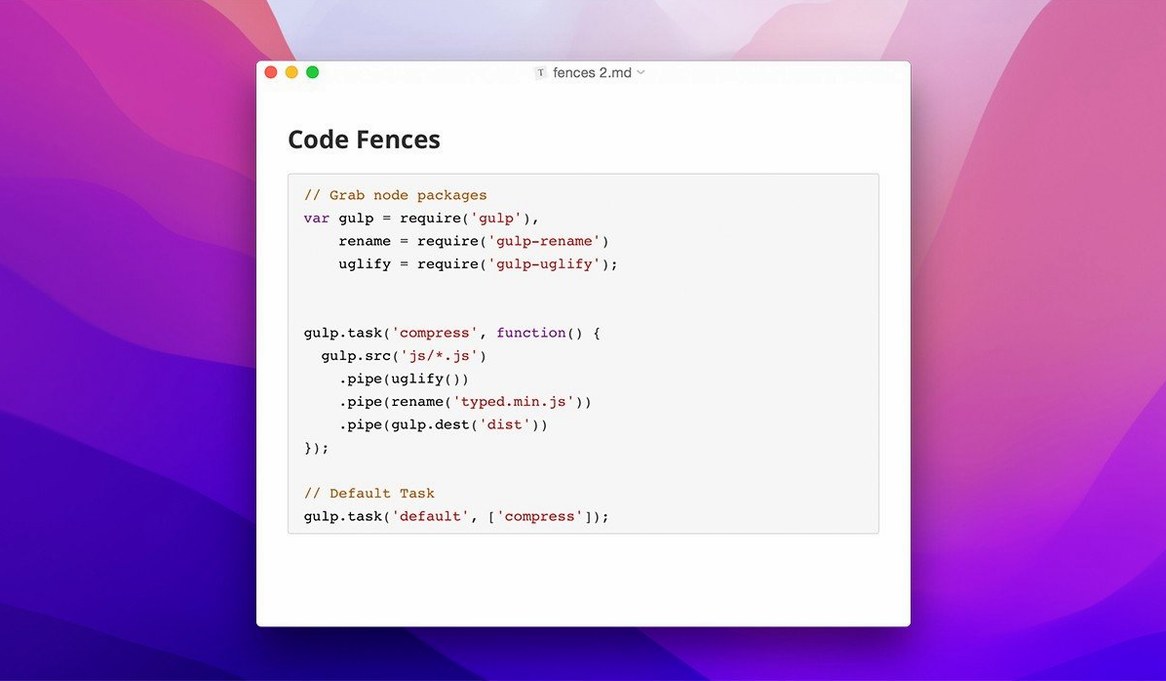
Typora supports 30 interface languages, from Arabic to Vietnamese, and can export Markdown documents with LaTeX, code fences, and tables of contents. It runs on macOS 10.13.6 and later, on both ARM and 64-bit Intel Macs.
| Detail | Information |
|---|---|
| Developer | appmakes |
| Category | Office, Markdown editor |
| Version | 1.14.10 |
| Architecture | ARM + Intel |
| Minimum macOS | 10.13.6 (official site says 11.0+) |
It reads and writes Markdown with live preview — you see the formatted result as you type. Custom CSS themes let you change the look. The sidebar now shows hidden files and folders, and the latest patch fixes content being clipped in the welcome panel and pandoc export from source mode.
Getting started after installing
Once Typora is in your Applications folder, open it and point it at a folder where you keep your notes or drafts. The sidebar shows your file tree, and you can navigate it with the keyboard now — a small improvement in 1.14 that saves reaching for the trackpad. Try opening an existing Markdown file first, just to see how the editor handles it. The live preview will show headings, lists, and links formatted immediately.
For a new document, create a file with a .md extension. Start typing. The inline preview hides raw Markdown syntax like **bold** or ## heading, replacing it with styled text. That is the whole idea: you do not switch between edit and preview modes because there is only one view.
Choose your interface language from 30 available
Open Preferences from the menu bar. The first tab, General, lets you choose your interface language from the 30 available. If you work in a bilingual environment, switching the editor to your native language can reduce friction when reviewing documents.
Under the Theme tab, you can browse the built-in CSS themes or add your own. Custom themes live in ~/.config/typora/themes/. If you write on a laptop in variable lighting, a light and a dark theme make a difference. Typora comes with a few, and the community has written more that you can drop into that folder.
In the Editor tab, you will find settings for line width, whether to show line numbers, and how smart quotes behave. Adjust line width to match your screen size — a wide display might want 1000 pixels, while a smaller laptop works better at 700.
Plain Markdown files open in any editor
Typora lives comfortably alongside other writing tools. Because it works with plain Markdown files, you can open the same folder in Visual Studio Code, iA Writer, or any text editor. There is no proprietary format locking you in.
Export goes through Pandoc if you have it installed. From the File menu, choose Export and pick HTML, PDF, Word, or LaTeX. The latest 1.14.10 fix addresses pandoc export from source mode, so that workflow should be stable now. If you do not use Pandoc, the built-in export covers HTML and PDF directly.
macOS shortcuts like Cmd+C and Cmd+V work as expected. You can drag images and files from Finder into the document — Typora handles the path insertion. The floating editor toolbar that appeared in 1.14 gives quick access to formatting options when you select text, similar to what you might expect from a word processor.
For writers who use version control, Typora works fine with Git. Because the files are plain Markdown, your diffs stay readable. I have colleagues who keep their notes in a Git repository and use Typora for daily editing.
Toggle source mode to see hidden syntax
One thing that catches people: Typora hides raw Markdown syntax, so if you need to see the underlying code for a complex table or a LaTeX block, you can toggle source mode from the View menu or with a keyboard shortcut (default is Cmd+/). The source view shows everything as plain text. After editing, switch back to live preview.
Another point: if your sidebar does not show certain files, it might be because Typora filters out non-Markdown files or hides dotfiles by default. In version 1.14, you can change that in the sidebar settings — look for the options to show hidden files and folders and to show non-Markdown files. This is useful if you keep notes in a folder alongside configuration files or images.
If you install Typora after using another Markdown editor, the different approach to preview can take a day or two to get used to. Give it that time. The WYSIWYG model means you stop switching views, which many writers find faster once they adjust.
Typora offers a clean, distraction-free writing experience for anyone considering the typora crack mac approach. The current build is version 1.14.10, and it is k'ed by the TNT team. It runs on both ARM and Intel Macs and does not ask for a license key. If you search for Typora 1.12.6 or later, you will find the same reliable build.
One small trick: if the editor feels sluggish on a large document with many images, try collapsing sections you are not working on. The outline panel (View menu, Outline) lets you jump between headings without scrolling.
- macOS 10.13.6 or later (official site recommends macOS 11.0+)
- ARM or 64-bit Intel processor
Questions I keep getting
Does typora work on apple silicon macs?
Yes, version 1.14.10 supports both ARM and 64-bit Intel Macs.
Can i use custom themes in typora?
Yes, typora supports custom CSS themes so you can change the editor's appearance.
How to install
1. Mount the disk image and run the app. Gatekeeper may block it — open it from the Security & Privacy pane if needed. 2. Press Enter to bypass Gatekeeper in Terminal (a brief command). 3. Drag the app to the Applications folder. 4. The app is ready to use.Similar apps




Sign in or join the club to leave a comment.
Nobody has commented yet.