- Version
- 5.8.2
- Studio or maker
- IK Multimedia
- Languages
- English
- Activation
- K'ed by MORiA
- Runs on macOS
- macOS 10.15 or later
- Chip type
- Apple Silicon, Intel 64-bit
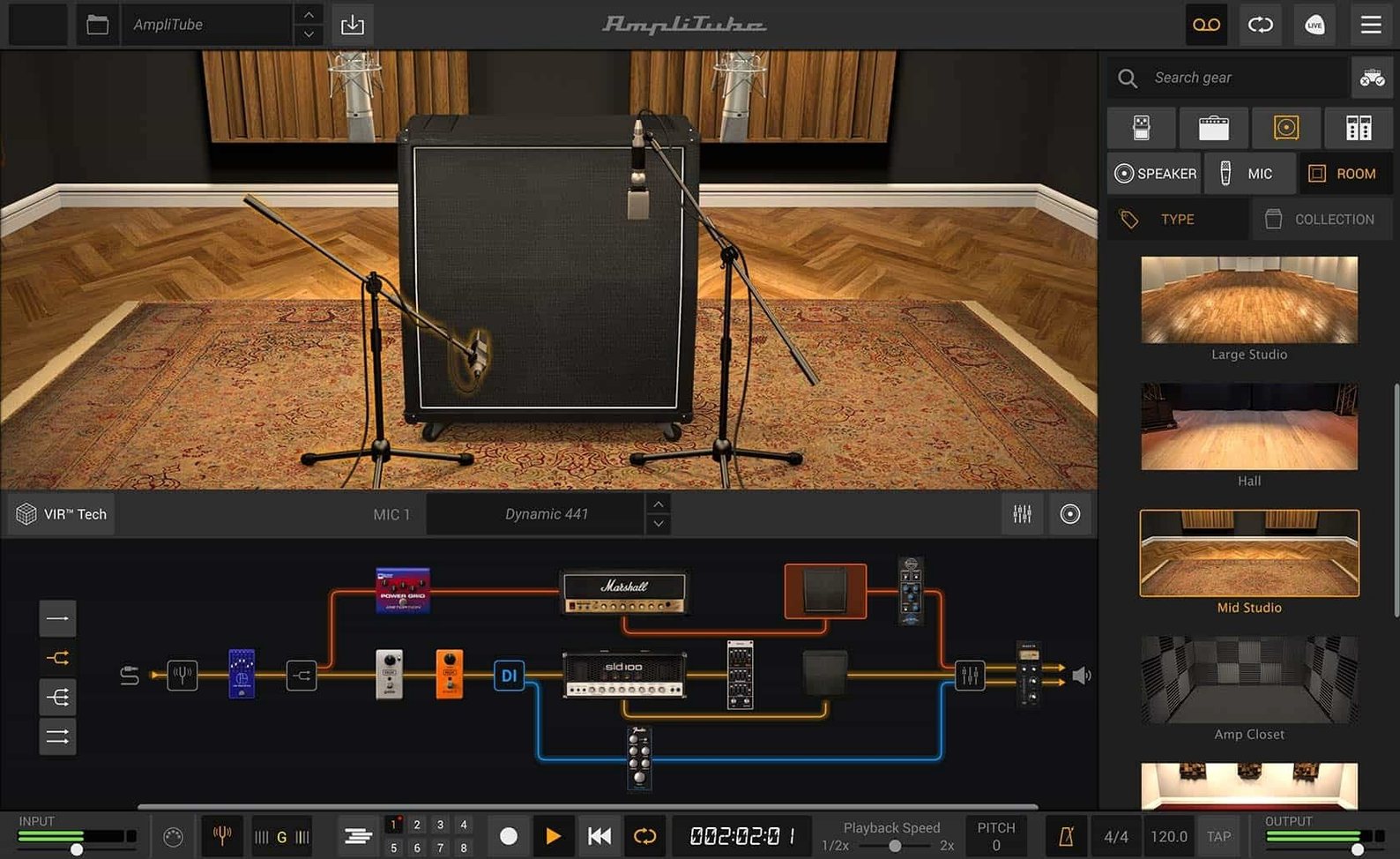
The current version of AmpliTube for Mac adds 23 new rack effects, 2 new pedals, and 2 new rooms. What stayed the same is the core: software that models guitar amplifiers and effects, available as a standalone app or as an AAX, VST, and AU plug-in for your DAW.
Drag-and-drop routing and VIR cabinet tech
- New signal chain with drag-and-drop routing and mixed DI signal
- New cabinet section using VIR technology
- Redesigned mixer with built-in effects
- Support for loading custom IR files
Same foundation, fresh additions
AmpliTube 5.8.2 keeps the familiar amp and effects modeling workflow while expanding the toolkit. The new rooms, rack effects, and pedals give you more options for shaping your sound. The redesigned mixer and cabinet section refine how you manage your signal path. It runs on both Intel and Apple Silicon Macs, requires macOS 10.15 or later, and is a 64-bit application with English interface language.
Home recorders using Logic Pro, GarageBand, or Pro Tools
This software suits several kinds of Mac users, each for a different reason. Guitarists who record at home will find the plug-in formats useful — AAX, VST, and AU mean it works inside Logic Pro, GarageBand, Pro Tools, or any other DAW that supports those standards. Bass players get the same modeling and signal routing options as guitarists, without needing separate software. Live performers can run the standalone app on a MacBook, load a signal chain with up to 57 simultaneous models, and control everything without opening a DAW. If you teach or demonstrate gear, the free AmpliTube 5 CS edition with its 42 models gives you enough to show amp and effects concepts in class. The larger MAX edition with more than 400 models is for players who want a deeper collection of branded gear and artist presets.
Runs on macOS 10.15 or later, Intel and Apple Silicon
AmpliTube 5.8.2 is a 64-bit application that runs on macOS 10.15 or later. It works on both Intel-based Macs and Apple Silicon machines, so whether you have an older MacBook Pro or a newer M-series iMac, the software installs and runs without compatibility issues. The installer comes as a standard disk image that you mount and run — no unusual setup steps beyond mounting the .dmg and following the installation process. Because it is available as a standalone app and as a plug-in, you control whether it launches on its own or inside a DAW session. The disk image file is the only delivery format, and the installation process is the same regardless of which edition you use.
Reorder pedals by dragging, not menus
Version 5.8.2 introduced a redesigned signal chain with drag-and-drop routing. In everyday use, this means you can reorder your pedals, amps, and effects by dragging them rather than going through menus. The mixed DI signal allows you to blend a direct input signal with your processed sound inside the same chain, which is helpful when you want a clean signal alongside your amp tone for later re-amping. The cabinet section, now using VIR technology, changes how cabinet models behave. Instead of a static impulse response, the modeling adjusts with your playing dynamics. You can also load your own custom IR files if you prefer a specific cabinet capture you already own. The mixer was redesigned with built-in effects, so you can add reverb, delay, or compression at the output stage without inserting a separate device. These additions do not change the core workflow — they extend it.
Works as AAX, VST, or AU in Logic, GarageBand, and more
AmpliTube works as a plug-in inside any DAW that supports AAX, VST, or AU formats. On macOS, this includes Logic Pro, GarageBand, Ableton Live, Cubase, and Pro Tools. You can also run it as a standalone app for practicing or performing without a computer loaded with other software. The drag-and-drop routing in the signal chain mirrors the kind of interaction you might expect from a touchscreen or a modern Mac interface, but it works with a mouse or trackpad just as well. Because it is a 64-bit application, it works with current macOS versions without needing Rosetta 2 on Apple Silicon Macs — though the installer runs natively on both architectures. The English interface language is consistent across all editions, and the disk image installation method is the same one used by many other Mac audio applications, so the setup feels familiar.
Build a stereo rig with parallel routing as a standalone app
Start by launching AmpliTube as a standalone app. Open the signal chain view. Drag a compressor pedal into the first slot, then drag an overdrive pedal into the second slot. From the amp section, select a clean amp model. In the cabinet section, choose a VIR cabinet that matches your style. Now add a second path: click the parallel routing option in the signal chain. On the new parallel path, drag a distortion pedal and a high-gain amp model. You now have a clean tone running through one path and a distorted tone running through another. Open the redesigned mixer. Assign the first path to the left channel and the second path to the right channel. On the mixer, add a stereo reverb as a built-in effect so both sides share the same space. Play through your interface. The drag-and-drop routing lets you adjust the order of pedals or swap the parallel paths without restarting. If you want to record this rig, close the standalone app and open your DAW. Insert AmpliTube as an AU or VST plug-in on a stereo track. The signal chain you built in the standalone session does not transfer automatically — rebuild it using the same drag-and-drop method inside the DAW plug-in window. For a mixed DI signal, enable the DI blend option in the signal chain, which sends a clean direct signal alongside your processed tone to its own output. You can record both signals at once and re-amp the DI later.
- New signal chain with drag-and-drop routing and mixed DI signal
- New cabinet section with VIR technology
- Redesigned mixer with built-in effects
- macOS 10.15 or later
- Intel or Apple Silicon
- 64-bit application
- Interface language: English
Questions I keep getting
Can I use AmpliTube 5.8.2 as a plug-in in my DAW?
Yes, it supports AAX, VST, and AU formats, so you can use it in most major DAWs.
Does the new version support custom impulse responses?
Yes, version 5.8.2 lets you load custom IR files into the cabinet section.
How to install
- Mount the downloaded disk image.
- Run the standard installation process.
Similar apps






Sign in or join the club to leave a comment.
Nobody has commented yet.