- Version
- 1.0.0
- Studio or maker
- Plugin Alliance, Brainworx
- Languages
- English
- Activation
- K'ed by TEAM HCiSO
- Runs on macOS
- macOS 12 or later
- Chip type
- Apple Silicon, Intel 64-bit
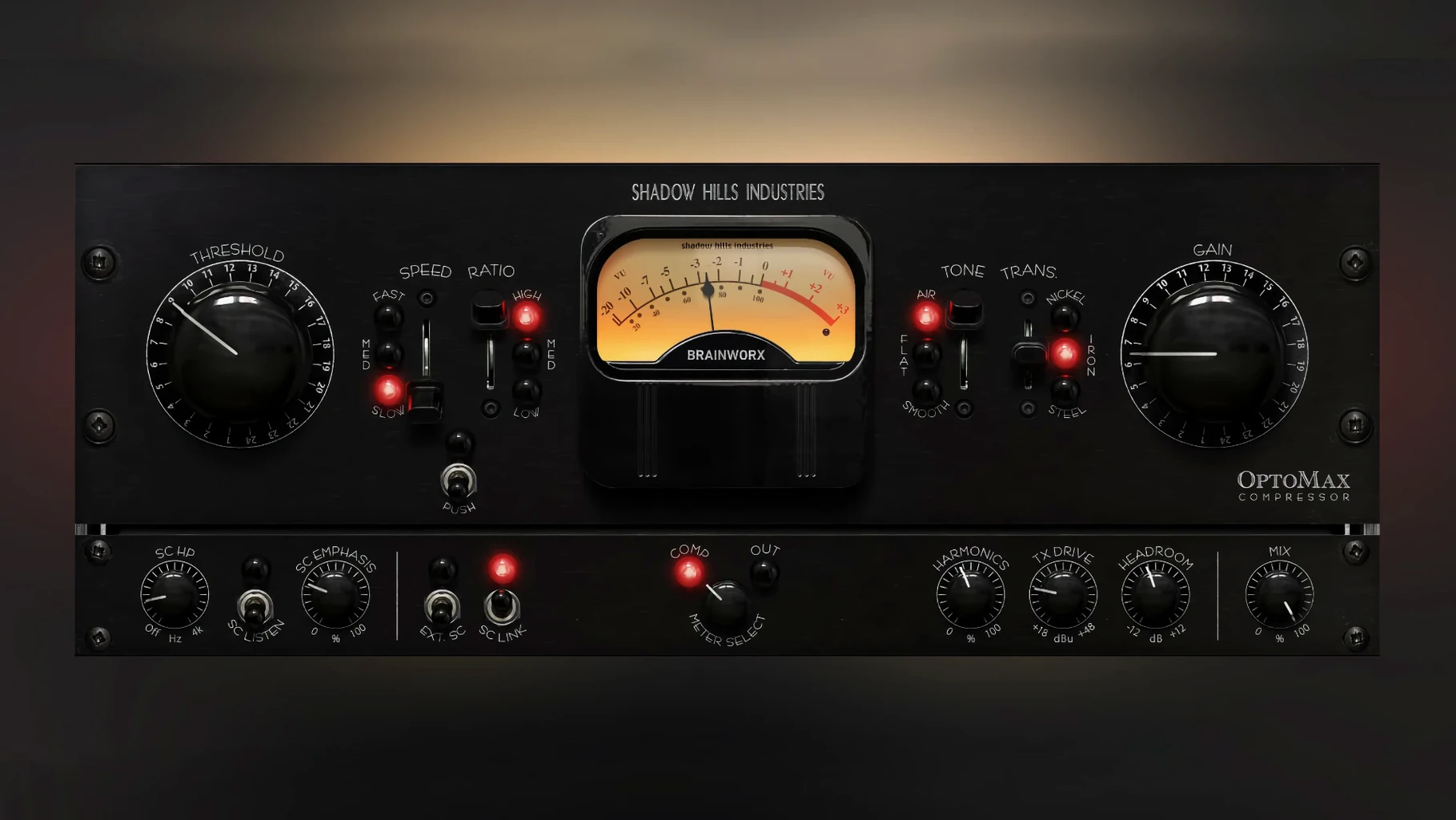
The Shadow Hills OptoMax from Plugin Alliance and Brainworx is an optical compressor that sits in the same family as the mastering hardware you might already know. It is available for macOS 12 and later, with both Intel and Apple Silicon support.
Before you download, check your hosts. The plugin installs as a standard VST, and the initial release, version 1.0.0, came out on September 18, 2025. The interface is in English.
On the sound side, OptoMax preserves natural dynamics while it evens out levels. You get gentle leveling and stronger peak control, plus slow, medium, and fast response settings. The Softness and Shine high-frequency modes shape the top end, and the parallel mix control lets you blend the compressed signal with the original.
For mastering work, the sidechain filtering is useful when you want the compression to react only to certain frequencies. It is a practical tool for leveling and peak control without squashing the life out of a mix.
Try nickel, iron, or steel transformer types first
When you open OptoMax for the first time, leave the response at its default and listen to what the compressor does on its own. Then try the three transformer types — nickel, iron, and steel. Nickel is the smoothest and works well on vocals or acoustic instruments. Iron adds a little weight, which helps on drum groups or bass. Steel is the most present and can push a mix forward without sounding harsh. Switch between them while the music plays; the difference is noticeable even at moderate levels.
The high-frequency modes, Softness and Shine, are worth testing early. Softness rolls off the top end slightly, which can tame a bright vocal or a brittle synth. Shine does the opposite — it lifts the highs a little. I usually set Shine on a mix bus when the track feels a bit dull, and Softness on individual tracks that have too much sibilance. The parallel mix control is another setting to adjust before you reach for the threshold.
Mix engineers get transparent vocal and bus processing
Mix engineers working on pop, rock, or electronic music will find OptoMax useful for vocals and bus processing. The optical character keeps transients intact, so a lead vocal stays present without losing its attack. Producers who record live instruments benefit from the transformer options: a DI guitar or a recorded piano can sound more like a finished track with the right transformer engaged.
Mastering engineers will appreciate the sidechain filtering. You can set the compressor to react mostly to low frequencies, which evens out bass notes without making the whole mix breathe unevenly. That kind of targeted control is harder to get with a simpler compressor. Home studio users who work on a single Mac without outboard gear get the same sound as a much larger setup — no need for extra hardware, just the plugin and a decent pair of monitors.
Beginners sometimes over-compress because optical compressors sound flattering even at higher ratios. The trick is to back off the gain reduction until you barely hear it working, then engage the parallel mix control to blend some dry signal back in. That preserves the natural dynamics the plugin is known for.
Leaving response on fast causes pumping on vocals
The most common mistake is leaving the response on fast for everything. Fast is useful for catching short peaks, but on a vocal or a full mix it can make the compressor react too quickly, causing a slight pumping effect. Try medium first and switch to slow if the track needs a more relaxed feel. The response setting changes the character noticeably, so cycle through all three before deciding.
Another mistake is ignoring the transformer types. Many users set the compressor, adjust threshold and ratio, and never touch the nickel-iron-steel switch. That switch changes the harmonic content as much as the compression itself. A mix that sounds dull on nickel might come alive on steel. It takes two seconds to click through them, so do it every time.
Some users also forget to use the high-frequency modes. Softness and Shine are not just subtle EQ curves; they interact with the compression circuit. Engaging Shine on a vocal that already has some de-essing can cause harshness. Instead, try Softness on the mix bus and Shine on individual tracks, or the other way around. There is no wrong order, but testing both saves time later.
That defeats one of its strengths. Dialing the dry signal back in lets the original transients cut through while the compressed layer adds weight and consistency. A 70/30 blend is a good starting point for most sources.
- Initial release.
- macOS 12 or later
- Intel or Apple Silicon
- English interface
Questions I keep getting
Does the Shadow Hills OptoMax work on Apple Silicon Macs?
Yes, the plugin supports both Intel and Apple Silicon architectures, so it runs natively on M1 and newer Macs.
What does the Shine mode do?
Shine is a high-frequency mode that affects how the compressor treats the top end, adding a certain brightness or air to the signal.
How to install
- Open the downloaded disk image to mount it.
- Run the standard installer package.
- Follow the normal installation prompts to complete the setup.
Similar apps





Sign in or join the club to leave a comment.
Nobody has commented yet.