

- Version
- 1.0.9
- Studio or maker
- Pulsar Audio
- Languages
- English
- Activation
- k'ed by GUISEPPE
- Runs on macOS
- macOS 11 or later
- Chip type
- Apple Silicon
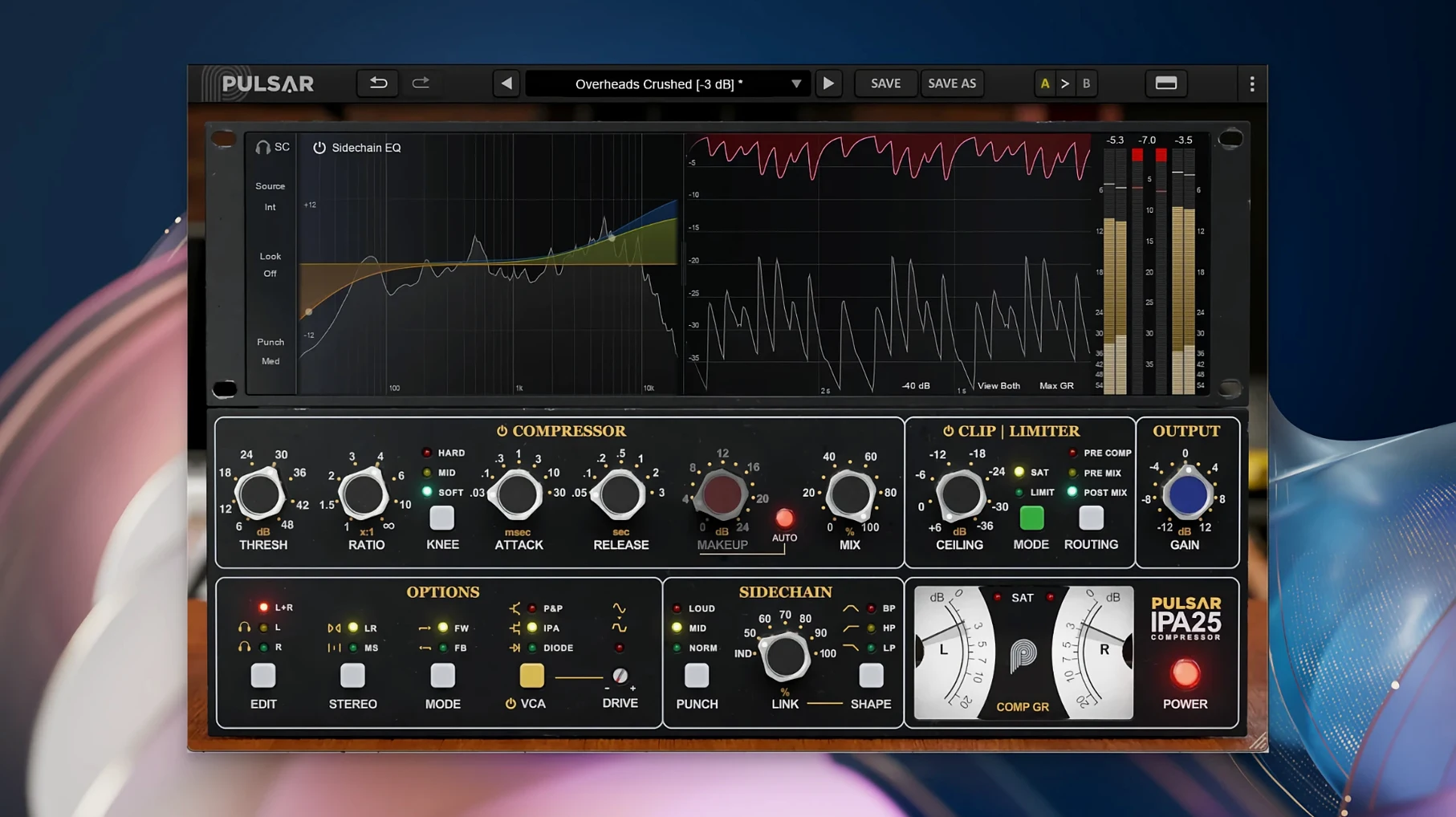
Pulsar Audio IPA 1.0.9 runs on Macs with macOS 11 or later and Apple Silicon, so it works on the M1 and newer models. It is a 64-bit plugin that needs a DAW like Logic, Ableton, or Cubase; there is no standalone version. The installer follows the usual plugin setup.
IPA is a multi-VCA dynamics processor inspired by the classic API 2500-style compressor. What makes it interesting is the three switchable VCA modes: IPA, P&P/Mu, and Diode. Each mode changes the character of the gain reduction, so you can go from clean and punchy to thicker and more colored without swapping plugins. The built-in clipper and limiter catch peaks after compression, which helps keep the level in check.
There is also a sidechain visual EQ and Mid/Side processing. The sidechain EQ lets you shape what the compressor reacts to, which is handy for de-essing vocals or taming a boomy bass. Mid/Side mode gives you control over the center and sides separately, useful for stereo widening or glueing a mix together.
For music producers and sound engineers, IPA covers vocals, drums, bass lines, and full mixes. The interface is straightforward, and the three modes make it a flexible tool for bus work or individual tracks.
Plugging into a mixing setup
IPA works inside any DAW that supports VST 2.4, VST 3, AAX Native, or Audio Unit formats. If you use Logic Pro, Ableton Live, Cubase, Reaper, or Pro Tools, the plugin appears in your insert list after the standard installation. I see it as a bus compressor or a track insert, and because of the Mid/Side mode, it also works on a stereo group or a master bus.
The plugin pairs naturally with other processors. I often place an EQ before IPA to clean up the source, then use IPA’s built-in clipper and limiter after the compression stage to catch any overshoots. The visual sidechain EQ inside IPA means you can filter the detector signal without adding an extra plugin in the sidechain path. That keeps the session tidy and the routing simple.
macOS features like the Apple Silicon architecture mean the plugin uses the same ARM-native code that modern DAWs expect. No bridging or translation layers are needed. The 64-bit format ensures compatibility with large sample libraries and high track counts.
Three VCA modes for rock, pop, and electronic producers
Music producers working on rock, pop, or electronic genres get a lot out of the three VCA modes. The IPA mode offers a cleaner, more modern compression character. P&P/Mu leans toward a softer, more musical compression. Diode mode adds harmonic saturation and a thicker sound. That range means one plugin can handle a snare bus, a vocal group, or a full mix without opening a second instance.
Mix engineers who work on stereo bus processing will appreciate the Mid/Side mode and the built-in limiter. Being able to compress the center and sides independently, then limit the output, reduces the need for a separate mastering chain during a mix session. Sound engineers who handle live recordings or broadcast mixes also benefit from the fast setup and visual feedback.
Teachers and students in production courses can use IPA to demonstrate compression styles. Switching between the three VCA modes shows how circuit design changes the attack, release, and saturation. The visual sidechain EQ is a good teaching tool for explaining frequency-dependent compression.
Workflow: tightening a rock drum bus
Here is a typical task: you have a drum bus with kick, snare, and overheads, and you want glue and punch without losing the transients.
- Insert IPA on the drum bus. Load the plugin in your DAW. Set the input gain so the bus hits around -6 dB on the meter, which gives enough headroom for compression.
- Select the P&P/Mu mode. This mode provides a softer knee and a more musical response, good for drum bus glue without aggressive pumping.
- Set the ratio and threshold. Start with a medium ratio and lower the threshold until you see 2-3 dB of gain reduction on the snare hits. Listen for the transients staying crisp.
- Adjust the sidechain EQ. Use the visual sidechain EQ to cut around 200-300 Hz. This stops the kick from triggering too much compression, so the overheads and cymbals stay open.
- Activate the clipper. Set the clipper to catch peaks above -1 dB. This tames any snare or kick overshoots without distorting the body of the hit.
- Engage the limiter. Set the limiter ceiling to -0.5 dB for a controlled output level. The limiter adds a final safety stage before the bus leaves the channel.
- Check Mid/Side balance. If the drum bus feels too wide or too narrow, enable Mid/Side mode and adjust the compression ratio for the sides separately. This keeps the center kick and snare solid while the overheads stay wide.
Switchable VCA modes and visual sidechain EQ
Three details stand out if you spend time with the plugin. First, the three VCA modes are switchable without loading a new instance, so you can A/B the character mid-session. Second, the visual sidechain EQ shows the frequency curve overlaid on the compression display, which makes it easy to see what the detector is ignoring. Third, the built-in clipper and limiter work as a self-contained output stage, meaning you do not need a separate clipping plugin after the compressor on the same insert slot.
The 64-bit format and Apple Silicon support mean the plugin loads quickly in modern DAWs, and the drag-and-drop preset management works like other Pulsar Audio plugins. If you use pulsar audio ipa in a Logic or Ableton session, the workflow stays consistent across sessions.
- macOS 11 or later
- Apple Silicon (M1 or newer)
- 64-bit plugin
- Requires a third-party DAW application
Questions I keep getting
What formats does Pulsar Audio IPA come in?
It is available in VST 2.4, VST 3, AAX Native, and Audio Unit formats, so it works with most major DAWs.
How to install
- Run the installer and follow the prompts.
- Restart your DAW so it scans the new plugin.
Similar apps
Sign in or join the club to leave a comment.
Nobody has commented yet.