

- Version
- 3.3.2
- Studio or maker
- Plugin Boutique
- Languages
- English
- Activation
- K'ed by MORiA
- Runs on macOS
- macOS 10.15 or later
- Chip type
- Apple Silicon, Intel 64-bit
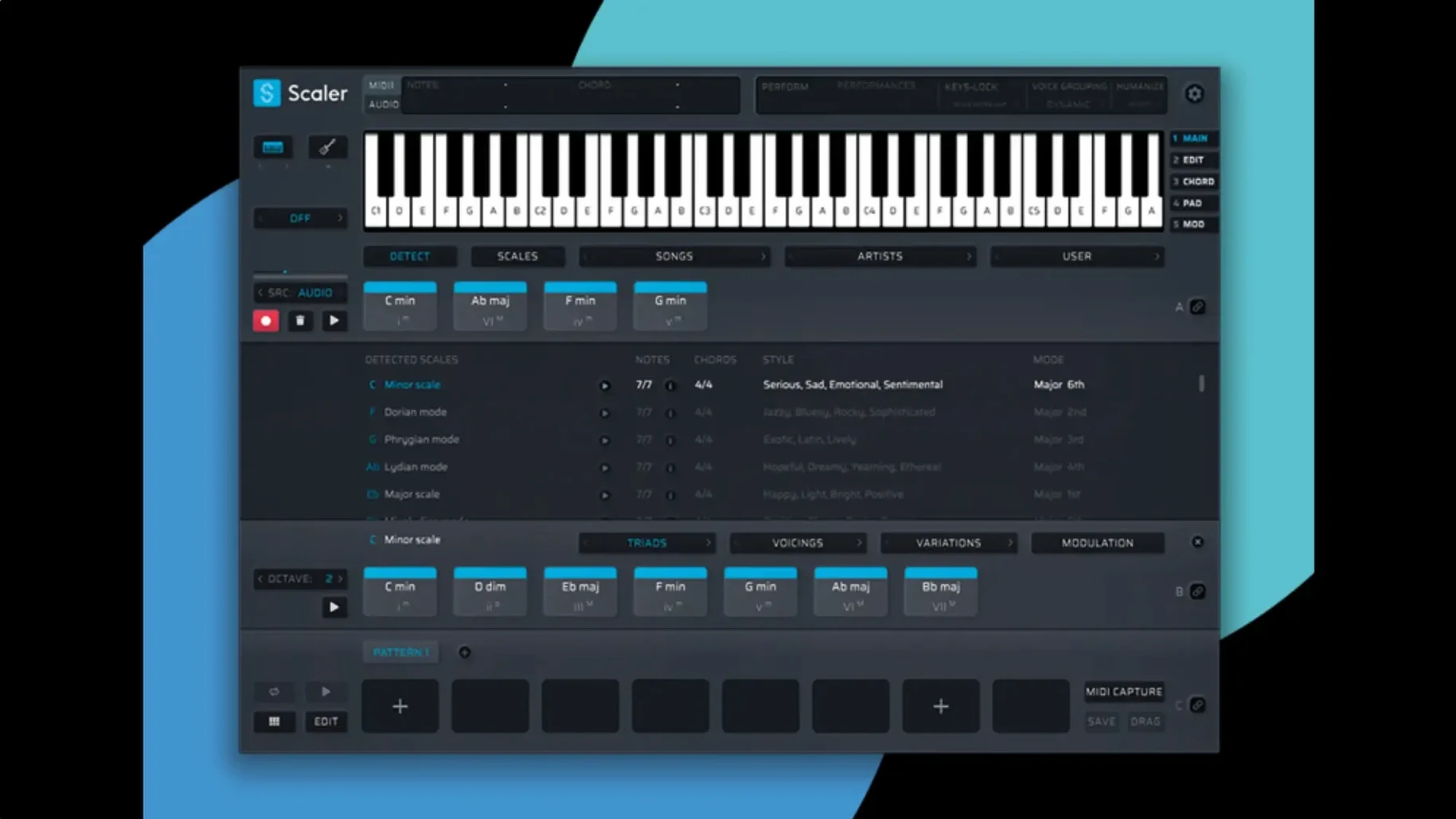
Scaler 3 is a music theory workstation that turns chord progressions into full compositions, right on your Mac.
At its heart is a chord suggestion engine that pulls from a library of presets grouped by artists and genres. You pick a key, browse the suggestions, and Scaler 3 plays them back so you can hear how they fit. Once you have a progression, the performance and performance sections let you generate melodies, bass lines, and arpeggios—all in any key you choose.
What makes Scaler 3 feel like a workstation rather than a simple chord generator is its ability to host other instruments. You can load VST or AU plugins on the chord and MIDI sections, so your piano chord becomes a string pad or a synth lead without leaving the window. The MIDI editor is where you fine-tune notes, and version 3.3.2 fixes display issues that could cause missing notes, incorrect chord representations, and unwanted blank space before chords. Exported MIDI now also crops empty space at the start, so your files land cleanly in any DAW.
You can run Scaler 3 as a standalone app or as a plugin in VST, VST3, AU, or AAX formats. It supports macOS 10.15 and later, and the interface is in English.
MIDI Editor display fixes improve deep-session workflow
The two fixes in this update address specific pain points that turn up when you are deep in a session. The MIDI Editor display issues were the kind of problem you might not notice at first—a note that should be there is simply not drawn, or a chord looks like it has the wrong voicing. That led to unnecessary time spent checking whether your performance was actually wrong or just displayed wrong. With the fix, what you see in the editor matches what will play, so you can edit with confidence.
The second change affects anyone who exports MIDI to bring progressions into a DAW. Previously, exported sequences sometimes started with a sliver of silence before the first note. That extra space could shift your timing or require manual trimming on the timeline. Now the export crops that empty space automatically, so the MIDI file begins exactly at the first note. If you use Scaler 3 to sketch ideas and then move them into Logic Pro, Ableton Live, or another DAW for arrangement, this saves a small but regular cleanup step.
Neither change rewrites how the workstation works. They are the kind of updates that make a tool more reliable over time, which matters when you are in the middle of a writing session and do not want to troubleshoot display glitches or file alignment.
macOS and processor requirements for standalone and plugin use
Scaler 3 runs on macOS 10.15 or later, covering Catalina through the current versions. It supports both Apple Silicon and Intel-based Macs with 64-bit processors. Because it works as both a standalone app and a plugin, the memory and processor load will depend on how you use it.
In standalone mode, Scaler 3 runs on its own with no host application needed. This is lightweight for sketching chord ideas or browsing the library. When you open it as a plugin inside a DAW, the overall demand on your system goes up because the DAW itself uses resources. The same is true if you host additional plugins inside Scaler 3 on the chord or MIDI tracks—each hosted instrument adds its own load. A simple chord progression with no extra plugins will use less than one with multiple instances of a synth or sampler loaded.
The interface is English only, and the app is 64-bit. If you are still running an older 32-bit host or macOS version before 10.15, you will need to update before using Scaler 3.
Genre presets and chord suggestions for guitar-to-Mac songwriting
Imagine a songwriter who works on an acoustic guitar during the day and transfers ideas to a Mac in the evening. They start Scaler 3 in standalone mode, pick a key, and browse the genre presets. The chord suggestion library gives them options built around common patterns in, say, indie folk or pop rock. They audition a few progressions, settle on one, and then layer a bass line generated by the performance section.
Later, they open their DAW, load Scaler 3 as an instrument plugin, and drag in the chord track. The exported MIDI now starts exactly at the first note, so the bass line lines up without a manual trim. They add a piano VST on the chord section inside Scaler 3 and a synth on the MIDI track, using Multi-Bind to keep the tracks linked for editing. The songwriter never leaves the Scaler 3 window to tweak voicings or swap sounds—everything is accessible from one interface.
For this kind of user, the main value is speed: the chord suggestions cut down the time spent staring at a blank piano roll, and the ability to host other plugins means they hear the song in context without bouncing or switching windows.
Troubleshooting Scaler 3 installation and connection issues
MIDI editor shows notes differently than expected
If you open the MIDI editor and see blank space before chords or notes that seem missing, check whether you are running version 3.3.2. Earlier versions had a display bug that caused these symptoms. The fix in the current version resolves it. If you have updated and still see odd display behavior, try closing and reopening the editor window—sometimes the display needs a refresh after loading a new preset or swapping plugins.
Exported MIDI still has a gap at the start
Version 3.3.2 automatically crops empty space from exported MIDI sequences. If you export and find a gap, confirm you are using the latest version. The automatic cropping applies to sequences exported from the timeline. If you are copying and pasting MIDI data manually from Scaler 3 into your DAW, that workflow is not affected by the fix.
Host application does not recognize the plugin
Scaler 3 supports VST, VST3, AU, and AAX formats. If your DAW does not see the plugin, start by checking that you installed the correct format for your host. AU is common for Logic Pro, while VST3 is widely used in Ableton Live and Cubase. Also confirm that your DAW is scanning the folder where Scaler 3 installed its plugin files. If you moved the files manually after installation, the host might not find them.
Standalone app does not produce sound
In standalone mode, Scaler 3 relies on the macOS audio system. If you hear nothing, check your system audio output device in System Settings. The app should use the default device, but if you have multiple audio interfaces, the selection in standalone mode might differ from your DAW. Also verify that Scaler 3 is not muted in the audio mixer.
Hosting plugins inside Scaler 3 causes instability
When you load third-party VST or AU plugins on the chord or MIDI sections, those plugins run inside Scaler 3. If a hosted plugin is unstable on your system, it can affect Scaler 3. Test with Scaler 3 empty first—if it runs fine, the issue is likely with the hosted plugin or its compatibility with your Mac and macOS version. Updating the plugin or using a different one on the same track can help isolate the problem.
- Fixed MIDI Editor display issues that could cause missing notes, incorrect chord representations, and unwanted blank space before chords.
- Exported MIDI now automatically crops empty space at the start of the sequence.
- macOS 10.15 or later
- 64-bit processor (Intel or Apple Silicon)
Questions I keep getting
Can Scaler 3 be used as a standalone app?
Yes, Scaler 3 works both as a standalone application and as a plugin in your DAW.
What plugin formats does Scaler 3 support?
It supports VST, VST3, AU, and AAX formats.
Does Scaler 3 run on Apple Silicon Macs?
Yes, Scaler 3 supports both Intel and Apple Silicon Macs, and it requires macOS 10.15 or later.
How to install
- Mount the downloaded disk image by double-clicking the .dmg file.
- Run the standard installer and follow the on-screen prompts to complete the setup.
Similar apps
Sign in or join the club to leave a comment.
Nobody has commented yet.