

- Version
- 2.1.5
- Studio or maker
- Xfer
- Languages
- English
- Activation
- k'ed by Team V.R
- Runs on macOS
- macOS 10.13 or later
- Chip type
- Apple Silicon, Intel 64-bit
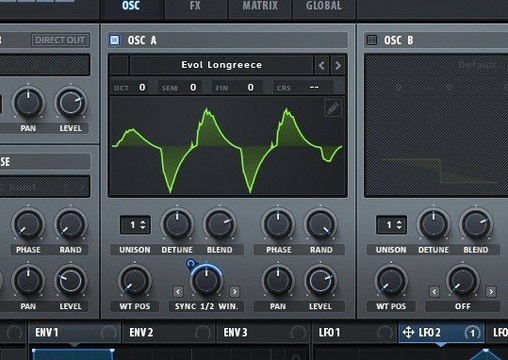
Serum 2.1.5 works on Macs running macOS 10.13 or newer, supporting both Intel and Apple Silicon processors. It is part of Xfer Records' VST suite and comes as a plugin you can load into your DAW.
Layer octaves with stack settings and unison controls
- Stack settings let you layer notes such as octaves, so a single pressed note sounds fuller without extra fingerwork.
- Each wavetable oscillator has advanced unison parameters: Unison WT Pos can assign a different waveform to all unison voices at once, and Unison Warp sets the unison voices differently. This gives you thick, evolving textures from one oscillator.
- Dual filter types let you blend or switch between two filter sections. Some filters come from LFOTool; others are new. Sample-rate reduction is available as a filter process for lo-fi character.
Building a patch step by step
When I build a patch in Serum, I usually start with a wavetable, then use the unison parameters to spread the sound across the stereo field. Adding a second filter with a different cutoff or resonance lets me shape the tone more precisely. The stack settings are my quick way to thicken a lead without duplicating tracks. The interface is in English, and the included getting-started instructions from Xfer Records walk through the basics if you are new to wavetable synthesis.
Fix the plugin not appearing in your DAW after install
A few things trip people up when they first load Serum into a DAW on Mac. Knowing about them beforehand saves a little head-scratching.
- The plugin doesn't appear in your DAW's list after installation. This usually means the plugin file wasn't placed in the folder your DAW scans. The installation and activation instructions file included in the download tells you where to put it. After moving the file, rescan your DAW's plugin list.
- The interface says "demo" or stops working after 15 minutes. The demo version from Xfer Records is limited to 15 minutes. The k'ed version from Team V.R bypasses that, but only if you apply the patch and follow the included VR.nfo file instructions. If you skipped the patch step, go back to the standard installation procedure and then apply the patch.
- Serum loads but produces no sound. Check that your DAW's MIDI track is sending to the correct channel and that the plugin's output isn't muted. Also confirm that the wavetable oscillator's level isn't turned all the way down.
- Presets from older versions sound different. Serum 2.0.24 and 2.1.5 use the same core engine, but some wavetables or modulation routings may shift slightly. If a patch sounds off, check the modulation matrix first.
Runs on Intel and Apple Silicon Macs with macOS 10.13 or later
Based on the requirements, Serum runs on any Mac with macOS 10.13 or later, whether it uses an Intel or Apple Silicon processor. The plugin is 64-bit, so it works with modern DAWs on both architectures. You don't need a top-spec machine to load a few instances, but heavier patches with multiple stacked oscillators and active unison voices may ask more of your CPU. The interface stays in English throughout, and the build label reads Xfer Records Serum 2.0.24 (Team V.R, Update only).
Native Apple Silicon support added in the latest update
Version 2.1.5 is a refinement release. Xfer Records added support for ARM Macs, so Apple Silicon users can run Serum natively without Rosetta translation. The update also includes the same blend of sound generation methods and powerful modulation system that Serum 2 introduced, now optimized for newer macOS versions. If you were using an earlier build on an M1 or M2 machine, this version should feel more responsive in your workflow. The demo limit remains 15 minutes, and the interface language stays English.
Route multiple mod sources at once with the modulation matrix
Some features are easy to overlook but make daily use smoother.
- The modulation matrix lets you route multiple sources to multiple destinations in one view. You can set it up once and save it with your patch.
- The wavetable editor inside Serum lets you import, edit, and transform waveforms without leaving the plugin. That means less tab-switching to external editors.
- The filter types borrowed from LFOTool include comb filters that track the musical note you're playing. This is handy for resonant effects that stay in key.
- Sample-rate reduction is built into the filter section, not as a separate effect. You can blend it with other filter processes for lo-fi textures.
Start with stack settings to layer octaves and adjust unison levels
- Stack settings – start by layering one or two octaves onto your main oscillator. This fills out thin sounds immediately. You can adjust the level of each stacked voice in the unison parameters.
- Unison WT Pos – assign different waveforms to each unison voice. For example, a saw wave on voice one and a square wave on voice two gives a unique hybrid tone.
- Unison Warp – set the unison voices to warp at different rates. This creates motion without using an LFO, which is useful for pads and evolving leads.
- Dual filter routing – switch between series and parallel mode early in your patch design. Series gives a tighter, more colored sound; parallel keeps each filter's character separate.
These settings take a few seconds to adjust and can change the whole character of a patch. Serum vst crack mac is a wavetable synthesizer ideal for electronic music producers crafting custom sounds.
Typical snags when setting up Serum from a downloaded build
Beyond the usual DAW detection issues, a few other things catch people off guard. They are simple to fix once you know what to look for.
- The plugin file shows a "not validated" warning in some DAWs. This can happen if macOS security quarantines the file during extraction. Move the plugin folder out of quarantine, then run the standard installation procedure again before applying the patch.
- The VR.nfo file won't open with a double-click. That file is a plain text document, but some Macs try to open it with an unrelated app. Right-click and open it with a text editor like TextEdit or a code editor. The instructions it contains are part of the activation process.
- Presets saved in an older build don't load at all in 2.1.5. If a preset file from Serum 2.0.24 or earlier causes a crash or silent failure, the patch may reference a wavetable that isn't included in the new version. Re-save the preset after opening it once in 2.1.5, and it should work going forward.
- The patch file fails to apply. Some users try to run the patch before completing the standard installation procedure. Always install the plugin first, then apply the patch, and finally follow the included installation and activation instructions file to the letter.
What to expect from Serum on your Mac based on the specs
The requirements list macOS 10.13 as the minimum, and the plugin works on both ARM and x86 64-bit Macs. That means a 2017 iMac running High Sierra and a current Apple Silicon MacBook both meet the baseline. You do not need a recent machine to run a single instance with a simple wavetable and one filter. If you stack multiple oscillators, enable unison voices on several of them, and route dual filters with sample-rate reduction, the work your processor does will increase. Serum vst torrent mac builds are available for both architectures, so you pick the right version for your system during installation. The interface stays in English only, with no language switching options. The k'ed build by Team V.R bypasses the 15-minute demo restriction, but only if you complete every step in the VR.nfo file.
What version 2.1.5 changed for everyday use
The jump from earlier Serum 2 builds to 2.1.5 brought two practical changes. First, native Apple Silicon support is now included, so the plugin runs directly on ARM processors without translation layers. Second, the update aligns the plugin with macOS versions released after 10.13, which means fewer compatibility warnings in newer DAW versions. If you were running an earlier k'ed build on an Intel Mac, the daily workflow stays identical — same filter types, same modulation matrix, same unison parameters. The difference shows when you work on an Apple Silicon machine: the plugin activates faster and responds to parameter changes with less delay. Serum 2.0.24 mac torrent users who upgrade to 2.1.5 will notice the same interface and feature set, just with better native performance on newer hardware.
- macOS 10.13 or later
- Intel or Apple Silicon
How to install
- Run the standard installer for your macOS version.
- Apply the patch as described in the included instructions.
- Open the installation and activation instructions file for the exact steps.
- Read the VR.nfo file for any remaining setup notes.
Similar apps
Sign in or join the club to leave a comment.
Nobody has commented yet.