
- Version
- 1.5.1
- Studio or maker
- XLN Audio
- Languages
- English
- Activation
- K'ed by TEAM HCiSO
- Runs on macOS
- macOS 10.13 or later
- Chip type
- Apple Silicon, Intel 64-bit
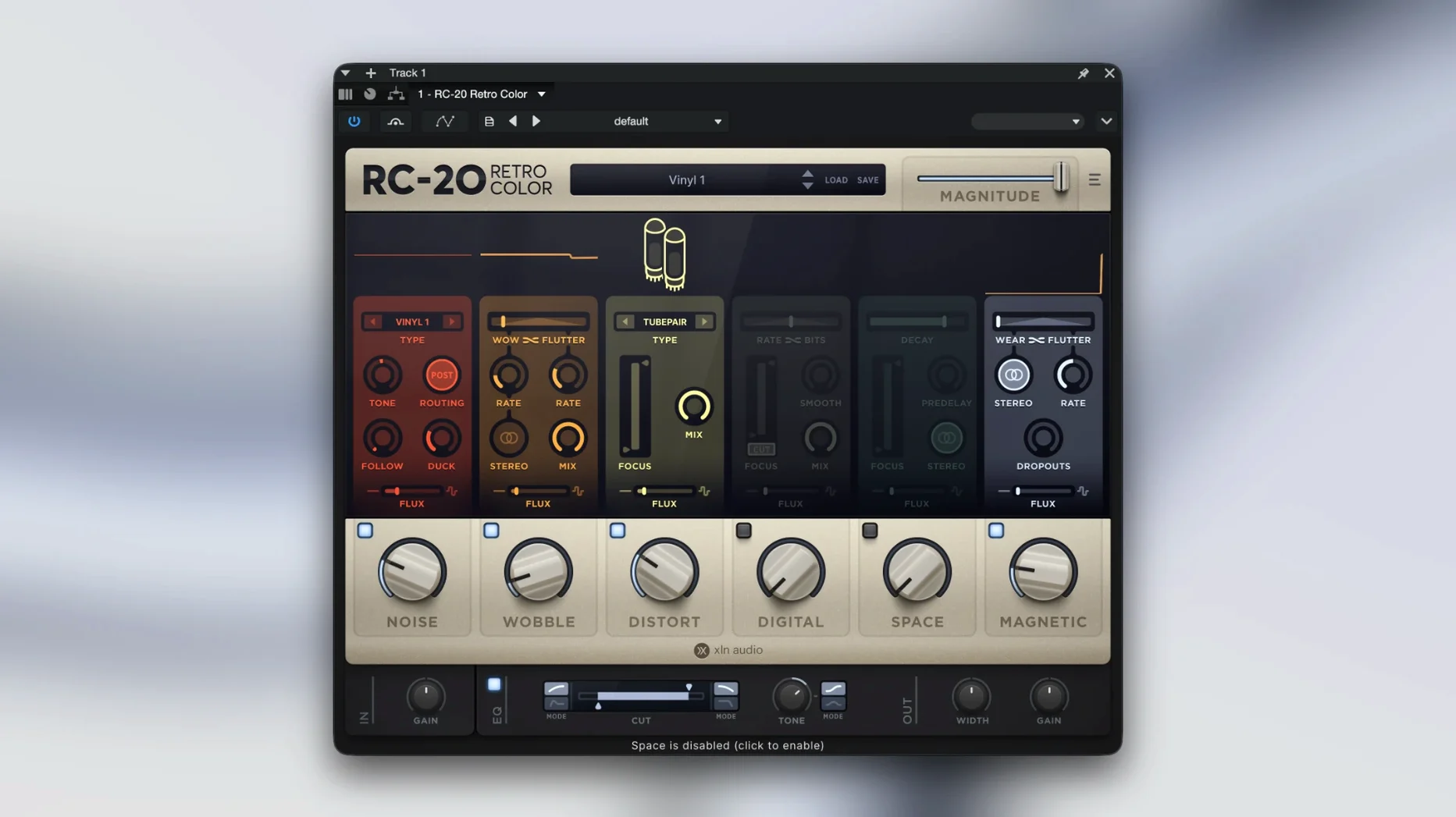
RC-20 Retro Color is a creative effect plugin that adds vintage-style texture and color to audio, recreating the feeling of old recording equipment.
What the modules do to your sound
- Noise layers tape hiss or vinyl crackle over the signal, giving it a physical, roomy presence.
- Wobble introduces slow pitch drift, like a worn tape machine pulling slightly off speed.
- Distort adds harmonics and grit, from subtle warmth to broken speaker crunch.
- Digital brings in lo-fi artifacts and bit crunch for a more synthetic, early-digital character.
- Space offers simple room and echo textures that sit behind the source rather than on top of it.
- Magnetic models the saturation and frequency response of magnetic tape.
Working with the Flux engine
The Flux engine lets any of these modules change over time, so the texture breathes instead of staying static. You can run the modules together for a dense, aged sound, or use just one for a subtle touch. That flexibility makes RC-20 Retro Color useful for adding life to dull recordings or pushing a track into a completely different era.
The built-in manual link saves folder hunting
A few details in RC-20 Retro Color do not call attention to themselves but save time once you notice them. The built-in manual link inside the plugin window means you never have to hunt through your system folders for a PDF. Clicking it opens the documentation straight from the interface, which is helpful when you are in the middle of a session and need to check what a module parameter does.
Each of the six effect modules can be switched on or off independently, so you can build a custom signal chain without loading multiple plugin instances. If you only want a little tape wobble and some room echo, you turn off the rest. That keeps the interface uncluttered and the CPU load lighter than running several separate plugins.
The presets are categorized by musical style and production goal. Selecting one loads a full configuration of modules, but you can then tweak individual modules without losing the preset name. This encourages experimentation: start with a preset that gets you close, then adjust to fit your track.
Drum buses get an old-console glue with Magnetic and Noise
Music producers working on a mix who want to glue digital tracks together benefit from the retro color approach. A drum bus recorded cleanly can sound like it came off an old console after a little Magnetic and Noise processing. Sound designers who create atmospheres and textures will find the Wobble and Digital modules useful for adding motion and grit to synthetic pads or field recordings.
Recording musicians who track at home with minimal gear often end up with dry, sterile takes. RC-20 Retro Color can add the sense of space and age that a professional studio would provide naturally. Mix engineers who need to make a modern production feel like a lost seventies recording will appreciate how the modules layer together without sounding like an obvious effect.
Because the plugin supports both Apple Silicon and Intel Macs natively, it works well on current hardware without compatibility layers. That matters for anyone who keeps their system updated to recent macOS versions.
Turning on every module at once muddies the sound
The most common mistake is turning on every module at once and pushing each parameter to an extreme. The result tends to be a muddy, over-processed sound that loses the original character of the source. RC-20 Retro Color works best when you choose two or three modules that serve a purpose and set them at moderate levels. Subtlety is the key: a little Noise adds air, a lot of Noise buries the signal.
Another mistake is ignoring the Flux engine entirely. Many beginners treat the plugin as a static effect, set it once, and leave it. Without the movement that Flux provides, the texture can feel like a blanket laid over the whole track. Giving the Wobble or Distort module a slow random variation makes the processing feel alive, as if the audio came from physical tape reels.
Beginners also tend to forget that the modules can be bypassed individually. They load a preset, decide they do not like one module, and delete the whole instance. The better approach is to audition each module by toggling it on and off, then build a custom combination from the preset starting point.
iZotope Vinyl narrows in on crackle and hiss instead
Other plugins aim for the same vintage texture territory, but they take different routes. The rc-20 retro color torrent community often discusses alternatives, and a few names come up regularly.
iZotope Vinyl focuses narrowly on vinyl record artifacts: crackle, hiss, warp, and dust. It is effective for that one sound, but it does not offer tape saturation, bit crushing, or the room echo that RC-20 Retro Color includes. If you need a broader palette of vintage effects across different eras, RC-20 Retro Color covers more ground in a single interface.
Soundtoys Decapitator is primarily a distortion and saturation plugin. It excels at harmonics and grit, but it does not model noise, wobble, or magnetic tape in the same way. RC-20 Retro Color's strength is combining multiple vintage imperfections in one place, so you can shape the whole character instead of adding just one type of dirt.
Waves J37 models a specific tape machine and provides saturation, wow and flutter, and noise. It stays closer to a real hardware emulation than to a collection of creative effects. RC-20 Retro Color offers a more modular approach, letting you mix and match modules from different pieces of vintage gear rather than simulating one device start to finish.
- macOS 10.13 or later
- 64-bit only
- Apple Silicon or Intel Mac
Questions I keep getting
Does RC-20 Retro Color work on Apple Silicon Macs?
Yes, the Mac version supports Apple Silicon natively, and it requires macOS 10.13 or later.
How to install
- Mount the downloaded disk image by double-clicking it. This makes the installer available to your Mac.
- Run the standard installation procedure and follow the prompts. It will place the plugin in your usual audio plugin folder.
Similar apps
Sign in or join the club to leave a comment.
Nobody has commented yet.