

- Version
- 2.4.0
- Studio or maker
- uJAM Instruments
- Languages
- English
- Activation
- K'ed by MORiA
- Runs on macOS
- macOS 10.15 or later
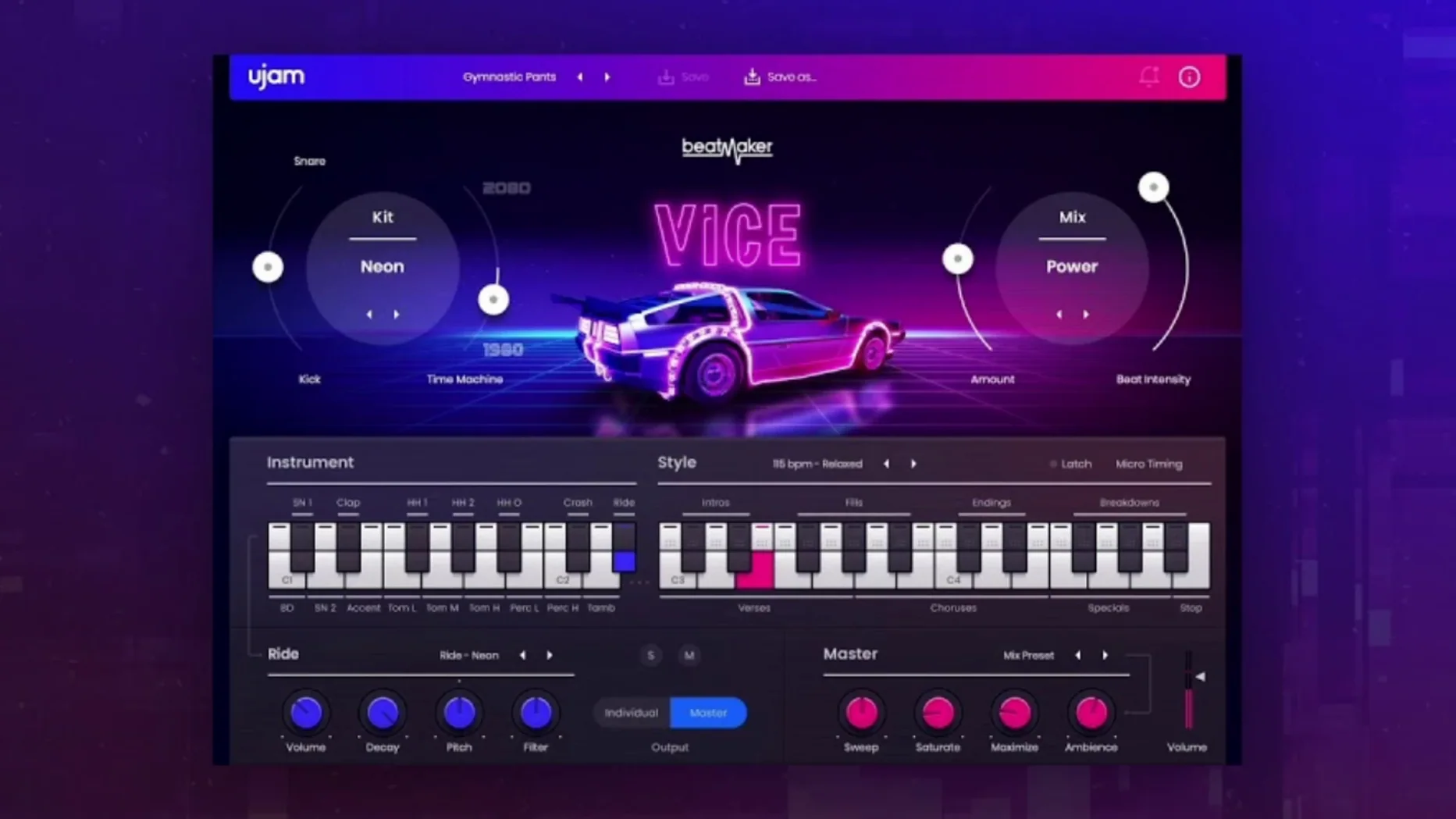
The 808 snare hits like a memory you did not live through. UJAM Beatmaker VICE is a drum plug-in built around that exact feeling: the sounds of classic Linn, Roland, Simmons, and Korg machines, processed through modern production methods. It gives you ten kits to work with, and the interface resizes to fit your screen.
Making drum tracks for 80s-inspired pop or rock
- Making drum tracks for synthwave, retrowave, or any 80s-inspired pop or rock.
- Layering those classic machine sounds without hunting for samples or emulating old hardware.
- Working inside your DAW with VST 2, VST 3, AAX, or AU 2 formats.
Requires 8 GB RAM and macOS 10.15 or later
- It needs 8 GB of RAM and macOS 10.15 or later. Intel and Apple Silicon both work.
- It is a drum plug-in, not a full groove workstation. You build beats from its kits and patterns.
- Version 2.4.0 runs with the latest UJAM App for installation and authorization.
Compared to other drum plug-ins I have looked at, VICE sits in a specific niche. Something like XLN Audio Addictive Drums gives you realistic acoustic kits with deep mixing control, which is great for rock or pop, but it does not have the same immediate 80s electronic character. Spectrasonics Stylus RMX offers a huge library of loops and grooves, but navigating it feels more like browsing a sample collection. VICE is more focused. It gives you ten curated kits and 460 patterns that sound like they belong on a record from 1985, and you can drag the MIDI out to edit further. It does not try to be everything.
Slots into Logic Pro or Ableton Live as a standard plug-in
Because VICE is a standard plug-in, it slots into your DAW like any other instrument. I load it as a MIDI track in Logic Pro or Ableton Live, write a simple chord progression on a synth, and then build a drum part from VICE kits that fits the mood. The MIDI drag and drop is the key link. I can drag a pattern into the DAW timeline, then layer a second pattern from a different kit on top, mixing the Linn kick with the Simmons snare. That gives me a custom kit without leaving the plug-in window.
It also works with macOS features you already use. The resizable interface means it sits well on an external monitor or a laptop screen. The plug-in formats cover every major DAW on Mac, so there is no extra setup beyond the usual plug-in scan.
The Time Machine control loosens rigid drum patterns
The Time Machine control is easy to overlook. It is a special control that shifts the playback character of a pattern. I use it to loosen a rigid drum machine pattern into something that feels more played, or to push it further into that worn tape sound. It is a single knob that changes the feel without opening another window.
The 460 patterns are grouped into 20 styles. That is a lot of material to audition, but the layout keeps it manageable. I can scroll through styles, click a pattern to hear it, and if I like it, drag it straight into my session. No exporting, no saving presets first. The patterns are also written as MIDI, so they respond to the kit sounds I have selected, not to a fixed audio recording. That means the same pattern sounds different across the ten kits.
A session with VICE
I opened a new project in Studio One last week to start a synthwave track. I inserted VICE on a stereo instrument track and clicked through the kits until I found the one that matched the dark pad sound I had already written. The kit had a punchy kick and a tight snare with that gated reverb tail.
I picked a style called Neon Drive from the list and scrolled through its patterns. The first few were too busy. The fourth one was a simple kick-and-clap groove with an open hi-hat on the offbeats. I dragged that into my track, looped it, and started writing a bass line over it. The pattern was a solid foundation, but I wanted a fill at the end of every eight bars. So I dragged a second pattern from the same style into a new lane, shortened it to one bar, and placed it at the right spot. Because both patterns used the same kit, the sounds matched perfectly.
Later I opened the MIDI region in the piano roll and moved a snare hit forward a few ticks. That slight flam gave the beat a human feel. The whole process took about ten minutes, and I did not have to touch a sample browser or bounce audio. The beats were ready to mix with the rest of the track.
- macOS 10.15 or later
- 8 GB of RAM
- Works on Intel and Apple Silicon Macs
- Interface in English
Questions I keep getting
Does Beatmaker VICE work on Apple Silicon Macs?
Yes, it runs on both Intel and Apple Silicon Macs as long as you have macOS 10.15 or later.
How to install
- Download the installer and run it.
- Follow the on-screen prompts to complete the setup.
- Open your DAW and scan for new plug-ins if Beatmaker VICE does not appear automatically.
Similar apps
Sign in or join the club to leave a comment.
Nobody has commented yet.