
- Version
- 13.0.30
- Studio or maker
- Steinberg
- Languages
- English
- Activation
- Included
- Runs on macOS
- macOS 13 or later
- Chip type
- Apple Silicon, Intel 64-bit
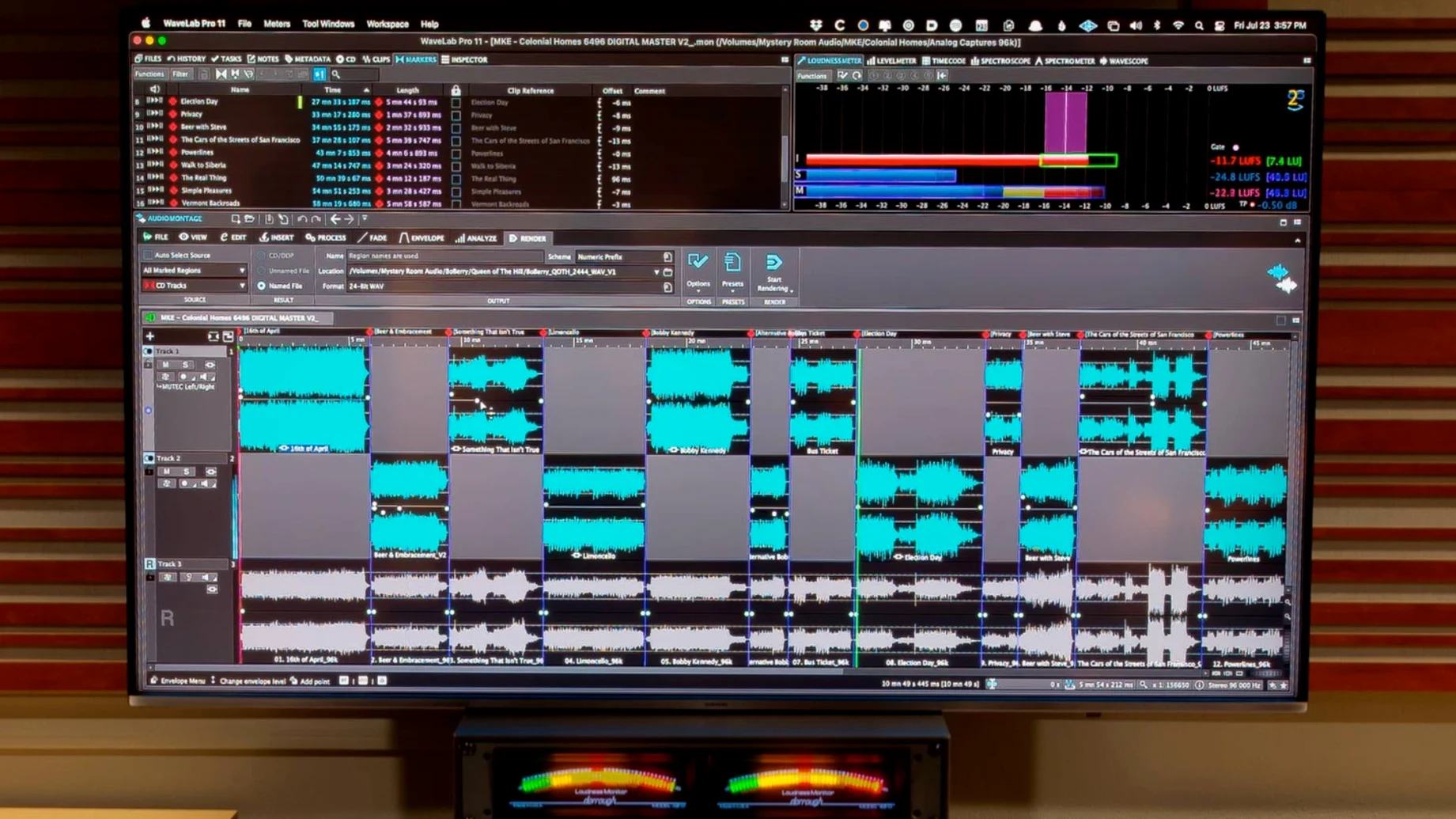
WaveLab Pro 13.0.30 runs on macOS 13 through 15, supporting both Intel 64-bit and Apple Silicon Macs. It is a full installer, not an update, so you get everything in one go.
Typical mastering workflow
- Import your mix into the Audio Editor. This is where sample-accurate editing and audio restoration happen. You can clean up clicks, noise, or do forensic analysis if needed.
- Arrange tracks in a Master Montage. Version 13 now lets you include Dolby Atmos channel-based surround files here. Sync file and montage navigation so edits stay in time.
- Apply processing on buses. Add compression, EQ, or limiting to the master bus. The plug-in version of WaveLab can also run inside your DAW for the same processing chain.
- Monitor and export. Use binaural monitoring with a personal HRTF profile for Atmos mixes. Then export your finished master.
The software is built around the idea of a complete mastering solution from start to finish. Whether you work in stereo or surround, the steps stay the same: edit, arrange, process, deliver.
How WaveLab fits with other tools on your Mac
WaveLab Pro works as both a standalone application and an ARA plug-in. In ARA mode, it runs inside compatible DAWs like Cubase 13, Nuendo 13, Reaper 7, and Studio One 6.5. This means you can edit audio in WaveLab without leaving your project timeline. The plug-in version keeps the same editing tools and processing chain, so you do not need to switch between windows for basic tasks.
Outside the DAW, WaveLab integrates with macOS file management. You can drag audio files from Finder directly into the Audio Editor or a Master Montage. Copy and paste also works across applications: select a section in WaveLab, copy it, and paste it into another program for review or further work. You can transfer audio ranges to other applications with or without effects applied. That is useful when you want to send a processed reference to a collaborator but keep the raw version on your timeline.
The software also scales waveform peaks automatically to fit the visible area. As you zoom in and out, the waveform adjusts so you always see detail without manual vertical scaling. It is a small thing, but it makes a difference when you are scanning a long file for edits.
Drag a stereo mix into the Audio Editor and see the full waveform
Imagine you have a stereo mix from a recent session. You open WaveLab Pro and drag the file into the Audio Editor. The waveform appears, and the visible area scales automatically so you see the full dynamic range. You listen through the track and notice a small click at a transition. You zoom in, find the sample-accurate position, and use the spectral editor to remove the noise without affecting the surrounding audio. A quick restore pass on the same section cleans up a faint background hum.
With the edit done, you create a Master Montage and drag in your processed file. If this is a surround project, version 13 lets you include Dolby Atmos channel-based files in the same montage. You sync the file and montage navigation so that scrolling through one moves the other in time. Then you add processing on the master bus: a gentle compressor and a limiter for level control.
Before export, you switch to binaural monitoring. You load your personal HRTF profile to hear how the mix translates to headphones. If something sounds off, you go back to the Audio Editor for a final adjustment. When everything is right, you export the master. The whole session stays inside WaveLab, no need to jump between different programs.
File and montage navigation sync when you scroll
- File and montage navigation sync. When you enable this, scrolling in the Audio Editor also moves the Master Montage view. It keeps your place when you edit across both views.
- Drag and drop from anywhere. You can pull audio from Finder, other apps, or even from within WaveLab itself. The software accepts files in standard formats without extra setup.
- Copy and paste across platforms. You are not limited to WaveLab. Copy an audio range, paste it into a chat message or an email, or into another editor for a quick check.
- Automatic peak scaling. The waveform view adjusts on its own as you zoom. You never have to manually resize the display to see quiet sections or loud peaks.
Don't confuse the Audio Editor with the Master Montage
One common mistake is treating the Audio Editor and the Master Montage as the same thing. They are separate views for different purposes. The Audio Editor is for sample-accurate edits and restoration. The Master Montage is for arranging processed files and applying bus processing. Beginners often try to do everything in one view, which can lead to confusion about where edits apply.
Another mistake is forgetting to sync navigation. If you edit in the Audio Editor and then switch to the Master Montage, the position may not match. Turning on navigation sync keeps both views aligned and saves time.
Some users also overlook the ARA plug-in integration. They launch WaveLab as a standalone app, edit, then export and import into their DAW. Running WaveLab as an ARA plug-in inside Cubase or Reaper eliminates that extra step. You edit in place, and the changes appear in your DAW project automatically.
Finally, beginners sometimes skip the HRTF setup for binaural monitoring. Without a personal HRTF profile, the binaural output uses a generic filter. It still works, but it will not match your ears as closely. Loading your own profile takes a minute and makes the headphone monitoring more reliable for Atmos work.
- Dolby Atmos master montages can include channel-based surround files.
- Dolby Atmos binaural monitoring supports loading a personal HRTF profile.
- macOS 13 or later
- Intel 64-bit or Apple Silicon processor
Questions I keep getting
Can I use WaveLab Pro as a plug-in inside another DAW?
Yes, the plug-in version can be used inside compatible DAWs, so you can run WaveLab's processing chain without leaving your main session.
Does WaveLab 13 support Dolby Atmos on Mac?
Yes. Version 13.0.30 adds the ability to include channel-based surround files in master montages and to load a personal HRTF profile for binaural Atmos monitoring.
How to install
- Run the full installer for WaveLab 13.0.30.
- Follow the included installation and activation instructions.
Similar apps
Sign in or join the club to leave a comment.
Nobody has commented yet.