

- Version
- 1.8.10-2026.09.04-Complete
- Studio or maker
- XLN Audio
- Languages
- English
- Activation
- K'ed by TEAM HCiSO
- Runs on macOS
- macOS 10.13 or later
- Chip type
- Apple Silicon, Intel 64-bit
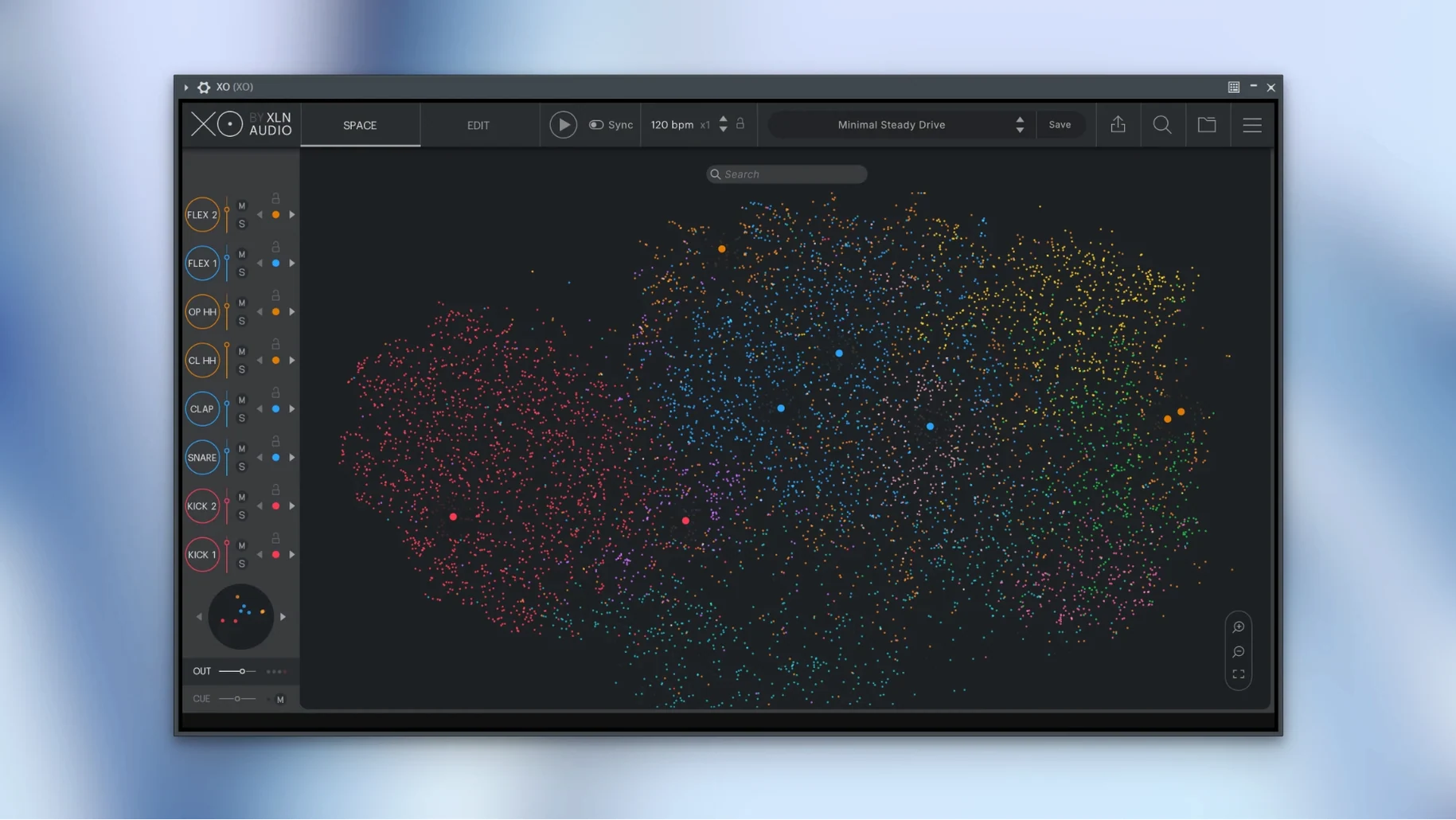
XLN Audio XO is a plugin and standalone instrument that acts as both a drum sample browser and a beat-making tool, sitting on a MIDI or instrument track in your DAW. It does not process audio from other tracks; instead, it generates its own drum patterns from its internal library.
Where XO fits in a session
You load XO on a dedicated instrument track, much like a virtual drum machine. From there, you browse and audition its 8,700+ one-shot samples, which are sorted by sound similarity rather than by folder name. Once you find sounds you like, the built-in sequencer lets you build patterns. The beat presets — 240 of them, fully editable — give you a quick starting point. You can route individual drums to separate outputs for mixing, or keep everything on one stereo bus.
Typical workflow and buses
After you settle on a pattern, XO can output each drum sound to its own track in your DAW via multi-output routing. That means kick, snare, hi-hat and the rest each get their own fader and insert chain. If you prefer simplicity, the main stereo out handles the whole kit. The Hot Swap feature lets you cycle through alternative samples on the fly while the sequencer keeps playing, so you can audition without stopping. MIDI export now works correctly even when lanes are muted, which was fixed in version 1.8.10.
How XO fits with other apps and macOS features
XO works as a standard Audio Unit (AU), VST or AAX plugin inside any major DAW on macOS — Logic Pro, Ableton Live, Cubase, Pro Tools and others. On a Mac, you can also run XO in standalone mode, which is handy when you want to browse samples or build a pattern without opening a full session. In standalone mode, the app uses the system’s built-in audio output or any Core Audio interface you have connected. That makes it a quick sketching tool if you have a few minutes between lessons or while waiting for a render to finish.
If you use Logic Pro, XO responds well to Logic’s track stacking and summing stacks, so you can group the multi-output channels into a single folder track. On macOS, the plugin respects the system’s color profile for its interface, which matters less for sound but keeps the visual display consistent with other windows. XO does not depend on any external sample libraries or cloud services — everything lives inside the installed package, so it works offline without extra setup.
Common snags people run into
The most frequent issue I hear about is the plugin not appearing in the DAW’s plugin list after installation. On macOS 10.13 and later, this usually happens when the installer places the plugin component in the correct folder but the DAW has not rescanned its cache. In Logic Pro, you can force a rescan from the Plugin Manager; in Ableton Live, hold the Option key while clicking Rescan. If XO still does not show up, check that the AU or VST version was installed — the standard installer puts all formats in place, but a custom install might skip one.
Another snag: the standalone version launches but produces no sound. This is almost always a Core Audio device selection issue. Open XO’s audio settings from the standalone window and pick your output device explicitly rather than leaving it on the default. If you use an audio interface, make sure it is powered on before starting XO.
A third point — users sometimes think XO has no sounds because the XO Space visual display shows empty dots. That just means no samples are selected yet. Click a dot or use the search field to find a category such as kick or snare, and the space fills up. The 8,700+ samples are all pre-loaded in the library; you just need to browse to them.
A forty-minute beat session with a student's short film project
Let me walk through a common scenario. A student of mine was building a beat for a short film project and had about forty minutes before the next class. He opened XO in standalone mode on an iMac, not wanting to load a full Logic session just yet.
Step one: find the kick. He clicked the search bar, typed “kick,” and the XO Space immediately showed a cluster of similar kick samples. Each dot represents a sound, and dots close together are sonically alike. He clicked a few to preview them and settled on one with a soft attack and a short tail.
Step two: build a pattern. He switched to the sequencer view and tapped in a simple four-on-the-floor pattern by clicking on the grid. XO’s sequencer works in steps, like a classic drum machine. He then added a snare on the backbeat and an open hi-hat on the offbeats. The Accentuator feature let him nudge the feel from rigid to slightly swung — he dialed it to about a third of the range, which gave the pattern a human feel without losing the groove.
Step three: swap sounds. With the sequencer looping, he used Hot Swap to cycle through alternative snare samples. Each time he hit the swap key, XO replaced the snare with a different sample from the same similarity cluster, keeping the pattern intact. He found a snare with a little more body and moved on.
Step four: export and carry on. He dragged the MIDI pattern from XO’s export area onto the desktop — a standard MIDI file. Later, in Logic, he imported that MIDI file onto a track and loaded the full plugin version to get the exact sounds. Because XO remembers which sample was on each pad, the MIDI notes triggered the same kit. He then set up multi-output routing so the kick and snare each got their own compressor. The whole sequence, from first click to having a usable beat in his project, took under ten minutes.
- macOS 10.13 or newer
- Intel or Apple Silicon Mac
- Interface language: English
Questions I keep getting
Can I use XO on an audio track or an effects bus?
No, XO is a virtual instrument plugin (VST, AU, AAX) and a standalone app. You load it on a MIDI or instrument track, not as an audio effect.
How to install
- Open the downloaded disk image file.
- Run the standard installation procedure from the installer package inside.
Similar apps
Sign in or join the club to leave a comment.
Nobody has commented yet.