

- Version
- 2.3.1
- Studio or maker
- AIR Music Technology
- Languages
- English
- Activation
- k'ed by GUISEPPE
- Runs on macOS
- macOS 13 or later
- Chip type
- Apple Silicon
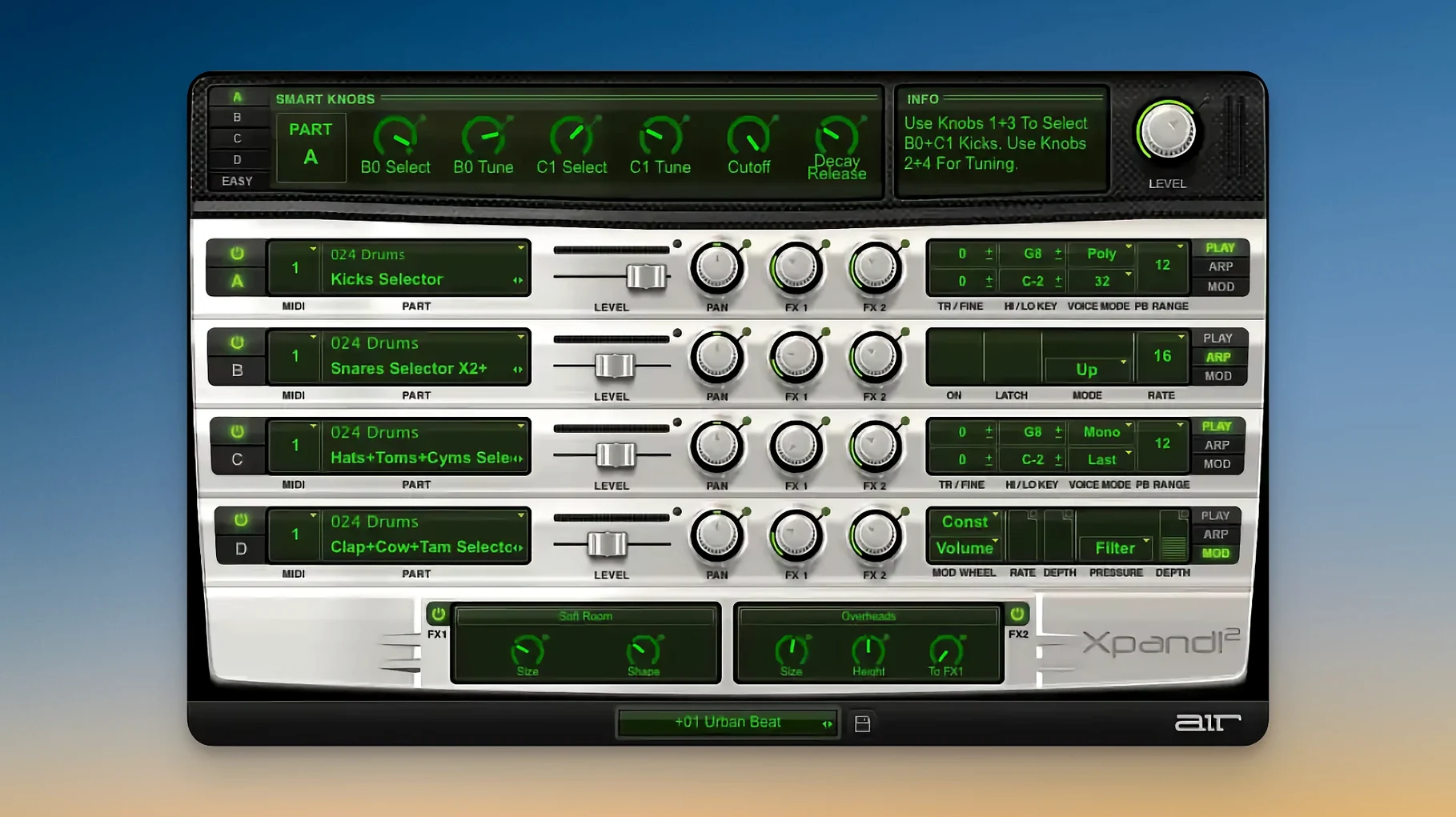
Xpand!2 runs on any Mac with macOS 13 or later and native Apple Silicon support. It is a 64-bit plugin that works in most major hosts as VST, AU, or AAX. The scalable interface looks crisp on Retina and HiDPI displays. Xpand!2 is a versatile virtual instrument for Mac users creating music with layered sounds.
Set up each slot for your workflow
Each patch holds four active sound slots, each with its own MIDI channel. You can set any slot to polyphonic or monophonic voice mode, and if mono, choose First, Last, Highest, or Lowest note priority. Every slot also has its own arpeggiator.
Edit sounds with six smart controls
Instead of diving into deep synthesis menus, you get six smart controls per slot. They let you shape the sound quickly — filter, envelope, effects, and modulation are all right there. The layout is simple enough to teach to students in a single session.
Browse 2,500 presets across 29 categories
The preset library covers keys, pads, basses, leads, drums, and more. Originally part of the Avid Pro Tools Creative Collection, Xpand!2 became a standalone instrument with a broader sound set. The categories help you find something usable fast, whether you are scoring a short film or building a beat for class.
Four sounds from one instance for tight-deadline composers
Composers working to tight deadlines benefit from having four sounds ready at once. A single Xpand!2 instance can cover a string pad, a bass line, a pluck, and a percussion hit, each on its own MIDI channel. That means less time loading separate plugins and more time writing.
Live performers who switch sounds between songs will appreciate the preset recall. Map MIDI program changes to switch patches without touching the mouse. The monophonic voice modes also help when you need a lead synth that responds to legato playing without overlapping notes.
Sound designers exploring hybrid textures can layer subtractive synthesis with wavetable or FM sounds inside one patch. The arpeggiator per slot adds movement without extra sequencing. And because each slot has its own note range, you can split the keyboard — low notes trigger one sound, high notes another — and play two or three layers at once.
Teachers and workshop leaders like the straightforward layout. I have shown students the smart controls in a single class period, and they can build a usable patch by the end of the hour. The preset categories also work well for quick demonstrations: pick a pad, show how the filter changes the character, then let them try the arpeggiator.
Routes each slot to a separate MIDI track in Logic Pro and Ableton Live
Xpand!2 sits inside a DAU or notation software as a plugin. In Logic Pro, you route each slot to a separate MIDI track using different channels, so you can write parts independently. In Ableton Live, you can map the smart controls to macro knobs for hands-on automation. Cubase, Digital Performer, and Studio One all recognize the four MIDI channels without extra configuration.
The plugin also works well alongside other AIR instruments. If you have the full AIR collection, you can blend Xpand!2 textures with a Velvet electric piano or a Strike drum kit on separate tracks. The sound palette stays consistent across the family, so mixing is easier than combining samples from different libraries.
macOS features like the system-wide MIDI service or a class-compliant USB controller pass through to Xpand!2 without a hitch. The plugin responds to Pitch Bend and Aftertouch, so a keyboard with a mod wheel or pressure sensitivity gives you expressive control. MIDI Learn lets you assign any hardware knob or slider to a smart control, which is useful when you want to tweak a filter live.
All four slots on channel 1 create a muddy blend
New users sometimes forget to set different MIDI channels for each slot. If all four slots are on channel 1, every note triggers all four sounds at once, and the result is a muddy blend. Assign channels 1 through 4 in the plugin, then match them in your host track.
Another early stumble is leaving every slot in polyphonic mode when monophonic would suit the part. A lead line or bass note sounds cleaner in monophonic with Last or Highest priority, because overlapping notes cut each other off naturally. The piano roll stays readable too.
People also overlook the note range settings. Without them, every slot plays across the whole keyboard. Setting a narrow range for a bass sound and a higher range for a pad stops them from fighting in the same octave. It takes ten seconds and saves an hour of mixing later.
Finally, beginners often ignore the arpeggiator because it looks like a simple on-off switch. Each slot has its own rate, direction, and gate length. Even a held chord can become a rhythmic pattern, which is useful for fast sketching or for adding movement to a static pad.
Version 2.3.1 runs natively on Apple Silicon without Rosetta
Does it work on Apple Silicon without Rosetta? Yes, version 2.3.1 runs natively on Apple Silicon. No extra translation layer is needed, so it behaves like any other native plugin on macOS 13 or later.
Can I use it without a DAU? Xpand!2 is a plugin, not a standalone application. You need a host that loads VST, AU, or AAX plugins. That includes most DAUs, notation software, and live performance hosts.
How many instances can I run at once? That depends on your Mac and your host, not on the plugin itself. Each instance uses four sound slots, so one instance can cover a lot of ground. I have seen projects with six or seven instances on a single machine without trouble.
Do I need extra sample libraries? No. The presets draw on the internal synthesis and sample engine. You do not download additional content. The 2,500 presets are part of the installation.
Is it only for electronic music? The preset categories include acoustic instruments too — pianos, strings, brass, and drums. You can score a classical piece, a pop arrangement, or a film cue without ever touching a synthesizer preset. The four-slot setup works for any genre where you want layered sounds on a single track.
- macOS 13 or later
- Apple Silicon
- Interface language: English
Questions I keep getting
Does Xpand!2 run on Apple Silicon Macs?
Yes, it supports Apple Silicon natively and requires macOS 13 or later.
How many sounds can I layer in one patch?
Each patch has four active sound slots, and you can layer them or assign different MIDI channels to each.
What kind of presets are included?
More than 2,500 presets organized into 29 categories, covering keys, pads, basses, leads, drums, and more.
How to install
- Installation and activation instructions are included with the package.
Similar apps
Sign in or join the club to leave a comment.
Nobody has commented yet.