
- Version
- 1.0.2
- Studio or maker
- Tone Empire
- Languages
- English
- Activation
- K'ed by MORiA
- Runs on macOS
- macOS 10.14 or later
- Chip type
- Apple Silicon, Intel 64-bit
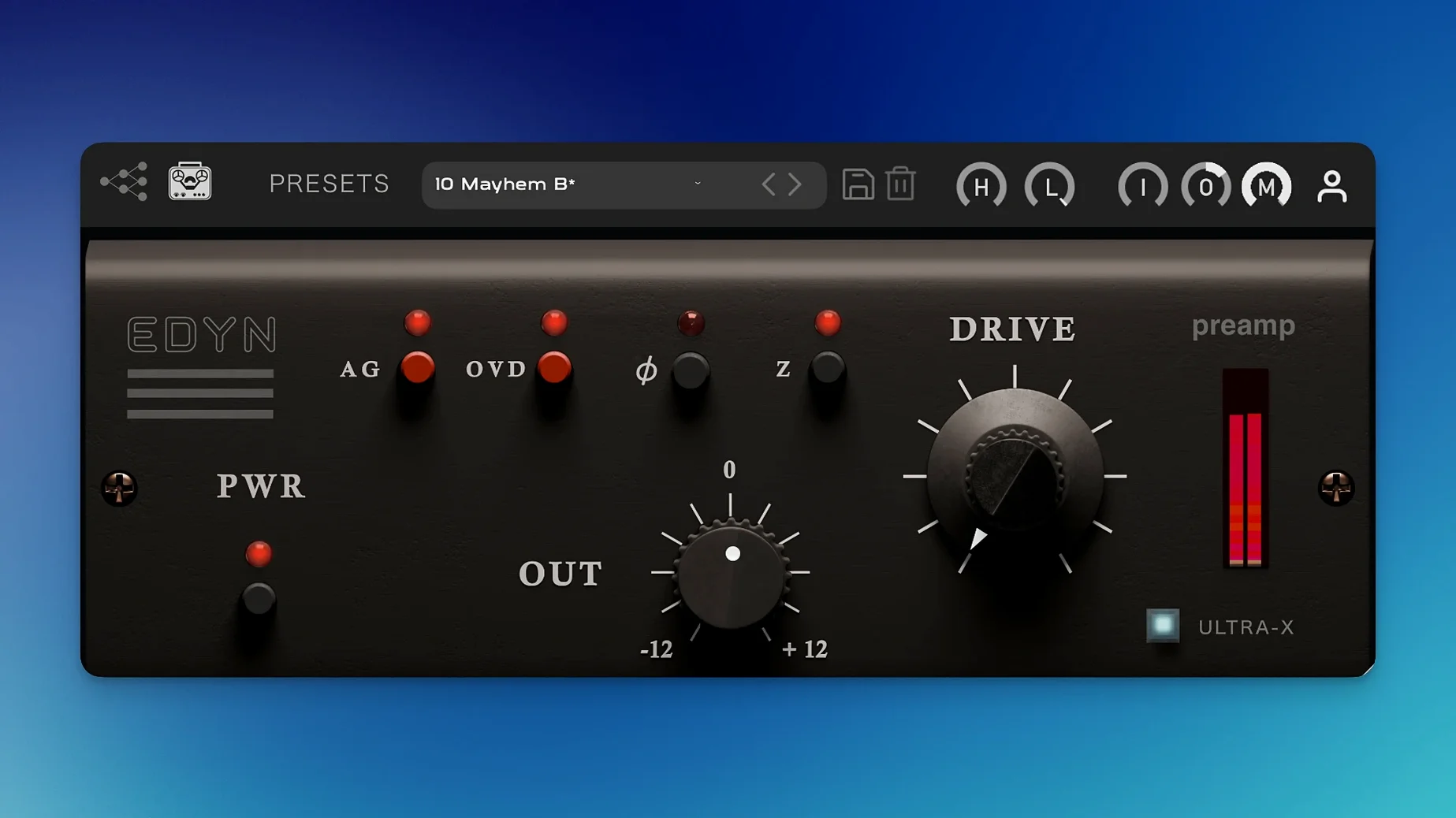
Three audio-shaping modules give you a vintage American console sound in a single plugin. EDYN 1.0.2 models a discrete transistor preamp with a bright midrange, fast transient response, and deep low end. Here is how its controls work.
What does the Drive module do?
The Drive module adds saturation. Turn it up to push the signal harder into the modeled preamp, adding harmonic distortion and density. It is the main control for adjusting how much analog character you want.
How do Input and Output levels affect the sound?
Input sets the level hitting the preamp stage, which changes how much saturation and compression the Drive module applies. Output adjusts the final volume so you can match levels after dialing in the tone. Together they let you set the intensity of the effect without clipping your mix.
What is the phase inversion button for?
Phase inversion flips the polarity of the output signal. Use it to fix phase cancellation issues when blending the processed signal with other tracks or a parallel bus. It is a simple but useful troubleshooting tool.
A session with EDYN on a vocal track
I had a voice recorded in a home studio, clear but thin. I inserted EDYN on the channel and started with Input at its default position, Drive at about a quarter. The first thing I noticed was the low end: the voice sat in the mix with more body, not bloated, just present. I adjusted Input upward, maybe halfway, and the Drive began adding a gentle, vinyl-like grit to the consonant attacks. The Mix control let me blend that color in gradually, probably around 70% wet, so the original clarity stayed underneath. Output came down a few dB to keep the level the same. The vocal went from flat to characterful without needing extra EQ.
Common hangups and how to work around them
Too much low end on a mix bus
If you drop EDYN on a full mix and the bottom feels heavy, check the Input level. A high Input pushes the preamp harder, which can exaggerate low frequencies. Lowering Input and compensating with Output often clears it up.
Phase sounds hollow after processing
When you use the Mix control for parallel processing, the filtered output can cause phase cancellation with the dry signal. If the track sounds thin or hollow, try engaging the phase inversion button. It flips polarity and can immediately restore the weight. This happens more often with drum overheads than with vocals.
Automation not following in Pro Tools
Version 1.0.2 addresses parameter automation issues in Pro Tools. If you are on an earlier version, update to 1.0.2 first. After that, write automation on the Input and Drive parameters, not the Output, because Output changes can fight the gain staging you already set. I do not remember having trouble with this after the patch.
EDYN's 50 vs. 200 ohm impedance switch vs. a 1970s British console sound
I use a few other preamp emulations, and they each have a different feel. One popular one models a British console from the 1970s, with a rounder, more compressed midrange. EDYN, with its 50 or 200 ohm impedance switch, lets you change how the plugin reacts to the input signal, which that British model does not offer. Another plugin I have is a clean, modern preamp that stays neutral until you crank the gain; EDYN adds character much sooner, especially in the midrange and high end. A third option is a recreation of an old Neve channel, which has a thicker, darker tone. EDYN sits between them: faster transient response than the Neve style, more brightness than the British one. I reach for it when I want clarity with some grit, not when I want full saturation or total cleanliness.
- Bug fixes for offline rendering on the master output.
- AU validation fixes in Logic Pro on macOS Sequoia.
- Crash fixes for multiple instances in Logic Pro.
- Parameter automation fixes in Pro Tools.
- Apple Silicon performance optimization and reduced CPU load.
- Improved support for high-resolution displays with a scalable interface.
- macOS 10.14 or later
- Intel 64-bit or Apple Silicon
- Interface language: English
Questions I keep getting
Is EDYN compatible with Apple Silicon Macs?
Yes, version 1.0.2 is optimized for Apple Silicon and also supports Intel 64-bit systems. It requires macOS 10.14 or later.
Does it work in Logic Pro without crashes?
Version 1.0.2 fixes crashes that occurred when using multiple instances in Logic Pro, and also resolves AU validation issues on macOS Sequoia.
How to install
- Download the package from the provided link.
- Open the package and follow the included install and activation instructions.
- Restart your DAW if needed to load the plugin.
Similar apps
Sign in or join the club to leave a comment.
Nobody has commented yet.