
- Version
- 2.1.5
- Studio or maker
- Toontrack
- Languages
- English
- Activation
- k'ed by Team V.R
- Runs on macOS
- macOS 10.13 or later
- Chip type
- Apple Silicon, Intel 64-bit
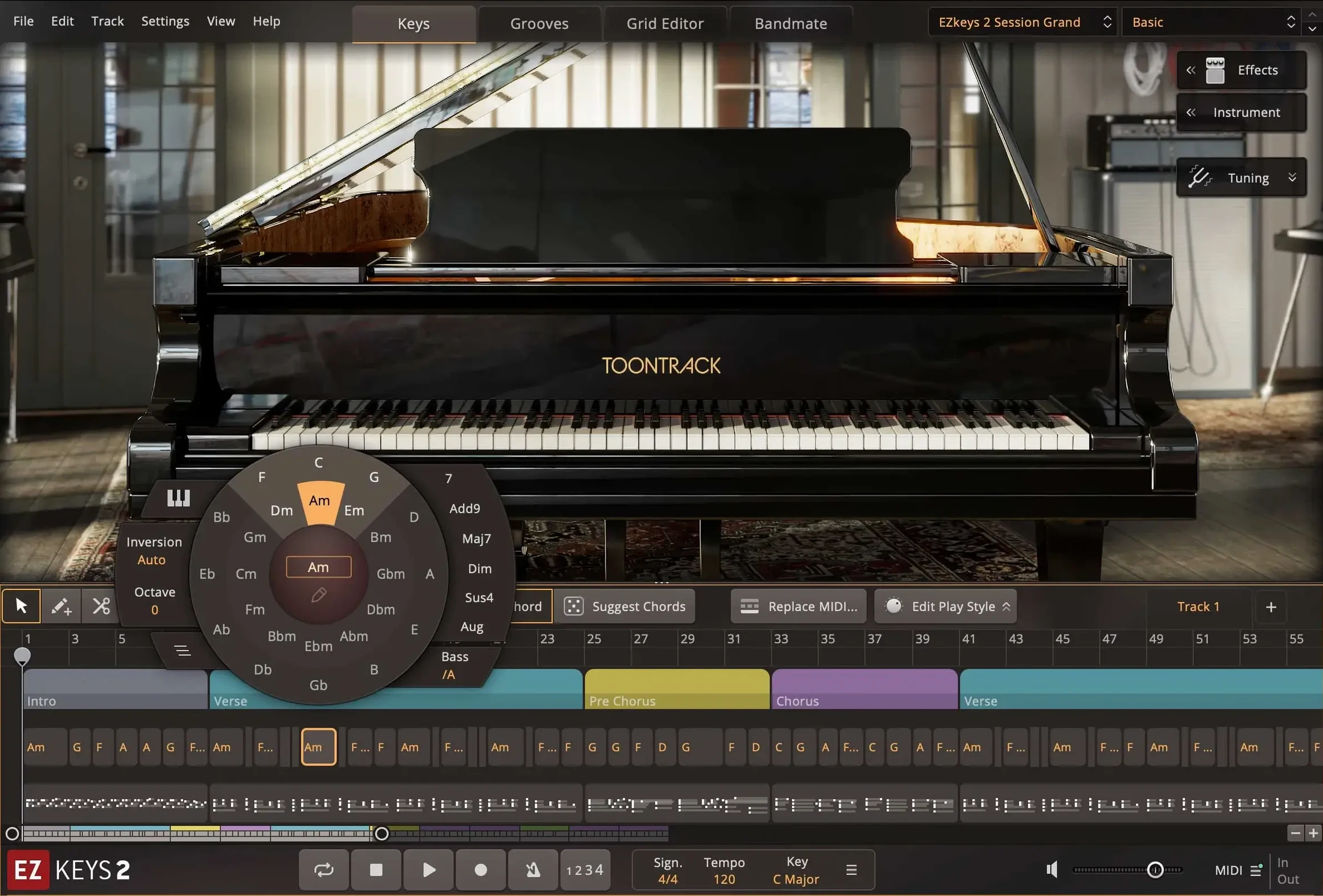
If you already use a DAW like Logic Pro or Cubase, you know the feeling of wanting a piano sound that responds like a real instrument, not a sample library that fights you. Toontrack EZkeys fits that space: it runs as a VST3, AU, or AAX plugin, so it slides into almost any host on Mac, including GarageBand. The current version, 2.1.5, also works as a standalone application, with updated icons matching macOS Tahoe style on Apple Silicon and Intel Macs.
The core sound library is a grand piano recorded with multiple microphones and ambiences, giving you room to shape the tone without digging through extra tabs. Professional pianists played the included MIDI pattern library, which covers styles from pop ballads to jazz. You can drag those patterns into your arrangement and edit them note by note, or build your own from scratch using the songwriting tools inside EZkeys. The String Machine EKX instrument now has a knob for the expression pedal in the Keys tab, a small addition that makes a difference for dynamic control.
EZkeys 2 is the newer version of the line, and it supports the same MIDI packs as the original. On Mac, the plugin takes advantage of multiple CPU cores, which keeps the CPU meter low when you layer several instances. It needs macOS 10.13 or later, works on both Intel and ARM processors, and comes in English only. The 2.1.5 update added support for the Transistor Organ EKX expansion, so the library keeps growing without changing the familiar workflow.
The updated icon in 2.1.5 changes standalone use
The jump to 2.1.5 is not a rewrite of the tool, but the changes nudge the daily workflow in useful directions. The most noticeable one, if you run EZkeys as a standalone app, is the updated icon. It now follows macOS Tahoe style, which means it blends visually with the system look on recent Macs. That sounds cosmetic until you have several plugin windows and a DAW open — the cleaner icon helps you find the right window at a glance.
Behind the scenes, the improved multi-core CPU performance means the plugin shares the processing load more evenly across your Mac's cores. If you often run multiple instances of EZkeys — say, a grand piano for the verse and a Rhodes‑style patch for the chorus — you may notice the system breathing easier than before. The expression pedal knob on the String Machine EKX instrument is another quiet improvement: it gives you a direct way to shape dynamics without reaching for an external controller.
EZkeys loads as AU into Logic Pro, VST3 into Cubase, AAX into Pro Tools
EZkeys fits into a typical Mac setup without friction. As an AU plugin, it loads directly into Logic Pro, MainStage, or GarageBand; as a VST3, it works with Cubase, Studio One, and similar hosts. The AAX format covers Pro Tools users. If you prefer to sketch ideas without opening a full DAW, the standalone mode launches quickly and can route audio to your system output or an interface.
The updated icons aren't just visual polish — they make macOS features like Stage Manager and Mission Control more practical. When you switch between a DAW project and the standalone app, the consistent icon style helps you identify the window before you click. The resizable interface adapts to different screen sizes, so it works on a MacBook screen or an external display without losing readability.
Opening the Chord Wheel to set a key and tempo
I start most songwriting sessions by launching EZkeys standalone. The first thing I do is open the Chord Wheel, which gives me a circle‑of‑fifths view of the song's harmony. I set a key and a tempo, then browse the MIDI pattern library for a verse idea. The patterns are played by session pianists, so they feel musical rather than mechanical. Once I drag a pattern into the arrangement area, I use the Songwriting Scales tool to tweak a few notes, shifting the melody line into something that sounds less like a template and more like my own.
After I have a verse shape, I switch to Bandmate. I feed it a simple audio loop — a guitar sketch I recorded earlier — and it generates a chord progression and a groove that fits the audio. I adjust the complexity slider until the accompaniment feels right. Then I record a short keyboard take on top, using the expression pedal control to add dynamics to the String Machine patch.
Back in the arrangement view, I fine‑tune the MIDI notes, adjusting velocities note by note. When the sketch is solid, I save the project as a standalone file, then open Logic Pro and load EZkeys as an AU plugin on a new track. The same pattern data transfers without conversion, so I can continue arranging there. The whole session — from blank page to a rough arrangement — takes about thirty minutes, and the tools inside EZkeys keep me inside the instrument instead of bouncing between applications.
Toontrack EZkeys helps songwriters create realistic piano parts, and ez keys torrent is not a safe or legal way to get it.
- Updated the standalone icon and project icon to macOS Tahoe style on Mac.
- Improved performance with multiple CPU cores, especially on Mac.
- macOS 10.13 or later
- Intel or Apple Silicon processor
- Interface language: English
How to install
- Mount the downloaded disk image.
- Run the standard installer and follow the prompts.
Similar apps
Sign in or join the club to leave a comment.
Nobody has commented yet.