- Version
- 5.40.2675 [Wineskin]
- Studio or maker
- AIMP DevTeam
- Languages
- Russian, English, German, Arabic, Belarusian, Hungarian, Danish, Spanish, Italian, Chinese (Traditional), Chinese (Simplified), Korean, Polish, Portuguese, Turkish, Ukrainian, Finnish, French, Czech, Swedish, Japanese
- Activation
- Not required
- Runs on macOS
- macOS 11 or later
- Chip type
- Apple Silicon
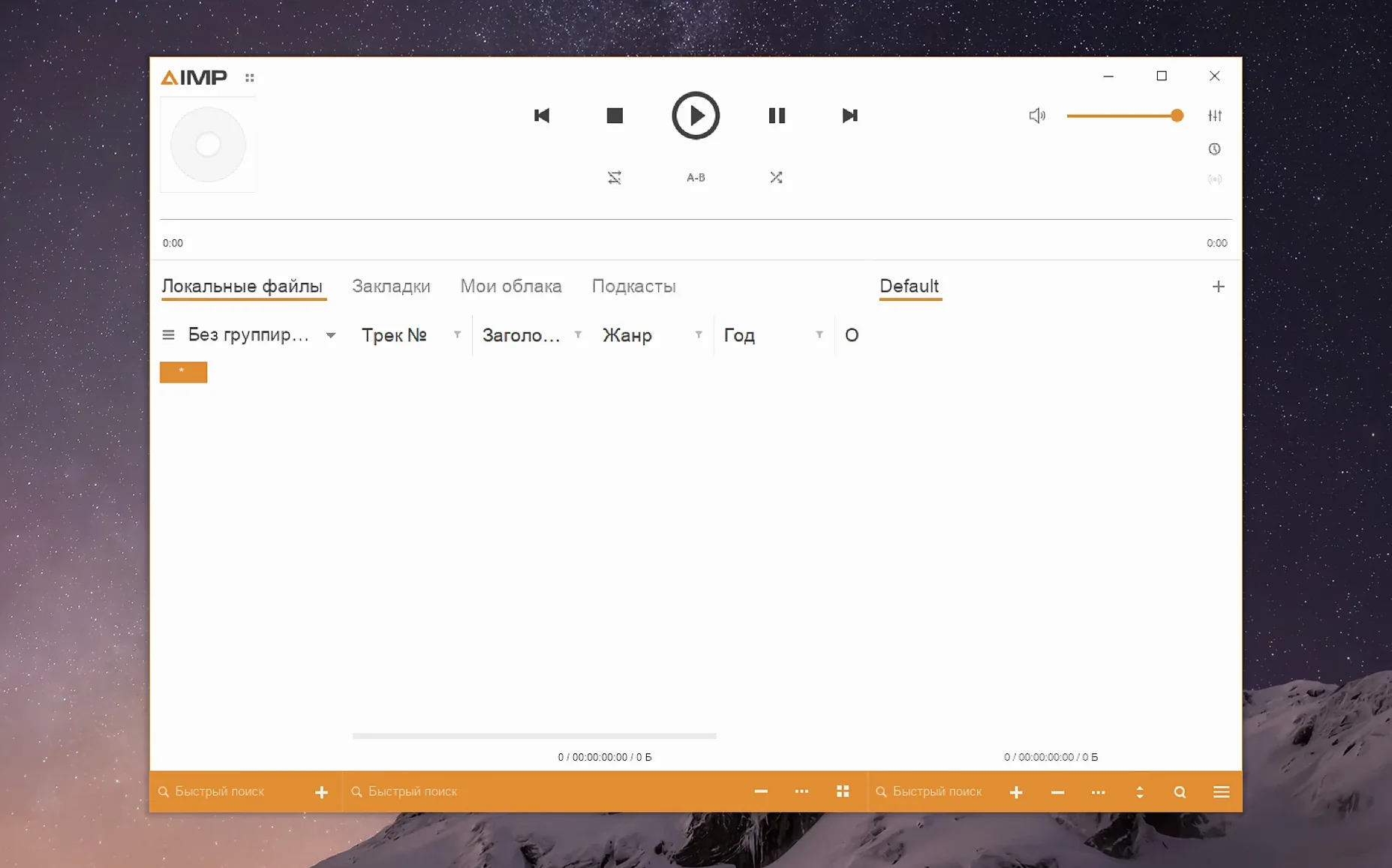
AIMP for macOS runs on Macs with Apple Silicon and macOS 11 or later. The current build is packaged with Wineskin, so it behaves like a native app even though it’s a Windows program underneath. That means it fits quietly next to the other tools you already use—your file manager, your tag editor, your music library—without asking you to change how you work.
What AIMP brings to a Mac setup
AIMP is a full-featured audio player with a tag editor, a music library, and waveform display. Because it’s a Windows app wrapped in Wineskin, it brings its own interface and shortcuts, which can feel familiar if you’ve used it on a PC. The interface language list is long—English, Russian, German, Japanese, Swedish, Czech, and more—so most people can set it to their own language.
Running it alongside your other apps
Since AIMP is a separate app, it works well as a second player next to the default Music app. You can use it for FLAC files, for organizing a large library, or just for the tag editor.
Built-in tag editor for music collectors
AIMP suits different Mac users for different reasons, but a few groups will find it especially useful.
Music collectors with large local libraries will appreciate having a tag editor built directly into the player. You don’t need to open a separate app to fix album art, correct track names, or batch-update metadata. The music library view and grouping tree let you browse your collection by artist, album, or genre without waiting for iTunes or Music to scan everything again.
People who prefer keyboard shortcuts and a clean playback interface will find AIMP straightforward. The waveform display gives a visual cue during playback, useful for spotting song transitions or editing cues. If you manage playlists regularly, the playlist manager in this version no longer marks your content as modified just because the playing track changed in active storage, so your playlists stay cleaner than before.
Users who work with multiple audio formats, especially lossless ones like Monkey’s Audio (APE), directly benefit from the updated Monkey’s Audio codec to version 11.08. The waveform calculation speed improvement also helps when you navigate through longer tracks or large folders.
Teachers running a school computer lab, like I do, might set AIMP as a dedicated player for music or language lessons. The language options cover twenty-three languages, including Arabic, Turkish, Ukrainian, and Traditional Chinese, which helps in multilingual classrooms. Since activation is not required, you can set it up on several Macs without extra steps.
Wineskin packaging for macOS 11 and Apple Silicon
AIMP for macOS requires macOS 11 or later and runs on Apple Silicon. There is no Intel version mentioned in this build. The app is packaged with Wineskin, which means it launches like any other Mac app from Launchpad, but behind the scenes it uses a compatibility layer to run the Windows version of AIMP.
The disk image contains the app and a Fix file. If you get an error on first launch, run the Fix file from the disk image. For users who find the interface too small, you can enlarge it by opening the app package contents from the Finder, going to Contents, starting KegworksConfig, then opening Config Utility (winecfg) under Tools. On the Graphics tab, set the screen resolution to a value between 122 and 144, apply the change, and restart the app.
The interface supports English, Russian, German, Arabic, Belarusian, Hungarian, Danish, Spanish, Italian, Traditional Chinese, Simplified Chinese, Korean, Polish, Portuguese, Turkish, Ukrainian, Finnish, French, Czech, Swedish, and Japanese. That’s twenty-three languages, so you can switch to your own without guessing menu labels.
Faster waveform calculation in the latest update
The latest update, version 5.40.2675, focuses on stability and codec updates rather than new visible features. For everyday use, the most noticeable change is the improved waveform calculation speed. If you frequently scroll through tracks or jump to different parts of a song, the waveform draws faster now.
The Monkey’s Audio codec update to version 11.08 means better support for newer APE-format files. If your collection includes Monkey’s Audio tracks, playback should be more compatible with the latest encoding versions.
Several fixes address issues you might have noticed in earlier builds. A libVorbis conflict that interfered with third-party plugins is resolved, so if you use additional audio plugins, they should work more reliably. Changing the sampling frequency no longer leaves old audio buffers unflushed, which prevented a potential sound glitch during format switching. The tag editor no longer raises a parser error for unnamed MP4 fields, making metadata editing smoother for files with incomplete tags.
The playlist manager no longer marks content as modified after changing the playing track in active storage, which reduces unnecessary playlist save prompts. The Skin Engine mouse wheel issue from the visualization window and the music library grouping tree Alt+Click issue are both fixed. Incoming crash-report issues were also addressed, which should make the app more stable overall.
Localizations were updated, so if you use AIMP in a language other than English, the translated menus and dialogs should be more accurate in this build.
- Localizations were updated.
- The Monkey's Audio codec was updated to version 11.08.
- Waveform calculation speed was improved.
- A libVorbis conflict with third-party plugins was fixed.
- A sampling-frequency buffering issue was fixed.
- macOS 11 or later
- Apple Silicon
Questions I keep getting
Does AIMP for macOS run on Intel Macs?
No, the current build requires Apple Silicon and macOS 11 or later.
What should I do if AIMP doesn't launch after copying it?
Open the disk image again and run the Fix file. That usually resolves launch errors.
Can I change the interface language?
Yes, AIMP includes many interface languages, including English, Russian, German, Japanese, Swedish, and Czech.
How to install
- Open the downloaded disk image.
- Drag the app to the Applications folder alias. This keeps it accessible from Launchpad.
- After copying finishes, launch the app from Launchpad.
- If an error appears on launch, run the Fix file in the disk image. It repairs common startup issues.
- To enlarge the interface, open the app package contents.
- Open the Contents folder and start KegworksConfig.
- In Tools, open Config Utility (winecfg).
- In the Graphics tab, set the screen resolution to a value from 122 to 144. This scales the UI to a comfortable size.
- Apply the change and start the app again.
Similar apps




Sign in or join the club to leave a comment.
Nobody has commented yet.