- Version
- 6.1
- Studio or maker
- Bitwig
- Languages
- English
- Activation
- K'ed by Totoro
- Runs on macOS
- macOS 12 or later
- Chip type
- Apple Silicon, Intel 64-bit
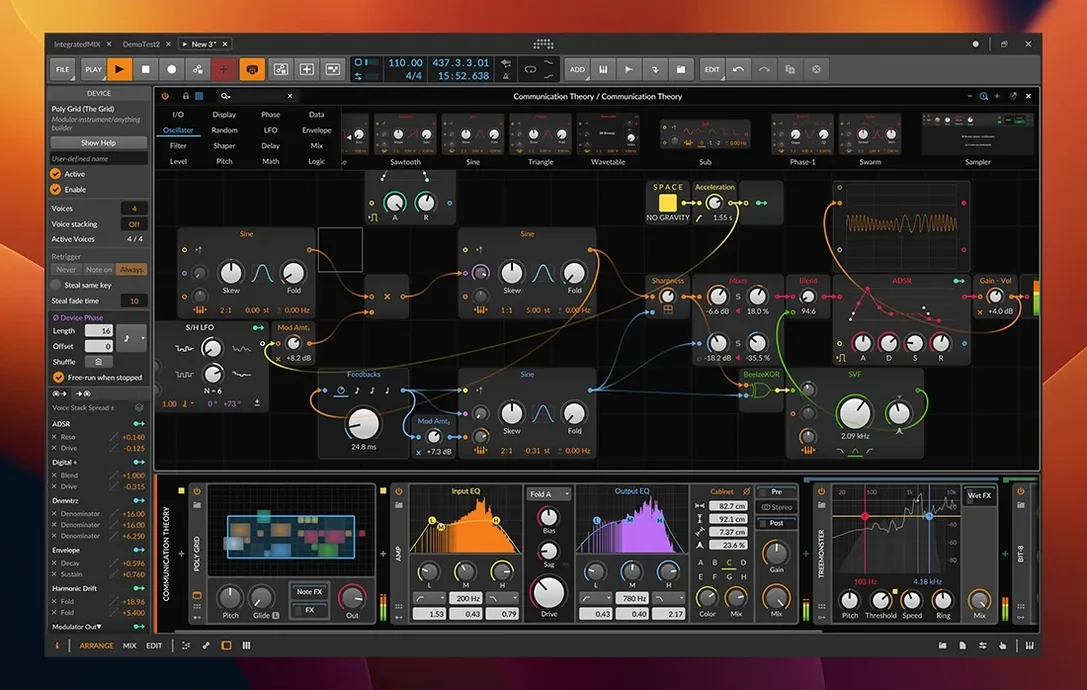
Bitwig Studio is a digital audio workstation for composing, recording, editing, and performing music.
This walkthrough focuses on one realistic task: slicing a sampled drum loop into individual hits using the updated Sampler in version 6.1. You start by dragging a loop onto a new track and opening the Sampler device. The new Fragments play mode automatically detects transient points and slices the sample at each beat. From there, you can map each slice to a different MIDI note, adjust Velocity and Pan per hit, and rearrange the pattern in the Arrange workspace. The result is a custom drum kit built from your own source material, ready for further editing or live performance.
Turn any audio loop into a custom drum kit
- Creating custom drum kits from any audio loop
- Quickly rearranging a sampled pattern into new rhythms
- Learning sample slicing without leaving the DAW
Sampler slicing requires Bitwig Studio 6.1 or newer
- The Sampler in 6.1 adds slicing and Fragments mode, but earlier versions lack this feature
- macOS 12 Monterey or newer is required
- English is the only interface language
From field recording to finished track in one session
You sit down with an idea. Maybe it is a field recording you made on your phone, a bass line from a hardware synth, or just a loop you found. In Bitwig Studio, the session unfolds the same way: you stay in one window and keep moving.
First, I create a new project and drag an audio file onto the Arrange workspace. The file appears as a clip on a new track. I double-click the clip to open the Detail Editor, which lets me see the waveform and trim the start and end points without altering the original file. Nondestructive editing means I can always go back.
Now I want to turn this loop into a playable instrument. I add a Sampler device to the track and switch the play mode to Fragments. The Sampler scans the loop, finds the transient points, and slices the audio at each one. Each slice becomes a zone that I can map to a MIDI note. I play a few keys on my controller and hear the loop rearranged into a new pattern.
From here, I can adjust each slice individually. In the Sampler editor, I select a zone and change its Velocity, Gain, Pan, Timbre, or Pressure. The microtonal editing tools let me fine-tune pitch if the original loop was not perfectly tuned. I can also drag slices around in the Fragments display to change their order.
Once the pattern feels right, I record a MIDI take in the Arrange workspace. The automatic tempo detection from version 6.1 means Bitwig already knows the tempo of my source loop, so the grid lines up. I then switch to the Mix workspace to balance levels, add an EQ, and maybe send the drums to a reverb bus. The three workspaces let me keep arrangement, mixing, and detailed editing visible on separate monitors if I have them.
Finally, I toggle Ableton Link and send the project clock to a friend who uses Live. We jam over the internet, each hearing the same arrangement in our own headphones. The session ends with a rough mix saved as a project file, ready for tomorrow.
How Bitwig Studio differs from Ableton Live and others
I get asked about this at the game club, where a few students are producing their own tracks. Here is how Bitwig Studio sits next to three other DAWs you might see on macOS.
Ableton Live. Both apps share the same session view and clip-based workflow. Live has a longer history and more third-party content, but Bitwig Studio offers the same real-time clip launching and Link support for sync. What Bitwig adds is the modular, window-based interface that lets me rearrange panels however I like. I cannot do that with Live.
Apple Logic Pro. Logic is deep and polished, but its interface is fixed. You work in one window layout. Bitwig Studio lets me pull the Detail Editor, the Sampler, and the Mix workspace into separate monitors. For live performance or for teaching electronic music production, that flexibility matters. Also, Logic does not include MPE support out of the box the way Bitwig does.
Steinberg Cubase. Cubase is strong for scoring and linear recording. Bitwig Studio is built for looping, improvising, and sound design. The modulation system in Bitwig has no direct equivalent in Cubase, and the new Fragments Sampler mode is a faster way to turn audio into an instrument than Cubase's sample editing workflow.
Each DAW has its strengths. Bitwig Studio wins when your work leans toward electronic production, live performance, or sound exploration.
Runs on Intel and Apple Silicon Macs with macOS 12+
Bitwig Studio 6.1 requires macOS 12 Monterey or newer. It runs on both Intel and Apple Silicon Macs, so it will start on a 2020 iMac or a MacBook Air with an M series chip. The installer is a standard drag-and-drop into the Applications folder, and the activation step in the included instructions is straightforward.
The application itself is one window, but you can detach the three workspaces (Arrange, Mix, Edit) onto separate monitors if you have them. That is useful on a laptop with an external display. On a single screen, the customizable interface lets you hide panels you do not need, keeping the workspace clean.
Bitwig Studio does not include a large library of loops or instruments. The built-in devices and effects are the ones you work with: more than 80 processors, the updated Sampler, and the modulation system. You supply the audio or MIDI content, either from your own recordings or from external sample packs.
Slicing controls missing? Check your version number
I cannot find the slicing controls in the Sampler. Slicing and the new play modes are part of version 6.1 only. If your copy is older, you will not see the Fragments or Spectral modes. Check the version number in the About dialog. The 6.1 update is the one that adds these features.
The automatic tempo detection does not work on my loop. Auto tempo detection reads the overall tempo of a clip, but it works best on material with clear rhythmic transients. If your loop is ambient or has a long fade, the detection may produce an odd value. You can manually set the tempo by typing it into the project tempo field. The Sampler still slices correctly once you supply the correct BPM.
My MPE controller does not send all dimensions. Bitwig Studio supports MPE, but the controller must be configured to send MPE data, not standard MIDI. Check the controller's manual to enable MPE mode. Once it is set, each note gets its own channel, and you can record Velocity, Gain, Pan, Timbre, and Pressure per note in the Detail Editor.
The interface language is only English. That is by design. There is no language selector. If you teach or work with non-native speakers, I recommend labeling common actions on a sticky note until everyone gets used to the terms. My students in Hamburg pick it up after a few sessions.
I cannot sync with Ableton Live. Ableton Link is a network protocol. Both apps must be on the same local network and have Link enabled. Also, both must use the same Link version. If it still does not connect, check firewall settings on your Mac. Ports used by Link need to be open for UDP traffic.
- Radically updated Sampler with slicing
- New Spectral and Fragments play modes
- Automatic tempo detection
- Automatic pitch detection
- macOS 12 Monterey or newer
- Intel or Apple Silicon
- Interface: English
How to install
- Use the included installation and activation instructions provided with the download.
Similar apps
Sign in or join the club to leave a comment.
Nobody has commented yet.