
- Version
- 6.7.3
- Studio or maker
- Zine EOOD
- Languages
- English
- Activation
- Included
- Runs on macOS
- macOS 10.13 or later
- Chip type
- Apple Silicon, Intel 64-bit
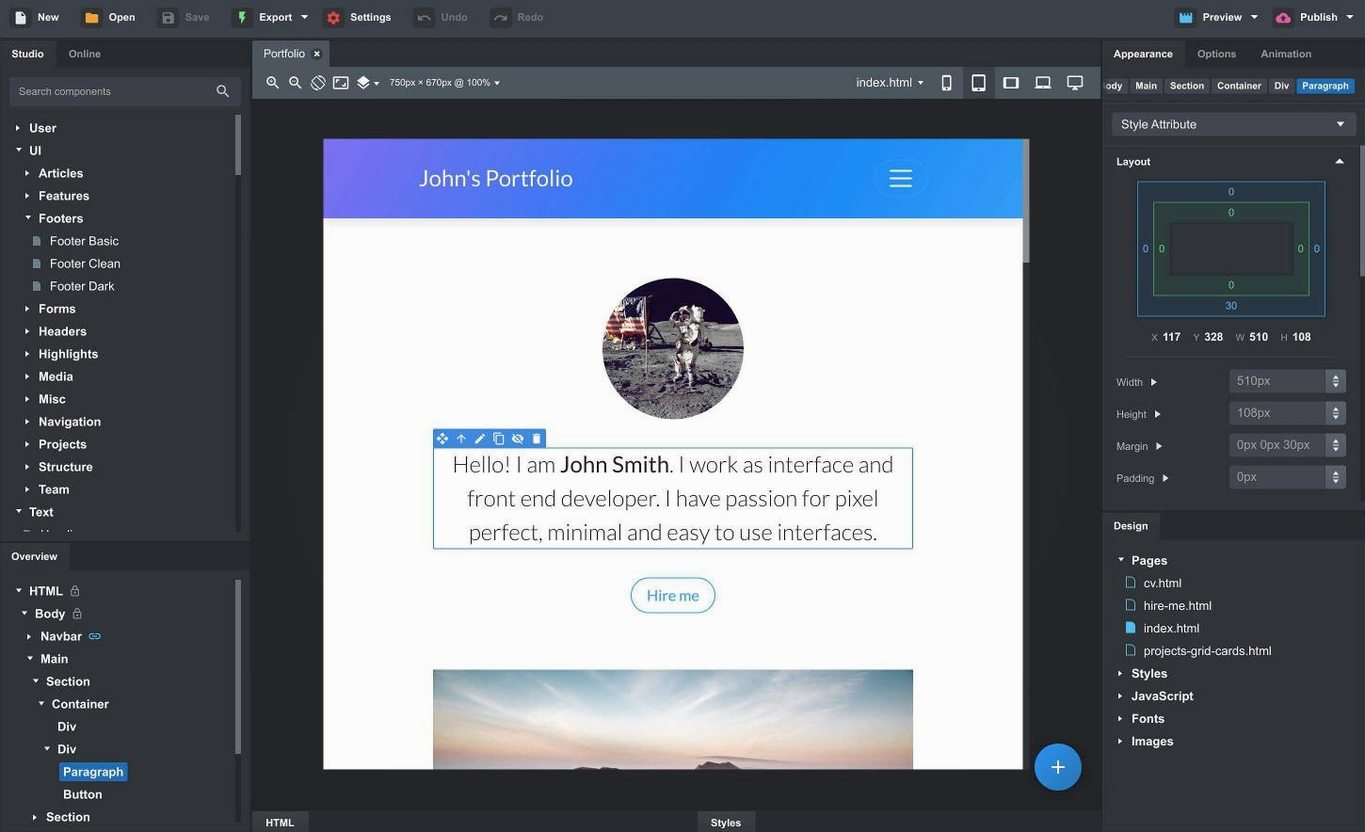
Building a responsive page from scratch usually means juggling code, resizing windows, and hoping the breakpoints behave. Bootstrap Studio for Mac removes that guesswork by giving you a visual canvas where the Bootstrap framework does the heavy lifting.
One realistic task: a landing page in an afternoon
- Drag a navbar component onto the canvas, then set it to sticky with the new Sticky On option.
- Add a hero section, drop in a headline and button, and let the grid arrange itself for mobile.
- Import your own CSS and JavaScript files by dragging them into the panel — no need to leave the app.
- Use the live preview to open the same page in Safari, Chrome, or a phone-sized window, and watch changes update instantly.
Why this works for teachers and tinkerers
The drag-and-drop components are just the start. You can save any part of your design as a custom component, so a footer or card you like becomes reusable in future projects. If you need fine control, you can edit the HTML directly or write SCSS and let Bootstrap Studio compile it. The online library adds community components, which is handy when you want a carousel or gallery without building it yourself.
How a freelance designer uses it
A friend of mine runs a small studio and takes on the occasional restaurant site or local business page. She used to write Bootstrap markup in a code editor, then refresh the browser, then tweak the CSS, then refresh again. With Bootstrap Studio, she opens the app, picks a blank Bootstrap 5.3 template, and starts dropping in components from the built-in library. The header, a hero image, a three-column feature section, a footer — she places them by dragging, adjusts spacing with the visual grid, and has a working prototype in about an hour. She then sends a live preview link to the client, who can see the layout on their phone. If they want changes, she drags a new component in place and the old one reflows automatically. It saves her the back-and-forth of “does this look right?” emails.
An afternoon session: from blank page to export
Let me walk through a typical working session. You launch Bootstrap Studio 6.7.3 and start with a new Bootstrap 5.3 project. The canvas shows a page with a header area already set up. You drag a navbar component from the Components panel and drop it at the top. Under its properties, you tick the Sticky On option so it follows the user as they scroll. Next, you grab a hero section, add a headline and a call-to-action button, then insert a spacer to separate it from the next row. The layout boxes snap into place as you resize them, and the preview next to the canvas refreshes every time you let go of the mouse.
Halfway through, you realize the gallery component would look better as a linked component — changes to one gallery update all instances across the site. You right-click the gallery and choose “Make Linked Component,” then drop a second copy on the services page. Now editing the gallery’s images in one place modifies both pages. When the footer is ready, you save it as a custom component from the context menu, so next week’s project starts with the same branding.
Before exporting, you open the live preview in a separate browser window to check the responsive breakpoints on a narrow iPhone view. The grid reflows the columns into a single stack, the navbar collapses into a hamburger menu, and the modal you added earlier closes when the visitor clicks outside the dialog (thanks to the new Click Outside to Close option). You export the clean HTML and CSS files, and the whole site is ready to upload.
Icon counts and AI model choices speed up your workflow
The Icon Dialog lists the number of icons per set, so you can quickly see which collection has a phone icon without clicking through every folder. The AI Assistant now offers gpt-4o-mini and gpt-4o models if you want help generating placeholder text or a page outline. And when you import an existing site by dragging in HTML, CSS, JS, and images, the app rebuilds the layout structure so you can edit it visually rather than searching through code. These are the kind of details that make Bootstrap Studio feel like a tool designed for people who build sites every day, not just a weekend project.
- Fixed the OpenAI API key dialog so it accepts all keys.
- Icon Dialog now shows the icon count and type for each set.
- Added a Sticky On option for sticky navbars.
- Added Click Outside to Close for Bootstrap modals.
- Added gpt-4o-mini and gpt-4o to the AI Assistant.
- macOS 10.13 or later
- Works on Intel and Apple Silicon Macs
Questions I keep getting
Can Bootstrap Studio import an existing website?
Yes. You can drag HTML, CSS, JavaScript, and image files into the app, and it will import them for editing.
Does it support SCSS?
Yes, Bootstrap Studio has full support for creating and editing SCSS files.
What are the system requirements for macOS?
It requires macOS 10.13 or later and works on both Intel and Apple Silicon Macs.
How to install
- Follow the included installation and activation instructions to set up Bootstrap Studio on your Mac.
Similar apps





Sign in or join the club to leave a comment.
Nobody has commented yet.