
- Version
- 7.4.8
- Studio or maker
- Cockos
- Languages
- English
- Activation
- k'ed by Team V.R
- Runs on macOS
- macOS 10.15 or later
- Chip type
- Apple Silicon, Intel 64-bit
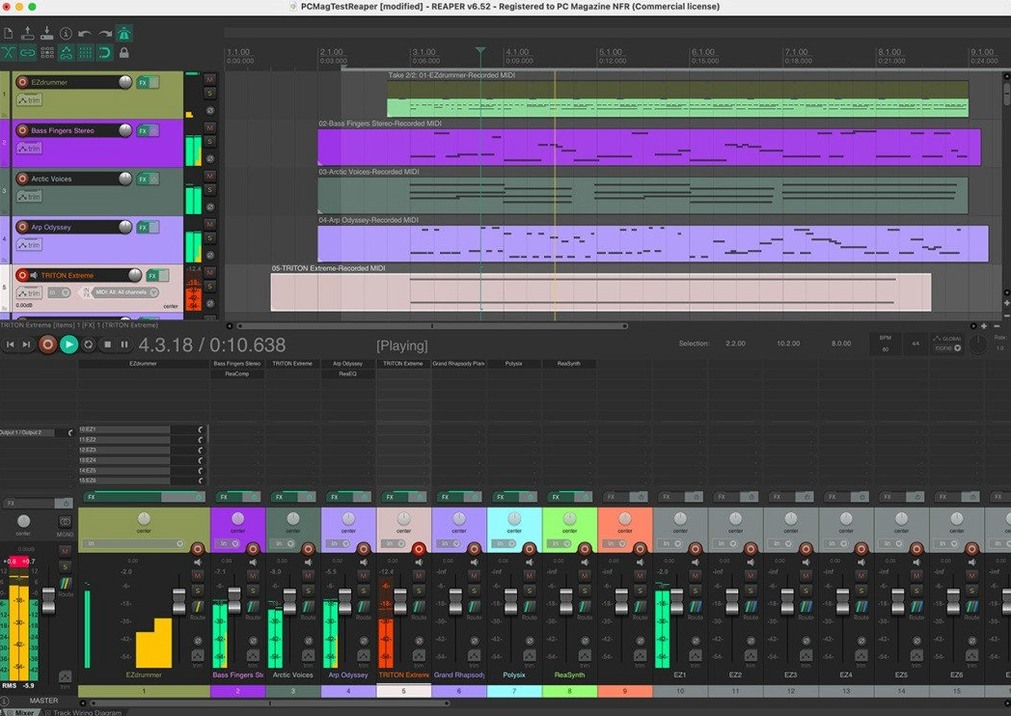
REAPER 7.4.8 handles up to 128 MIDI input devices and 512 remappable audio input and output channels. Those numbers tell you what kind of tool this is: not a simple recorder, but a full digital audio workstation that can take a soloist, a band, or an entire orchestra from first take to final master.
Sits next to your other Mac audio apps
If you already use your Mac for music, REAPER sits comfortably next to the other apps on your drive. It supports a wide range of hardware interfaces, digital formats, and plugins, so the gear you own now will likely work without fuss. The loopback audio feature adds up to 512 additional channels, which is handy when you want to route sound between applications. Child tracks route automatically into their folder, keeping your session tidy when you group instruments.
Extend it to match your workflow
REAPER is built to be modified. You can script repetitive tasks, add custom actions, and tweak the interface until it feels like your own. That flexibility makes it a favorite among teachers and hobbyists alike. With an audio interface and a microphone, your Mac becomes a recording studio. You can evaluate the full version for 60 days before deciding if it stays in your toolkit.
Skipping the default template is the most common error
When you first open reaper, the number of buttons, menus, and panels can be overwhelming. Most beginners I have watched in the game club or in my own early days make the same few mistakes.
Skipping the default template setup. Reaper starts with a blank project and no default input configuration. New users often begin recording without setting up their audio device preferences first, which leads to latency issues or no sound at all. A quick fix: open Preferences, choose your audio system and device, and save that as your default project template. It saves ten minutes of frustration on every new session.
Recording on the master track. It happens more often than you would think. Beginners arm the master track for recording instead of creating a new track. Reaper does not stop you from doing this, but you will not get the expected result. The master track is for mix processing, not for capturing audio or MIDI. Make a habit of pressing Command+T to insert a new track and arming that one instead.
Forgetting about the routing matrix. Reaper’s routing is powerful but invisible at first glance. Beginners sometimes wonder why their recorded track is silent or why a plugin on one track affects another. The routing matrix, found in the View menu, shows every connection clearly. Check it when something sounds wrong before reaching for other controls.
Not using the undo history. Reaper keeps a deep undo history, but new users often close a project and lose it. If you make a change you do not like, open the undo history and step back as far as you need. It is faster than deleting items and re-recording.
A workflow for recording a single vocal take from start to finish
This workflow covers recording one vocalist with a simple setup: a microphone, an audio interface, and reaper. It takes about ten minutes from opening the app to having a clean take ready for editing.
- Set up your audio device. Open Preferences, go to Audio, then Device. Select your interface from the dropdown. Set the sample rate to 44100 Hz and the buffer size to 256 samples. This gives a good balance of low latency and stability for most Macs.
- Create a track and arm it. Press Command+T to add a new track. Click the red Record Arm button on the track control panel. If you do not see the meter moving when you speak into the microphone, check your interface gain knob or the input assignment on the track.
- Set a count-in. Go to the Options menu, choose Metronome and Count-in, and set the count-in to two bars. This gives you a steady tempo reference before recording starts. (If you do not use a click track, you can skip this step.)
- Record. Press the Record button in the transport bar. Sing or speak your part. Press the Space bar to stop when you are done.
- Trim the take. Click the recorded item to select it. Drag the left and right edges inward to cut out silence at the start and end. This cleans up the project and makes editing faster.
- Save the project. Press Command+S, name your project, and choose a folder. Reaper creates a project file and a subfolder for audio files, keeping everything organized. Now you are ready to add effects or comp takes.
Lining up two MP3 files from a Zoom interview
Marcus edits a weekly interview podcast recorded over Zoom. He receives two separate MP3 files: one from the host, one from the guest. In the past, he lined them up by hand, which took time and sometimes drifted out of sync by the end of the episode.
With reaper, Marcus imports both files onto two tracks. He enables the item snap setting so they stay aligned. He zooms into the waveform at the beginning of each file and lines up a clear word or a cough. Reaper’s built-in stretch markers let him nudge one track by a few milliseconds if the interview software introduced a tiny offset. After the alignment, he uses the volume envelope on each track to smooth out level differences between speakers. The whole sync process takes under two minutes. Marcus now spends less time fixing drift and more time editing content.
Version 7.4.8 improved large-project track management
Version 7.4.8 continues reaper’s tradition of incremental, practical updates rather than redesigns. The changes that affect daily work include improved handling of large projects with many tracks, making folder track management more predictable when you move tracks around. The envelope system received refinements that reduce accidental edits when you click near a point. Users who work with MIDI will notice that the inline MIDI editor responds faster when selecting notes across multiple channels. For those who use the software with video, the video processor now applies effects more reliably during playback. If you run reaper on an Apple Silicon Mac, these updates also include optimizations that take better advantage of the ARM64 architecture, though the universal build works on both Intel and Apple Silicon machines. The developers have also expanded the scripting API slightly, which means custom scripts from the community continue to grow more capable without breaking existing ones.
- macOS 10.15 or later
- Intel or Apple Silicon
- English interface
How to install
- Mount reaper748_universal.dmg and drag REAPER to your Applications folder. This build runs on both Apple Silicon and Intel Macs.
- If you are on an Intel Mac and prefer a native Intel-only install, use reaper748_x86_64.dmg instead.
- After the main app is in place, run the Reaper 7.x.x unipatch. It keeps the program up to date with the latest fixes.
Similar apps






Sign in or join the club to leave a comment.
Nobody has commented yet.