- Version
- 15.0.30
- Studio or maker
- Steinberg
- Languages
- English
- Activation
- K'ed by iamdumb
- Runs on macOS
- macOS 13 or later
- Chip type
- Apple Silicon, Intel 64-bit
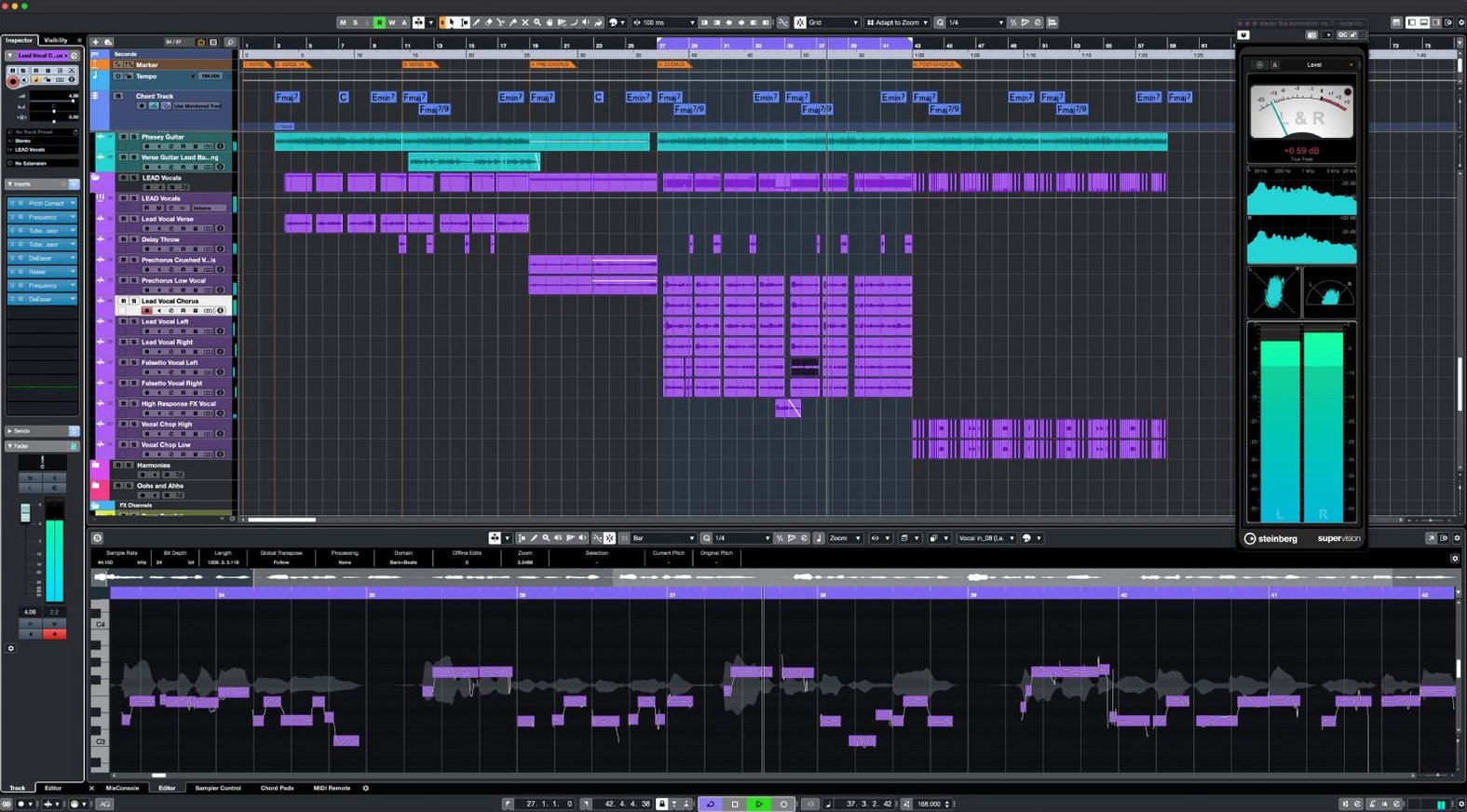
Cubase 15.0.30 runs on any Mac with macOS 13 or later, whether it's an Intel model or Apple Silicon. That covers a wide range of machines, so most teachers and students can get it going without hunting for an older version.
Record unlimited audio, MIDI, and instrument tracks in one project
- Recording and editing unlimited audio, MIDI, and instrument tracks in one project.
- Vocal correction with VariAudio, plus AudioWarp to snap audio to your project's tempo and grid.
- Surround sound work with built-in Dolby Atmos tools.
- Adding loudness without ruining transients using the Raiser compressor.
- Generating evolving textures with FX Modulator.
- Setting up complex routing with 8 send channels and 64 return channels.
Aimed at professionals with a real learning curve
- Cubase is aimed at professional producers, composers, and sound engineers, so the learning curve is real.
- Sample rates go up to 192 kHz, which is great for high-resolution audio but demands a capable interface.
- The interface is English only, though the shortcut system helps speed up workflow.
Don't jump into recording without setting up a template
When you first open Cubase, the number of options can feel overwhelming. A few recurring slip-ups show up in the school club and in my own early attempts with DAWs. One is jumping straight into recording without setting up a proper template. Beginners often start from a blank project and spend the next twenty minutes adding busses, routing audio, and naming tracks. A simple template with a few audio tracks, one instrument track, and a stereo output already routed saves that time every time.
Another mistake is ignoring the track types. Dropping a MIDI drum loop onto an audio track by accident, then wondering why no sound comes out, is a classic. Cubase treats audio, MIDI, instrument, and group channels separately, so taking a minute to confirm the track type before you drag anything in helps avoid head-scratching.
People also forget about the 64-bit processing engine. It handles large projects well, but only if you keep an eye on what loads into memory. Beginners sometimes load every virtual instrument they own into a single project, then wonder why things get sluggish. Cubase gives you 64 VST instrument slots, but you don't have to fill them all. Loading only what you need keeps the session responsive.
A quieter but common oversight: not using the Scale Assistant. It lives inside the chord tools and can lock your MIDI notes to a preset scale. New users often play something that sounds off without realizing they are hitting notes outside the key. The Scale Assistant stops that before it becomes a problem, especially for people still learning music theory.
Lastly, many beginners skip the AudioWarp step when they import audio loops. A guitar riff recorded at 100 BPM dropped into a 120 BPM project will drift out of time. AudioWarp snaps it to the grid, but you have to activate it. It is not automatic.
What to check before installing Cubase
Built-in Mac audio works for MIDI and learning the layout
Not for getting started. Cubase will use your Mac's built-in microphone and speakers or headphones. The sound quality and latency might not be ideal for serious recording, but it works fine for arranging MIDI, learning the layout, and trying out the included effects. When you want to record a vocal or an instrument with decent quality, that is when an interface becomes useful.
Can I use my existing MIDI keyboard with it?
Most likely yes. Cubase includes MIDI Remote integration, which can connect common MIDI controllers and lets you create custom mappings if yours is not listed. The recent addition of support for Novation Launch Control Series 3 shows that Steinberg keeps updating compatibility with newer hardware. If your keyboard works as a standard class-compliant device, macOS will see it immediately, and Cubase will let you assign it.
How big is the download?
The macOS package is listed as under 1.3 GB. That is a moderate size for a modern DAW. Downloading through the Steinberg Download Assistant takes a while on slower connections, but the file itself is not enormous. Once installed, the application and its content will use more space as you add sound libraries and projects.
Cubase runs on internal audio with high buffer settings
Yes. Cubase runs on the Mac's internal audio hardware. The same limits apply as with any DAW on a laptop: high buffer settings help avoid clicks and pops when you have many tracks going. With unlimited audio and MIDI tracks available, a typical laptop can handle a good-sized project before you need to freeze or bounce tracks.
What is the difference between this and other Cubase versions?
One installer covers all Cubase 15 versions. The license you own determines which features unlock. So if you have a license for Cubase Pro, you get the full Dolby Atmos tools, unlimited channels, and all effects. The download file is the same either way.
Requires macOS 13 or newer, works on Intel and Apple Silicon
Cubase 15.0.30 requires macOS 13 or newer. It works on both Intel Macs and Apple Silicon machines, so no matter which generation you use, you can install the same copy. The installer uses the Steinberg Download Assistant, which handles the download and keeps the files organized.
The application itself provides a 64-bit sound engine that supports sample rates up to 192 kHz. That means it can handle high-resolution audio projects if your interface and speakers support it. The project can contain unlimited audio channels, MIDI tracks, and instrument tracks. You can also use up to 256 group channels, 8 send channels, and 64 return channels for routing. That is enough for large orchestral or film-style productions.
On the effects side, each channel can hold up to 16 insert effects. There are 64 VST instrument slots available. The included Raiser compressor is designed to increase loudness while leaving transients and transparency intact. FX Modulator can generate complex, evolving textures without needing a separate plugin. Vocal correction is handled by VariAudio, and the Scale Assistant provides preset scales to keep your melodies in key. Audio to MIDI chords detects harmony in audio recordings and converts it to MIDI notes, which is useful for analyzing or rewriting parts.
Cubase also supports up to 256 physical inputs and outputs, so if you work in a studio with a large patchbay or multiple audio interfaces, it can handle that routing. The keyboard shortcut system can speed up common tasks once you learn the layout, though the interface itself is in English only.
A composer writing a three-minute short film score in one week
Imagine a composer who needs to write a three-minute score for a short film. They have a deadline of one week and a modest setup: a MacBook, a MIDI keyboard, and a small audio interface. They start by setting up a Cubase project with the film's video imported onto the timeline. They create instrument tracks for strings, piano, and a soft synth pad, using the 64 VST instrument slots to load a few sampled libraries.
As they compose, they use the Scale Assistant to keep the piano melody inside a minor scale, avoiding wrong notes while working quickly. For a scene with dialogue, they need to add a subtle ambient texture. FX Modulator generates a slow, shifting drone that sits underneath the speech without competing with it. When they record a live cello part through the interface, they notice a few timing issues. AudioWarp snaps the performance to the project tempo in seconds, so they do not have to rerecord.
Later, the director asks for a louder final mix without distortion. The composer inserts Raiser on the master bus, which adds perceived loudness while keeping the cello transients intact. The whole project stays within the track and channel limits without any need to bounce stems early. The composer exports the final mix and sends it off.
Start with a simple template of one audio and one instrument track
Start with a simple template. Create a new project, add one audio track, one instrument track, and a stereo output. Save it as a template. Every time you open Cubase after that, you can begin from this clean setup instead of rebuilding the basics.
Take ten minutes to explore the shortcut system. You do not need to memorize every command, but learning a few for cutting, duplicating, and moving events saves noticeable time across a session. The shortcuts are listed inside the program, so you can check them without leaving the app.
Try the Scale Assistant on a MIDI track early on. Even if you know theory, it helps to lock the keyboard to a scale and just play. It reduces the chance of accidental sour notes and lets you focus on rhythm and phrasing.
When you import audio loops, activate AudioWarp manually. Cubase does not warp every imported clip by default. Right-click the clip, find the warp options, and let the program analyze the tempo. Once it snaps to grid, editing becomes much cleaner.
Keep an eye on the number of active VST instruments. With 64 slots available, it is easy to load every sound you own. But a lean project runs better. If you are not using a particular instrument, deactivate or remove it. You can always bring it back later.
Lastly, check the release notes for Cubase 15.0.30. They list fixes and smaller enhancements that might affect something you are working on. Knowing what changed helps you avoid old workarounds that are no longer needed.
It fits next to your existing tools as a complete production environment, not a lightweight sketchpad.
- Fixes and enhancements across several areas of the app.
- Support for Novation Launch Control Series 3 controllers.
- MIDI Remote API 1.3 is now supported.
- macOS 13 or later
- Intel or Apple Silicon
Questions I keep getting
Does Cubase 15.0.30 run on Apple Silicon Macs?
Yes, it supports both Intel and Apple Silicon Macs, as long as you're on macOS 13 or later.
How to install
- Use the included installation instructions to set up Cubase on your Mac.
- Follow the included activation instructions to get started.
Similar apps




Sign in or join the club to leave a comment.
Nobody has commented yet.