- Version
- 9.0.9
- Studio or maker
- Cycling '74
- Languages
- English
- Activation
- K'ed by TEAM HCiSO
- Runs on macOS
- macOS 11 or later
- Chip type
- Apple Silicon, Intel 64-bit
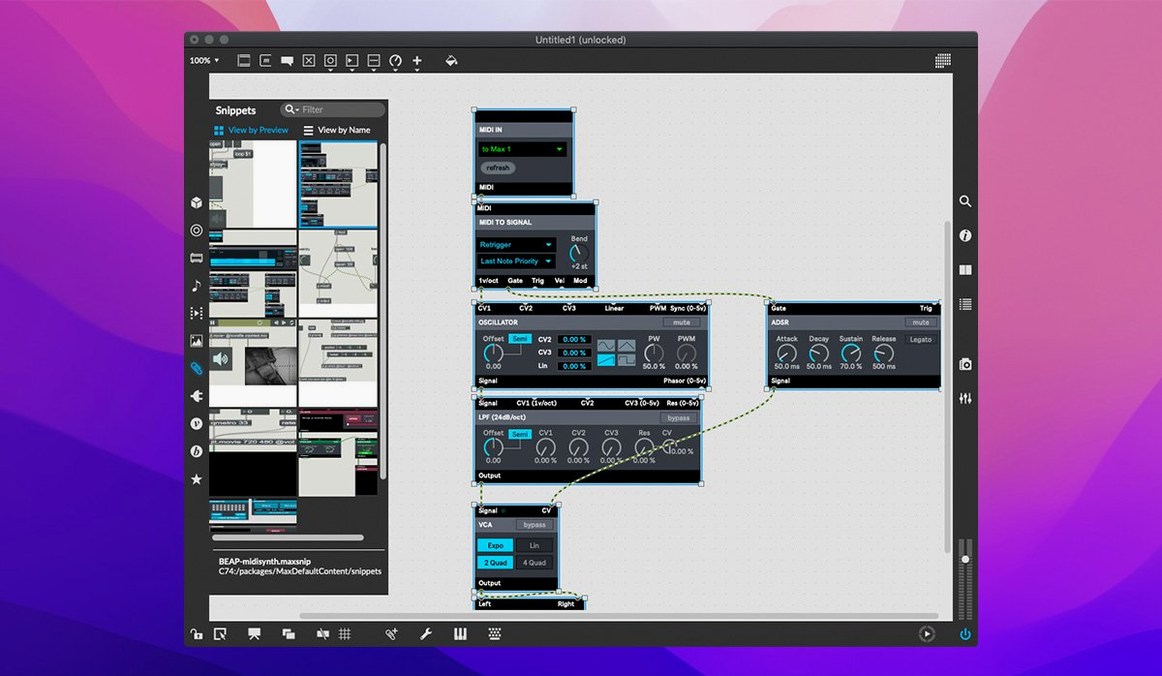
Open the Max window and find the interactive help for any object by right-clicking. That working demonstration shows you exactly what the object does and how its inlets, outlets, and arguments behave. Here are the first terms a newcomer should know:
Patcher — the canvas where you wire objects together. Drag objects from the Object Browser or type them in.
Object — a box that performs one task, like playing a note or routing data. Type its name and arguments, then connect its outlets to inlets of other objects.
Message — a value you send to an object, often typed in a message box and patched to an inlet.
Bang — a trigger that makes an object do its thing. Click a bang button in the patcher to see it fire.
Inspector — a panel that shows every property of the selected object. Use it to change colors, ranges, or behavior without retyping.
MIDI — musical instrument digital interface. Max sends and receives MIDI through its built-in objects, letting you control synthesizers, drum machines, or software instruments.
QuickTime movie — Max can play QuickTime movies right inside a patcher, useful for video-reactive patches or syncing sound to visuals.
Will Max run alongside other audio software I already have
Before you mount that disk image and drag Max into Applications, a few things come up regularly with the teachers and artists I talk to.
Will it run alongside other audio software I already have? Yes. Max behaves like a normal Mac application. It does not install kernel extensions or change your system audio routing unless you tell it to. Many people run Max side by side with a digital audio workstation like Ableton Live or Logic Pro, sending MIDI between them via inter-application MIDI or virtual cables.
Do I need to know programming? No. Max is visual. You connect boxes instead of writing lines of code. The 40 interactive tutorials walk you through the basics. That said, the more you explore, the more you discover that Max can handle complex logic, and the object-based approach makes it easier to learn than traditional text programming.
Can I share what I make without making others install Max? Not directly. Patchers run inside Max. But with the cross-platform SDK you can build standalone applications that include the Max runtime, so people without the full software can run your patch. This takes some extra steps but it is documented in the SDK materials.
Does it work with older Macs? Max 9.0.9 requires macOS 11 or later and supports both Intel and Apple Silicon. If your Mac runs Big Sur or newer, you are good. The install is a simple drag to Applications.
Smart copy and paste remembers your object's inspector properties
Max packs features that are easy to overlook on a first browse, but worth knowing about.
Smart copy and paste. When you copy an object, the Inspector remembers its properties. Paste a copy and the new object keeps the same arguments, ranges, and colors. Saves time when you are building a row of similar objects.
Foreground and background running. A patcher can run in the foreground (it updates only when its window is open) or the background (it keeps running even when hidden). This is set from the patcher inspector. Background mode is useful for patches that monitor MIDI input or generate sound while you work on something else.
Message tracking. Turn on message tracking in the debug menu and Max highlights the data path between objects as messages travel through your patch. It is a teaching tool and a troubleshooting aid rolled into one.
The Object Browser. You can type an object name directly into a patcher, but the Object Browser lists all objects with search and categories. Hover over any object to see a one-line description. Right-click again for the interactive help.
Title bar object box. Each patcher has a small object box in its title bar. Double-click it to rename the patcher. This matters when you have multiple subpatchers open and need to tell them apart.
Serial device support. Max reads from serial ports, which is less common in music software. This matters if you connect hardware controllers, sensors, or Arduino-style boards that communicate over serial.
Building a master patcher with subpatchers for live sequencing and processing
Imagine a composer who builds electronic music pieces and performs them live. They open Max and create a master patcher that contains several subpatchers: one for sequencing drum sounds from a hardware synth via MIDI, one for processing a microphone input with a delay effect, and one for controlling a video projection through QuickTime movie playback.
They assign MIDI notes from a small keyboard controller to trigger different parts of the master patcher. During rehearsal they use the Inspector to adjust the delay time on the effect subpatcher without stopping the audio. They leave the video subpatcher running in the background so the visuals continue while they adjust the music patch.
On stage they only need to press a few keys, and Max manages the rest: sending MIDI notes to the drum machine, processing live audio, and keeping the video in sync with the tempo. The message tracking feature helps them verify the timing chain is correct before the show.
How Max fits with other apps and macOS features
Max does not replace your audio workstation, but it extends it. You can route MIDI from Max into Ableton Live, Logic, or any DAW that accepts external MIDI. You can also send MIDI out to hardware instruments through a USB MIDI interface.
On macOS, Max works with the system MIDI setup. Open Audio MIDI Setup to configure virtual MIDI ports, then address them from Max objects. For video, QuickTime playback lets you sync sound to visuals without exporting a finished movie file each time.
The cross-platform SDK means you can code new objects in C or C++ and compile them for Mac. This is advanced territory, but it lets you build custom components that behave exactly like Max objects. Many third-party object libraries started as SDK projects.
For musicians who use Ableton Live, the support for button assignments for parameter banks in live.banks (introduced in version 9.0.9) makes it easier to map hardware controllers to Live parameters via Max. The bundled RNBO v1.3.5 extends Max with real-time audio patching that can export to other environments.
- macOS 11 or later
- 64-bit processor (Intel or Apple Silicon)
- Interface language: English
Questions I keep getting
Can I run multiple patches at once in Max?
Yes. Max can create and run multiple applications and tasks at the same time, limited only by your computer's memory and speed.
Does Max support MIDI hardware?
Max includes built-in support for MIDI input and output streams, so you can connect keyboards, controllers, and other MIDI gear directly.
How do I start learning Max as a beginner?
Use the interactive help by right-clicking any object and choosing Open Help. Each help patcher is a working demonstration you can edit and experiment with.
How to install
- Mount the downloaded disk image.
- Drag the Max app to the Applications folder alias inside the image.
- After copying finishes, launch the app from Launchpad.
Similar apps
Sign in or join the club to leave a comment.
Nobody has commented yet.