
- Version
- 1.15.6
- Studio or maker
- Blace Plugins
- Languages
- English
- Activation
- K'ed by Monter Group
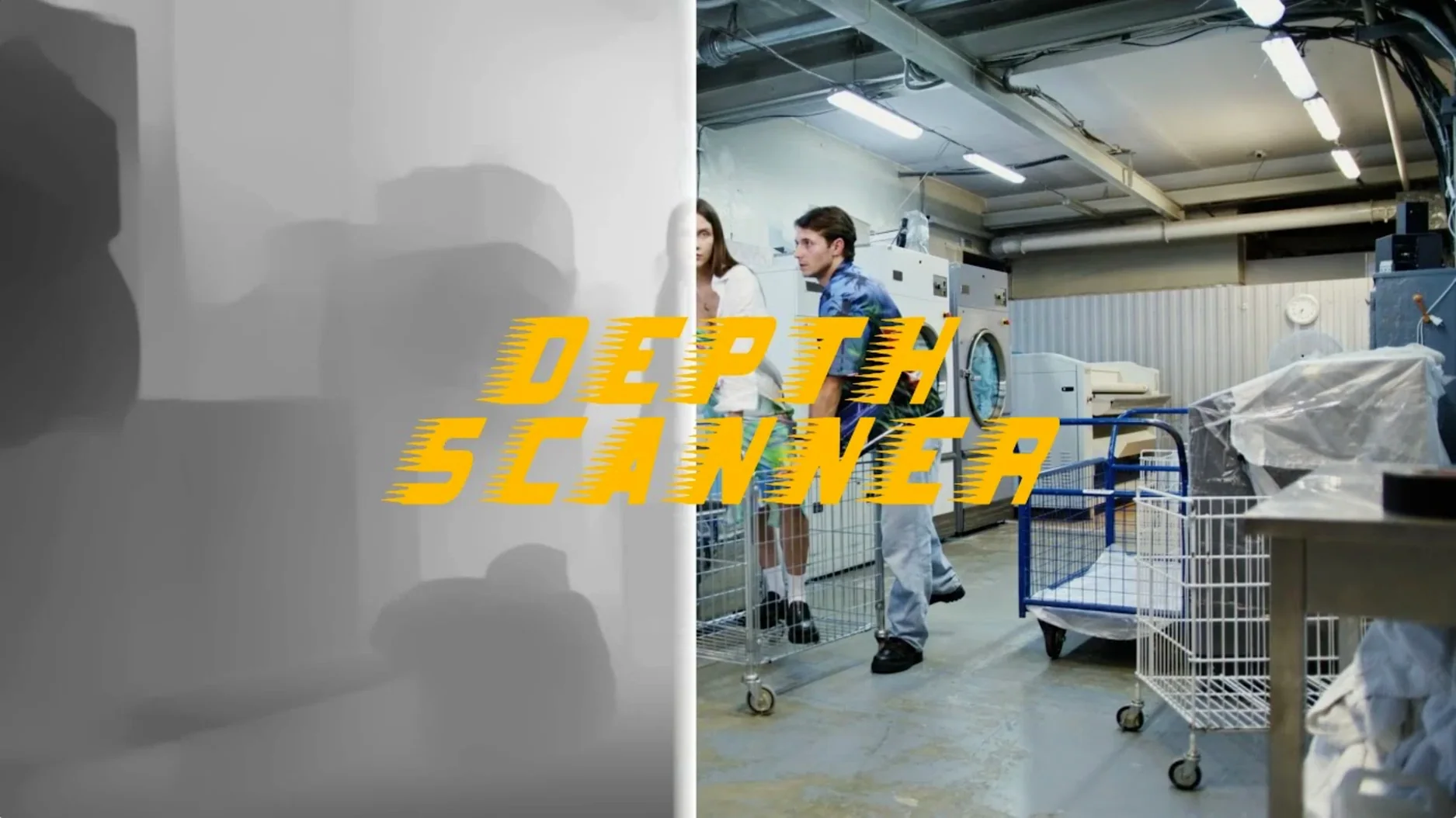
Depth Scanner runs on any Mac that can handle Adobe After Effects, including both Apple Silicon and Intel models. It is a plugin, not a standalone app, so it lives inside After Effects and works with whatever you already have there.
What it does
Point it at a video clip or a photograph, and it uses artificial intelligence to build a depth map automatically. That map is a grayscale image that tells After Effects how far each part of the scene is from the camera. From there you can create depth-of-field effects, where near objects stay sharp and backgrounds blur naturally, or build depth-based transitions that move between scenes with a sense of physical space.
Suits video editors and motion designers avoiding rotoscoping
It suits video editors and motion designers who want depth information without rotoscoping or manual painting. The interface is in English, and the plugin documentation lists it alongside Depth Scanner 2, so you are getting the current version of the tool. If you already keyframe cameras or work with 3D layers in After Effects, this gives you one more input to drive them with.
Let me walk you through a task I often do with it so you can see the whole process. Suppose you have a short clip of a person standing in a room, and you want the background to fall gently out of focus while the person stays sharp. Here is one way to set that up from start to finish.
A complete workflow: selective focus from a single clip
Bring your clip into an After Effects composition as you normally would. Select the layer in the timeline, then go to the Depth Scanner plugin panel. I usually leave the default settings alone for a first pass. Click the button to generate the depth map. The plugin analyzes the frame and produces a grayscale image where white areas are closest to the camera and black areas are farthest.
Once the depth map appears, you have a few options. For a simple depth-of-field effect, I apply a blur effect to the original clip and use the depth map as a mask. In After Effects, you can use the Compound Blur effect and point it at the depth map layer. Adjust the blur amount, and areas that are black in the map blur more, while white areas stay clear. You might need to invert the map depending on how your scene is arranged.
If you want more control, the depth map works well with After Effects native 3D camera tools. Duplicate your clip layer several times, each one representing a different depth range. Use the depth map as a reference to mask each duplicate. Then you can position the layers in 3D space and move the camera to create a parallax effect. This is the same technique you would use for a Ken Burns style motion, but driven by actual depth data instead of guesswork.
For a depth-based transition, place two clips on separate layers. Generate a depth map for the first clip. Then use the map to control the opacity of the top layer. For example, you can make the foreground of the first scene fade out while the background remains visible, revealing the second scene underneath. It creates a transition that feels like moving through space rather than a simple crossfade.
Small conveniences I noticed over time
Depth Scanner keeps the depth map in the project panel as a separate item. That means you can reuse it across multiple layers or comps without regenerating it. If you decide to tweak the effect later, the map stays unchanged, so you only run the analysis once.
The plugin works on still images just as easily as video. For a photograph, you get the same depth map in a single frame. This is handy when you are building a composite and need to match depth across several source images. You can generate maps for each photo and then blend them in After Effects using the depth information as a guide.
Because it runs inside After Effects, it respects your existing project structure. You can apply it to adjustment layers, groups, or even nested compositions. If you have a complex scene with multiple elements, you can generate separate depth maps for different parts and combine them using layer blending modes.
The plugin does not require any additional software or libraries. It is a single plugin file that you install into the After Effects plugins folder. Once it is there, it appears in the Window menu under the Blace Plugins section. No background services or separate processes to manage.
Works with 4K video at any composition resolution
People often ask whether it works with 4K video. The answer is that it processes whatever resolution your composition is set to. If After Effects can handle the clip, the plugin can handle it. The analysis time depends on the number of frames and the complexity of the scene, but it runs entirely within After Effects so you can preview results as they come in.
Another common question is about batch processing. Depth Scanner does not have a built in batch mode, but you can use After Effects own scripting capabilities to apply it across multiple clips. If you have a folder of similar footage, you can write a simple script that runs the plugin on each file and saves the depth maps. For occasional use, the manual approach is fast enough.
Some people wonder if the depth maps are editable. The plugin outputs a standard grayscale video or image, which you can modify in After Effects just like any other layer. You can paint corrections onto the map, blur it, or adjust contrast to fine tune the depth information. It gives you a starting point, not a locked result.
I also get asked how it compares to Depth Scanner 2. The documentation lists both, and they serve the same purpose. Version 1.15.6 is the current build, and it works on both Apple Silicon and Intel Macs. If you already own the plugin, this is the version you are running. If you are new to it, this is the version you install.
Integrates with After Effects, Premiere Pro, and Photoshop
Since it is a plugin for After Effects, it integrates directly with the Adobe ecosystem. The depth maps you generate can be used in Premiere Pro if you round trip through After Effects, or in Photoshop if you export frames as stills. The grayscale format is standard, so nothing special is needed to move the maps between apps.
On macOS, the plugin uses the standard After Effects plugin folder structure. If you use multiple versions of After Effects, you need to install the plugin into each version separately. The process is the same for all supported versions, and the plugin does not depend on any specific macOS feature beyond what After Effects requires. It does not need Rosetta on Apple Silicon Macs because it runs natively within After Effects, which itself runs through Rosetta for Intel plugins. The developer has handled compatibility, so you do not need to think about it.
The plugin also works with After Effects integration tools like Dynamic Link. If you have a Premiere Pro project with a linked After Effects composition, you can apply Depth Scanner inside that composition and the depth map updates in Premiere Pro automatically. It saves you from exporting and reimporting intermediate files.
For archiving, the depth maps are small files. A typical HD clip generates a depth map that takes up a fraction of the original video size. You can store them alongside your project files and regenerate them only if you lose the originals.
- macOS compatible with Adobe After Effects
- Adobe After Effects
- Interface language: English
Questions I keep getting
Does Depth Scanner work on photos or only video?
It works on both video clips and photographs. You can feed it either and get a depth map back.
What can I do with the depth map it creates?
The depth map can drive depth-of-field effects or depth-based transitions in After Effects.
Is this a standalone application?
No, it is an Adobe After Effects plugin. You run it inside After Effects, not on its own.
How to install
- Run the standard installer for the plugin.
- Restart After Effects so it picks up the new plugin files.
Similar apps




Sign in or join the club to leave a comment.
Nobody has commented yet.