- Version
- 2.2.9
- Studio or maker
- Splasm Software
- Languages
- Russian, English, German, Spanish, Portuguese, Swedish
- Activation
- K'ed by TNT team
- Runs on macOS
- OS X 10.11 or later
- Chip type
- Apple Silicon, Intel 64-bit
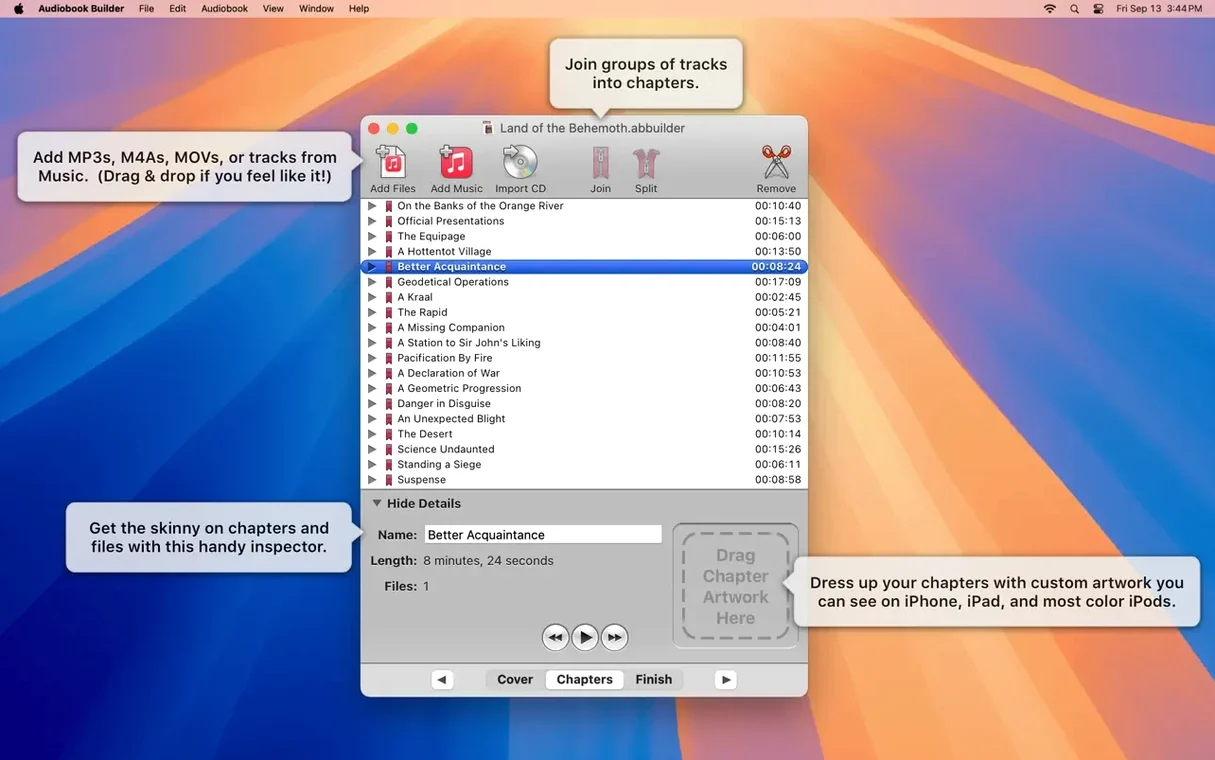
When you have a pile of audio CDs or scattered MP3s that you want to listen to as one continuous book, the default music apps don't quite fit. Audiobook Builder for Mac solves that by turning those files into proper audiobooks with chapters, cover art, and the right format for your iPhone or iPad.
Gather your audio files and open the app
Launch Audiobook Builder and drag in the audio files or insert a CD. The app reads the tracks and shows them in a list, ready for the next step.
Add the book details and cover
Enter the book title, author, and pick a cover image. On macOS 13 Ventura and later, chapter artwork works too, so you can give each chapter its own visual cue.
Build and send to your library
Choose your preferred audio settings, then hit build. The finished audiobook lands directly in iTunes, Music, or Books, synced to your Apple devices. The whole process takes a few minutes and gives you a library that actually behaves like audiobooks.
A teacher's commute project
One of my colleagues, a history teacher who records her own lecture summaries for students who miss class, found herself with forty separate WAV files from a semester. She wanted them organized as a single audiobook her students could navigate easily. She opened Audiobook Builder, dragged in the files, and created named chapters for each week's topic. The cover image was a simple title slide she made in Preview. Within ten minutes, the whole thing was in her Music library, ready to sync to student iPads. She told me it saved her from hearing "I couldn't find the right file" again.
Building an audiobook from loose MP3 files
I set up a session myself with a box set of radio plays I had as loose MP3s. First, I launched Audiobook Builder and dropped the files into the window. The list appeared with each file as a potential chapter. I clicked through to adjust chapter breaks — merging two short episodes into one chapter, splitting a longer one into two so the car ride home felt complete.
Next, I typed the title and author. I found a public domain image online, saved it, and dragged it into the cover art area. For chapter artwork, I chose a different color block for each chapter, nothing fancy, just enough to see where I was on my phone.
I left the audio settings on the preset for iPod and iPhone, which balances file size and quality well. Then I clicked build. The progress bar moved at a steady pace, and when it finished, the audiobook appeared in Music. I checked the chapter titles on my phone — each one showed the custom name I'd set.
The whole workflow, from dragging files to having it on my phone, took about the same time as brewing a pot of tea.
Fits into your Mac's existing tools and libraries
Audiobook Builder fits quietly into the tools you already use. The cover art and chapter images can come from any image file on your Mac — Photos, Preview, even a screenshot. The finished book goes straight to iTunes, Music, or Books, depending on your macOS version. If you use Finder tags or Smart Folders to organize your audio source files, the app respects those folder structures when you drag them in.
For anyone running macOS 10.11 through 14 Sonoma, the app still works without fuss, and version 2.2.9 adds explicit support for macOS 15 Sequoia. That means no sudden incompatibility when you update your system. The same app runs on both Intel and Apple Silicon Macs, so it works in a mixed household or after switching machines.
Cover art now works on macOS Ventura
The latest update is small but practical. Cover and chapter artwork now function properly on macOS 13 Ventura — earlier versions had trouble there, so anyone who upgraded found that feature suddenly working again. The app no longer shows misleading "no audio in file" errors for WAVE files that contain MP3 audio data, which used to stop a build cold until you tracked down the file. An error reporting glitch on pre-macOS 11.3 Macs is fixed, and the Description tag works again for some classic iPods, which matters if you maintain an older device for a student or family member.
- Ready for macOS 15 Sequoia.
- Cover and chapter artwork work on macOS 13 Ventura.
- Fixed a false “no audio in file” error for WAVE files that contain MP3 audio.
- Corrected an error reporting issue on Macs running macOS 11.3 or earlier.
- Restored the Description tag for some classic iPods.
- macOS 10.11 or later
- 64-bit processor
- Works on Apple Silicon and Intel Macs
Questions I keep getting
Does Audiobook Builder work on Apple Silicon Macs?
Yes, version 2.2.9 runs natively on Apple Silicon processors and also on Intel Macs.
Can I add chapter artwork to my audiobook?
Yes, chapter artwork is supported on macOS 13 Ventura and later.
How to install
- Mount the disk image and run the Open Gatekeeper friendly option.
- If prompted, press Enter in Terminal to bypass Gatekeeper.
- Drag the app to your Applications folder.
- Open the app once installation finishes.
Similar apps


Sign in or join the club to leave a comment.
Nobody has commented yet.