- Version
- 4.2
- Studio or maker
- Rovio Entertainment
- Languages
- Russian, English, German, Arabic, Spanish, Italian, Chinese (Traditional), Chinese (Simplified), Korean, Dutch, Portuguese, Turkish, French, Japanese
- Activation
- Not required
- Chip type
- Apple Silicon, Intel 64-bit
- Tried out on
- macOS Tahoe, Mac mini 2024 M4
- First released
- 16.07.2021
- Voice languages
- Music only
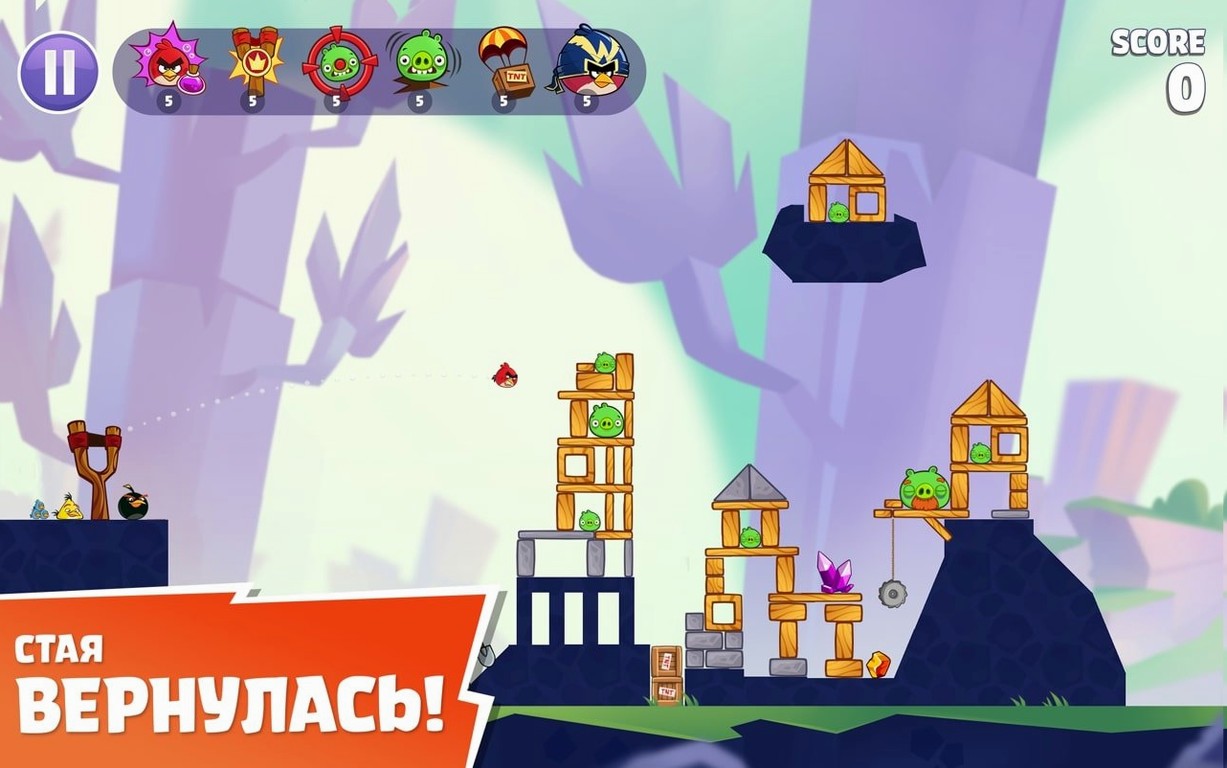
You pull back the slingshot on your Mac, aim at a fortress of green pigs, and let Red fly. Wood splinters, stone cracks, and the pigs scatter. That is the minute-to-minute rhythm of Angry Birds Reloaded v4.2, a remastered follow-up from Rovio Entertainment that keeps the physics-based launching you remember.
What you do each round
You choose a bird from the flock — Red, Chuck, Bomb, Silver, or others from the games and movies. Each has a special ability: Chuck speeds up mid-flight, Bomb explodes on impact. You drag back on the slingshot, adjust the angle and power, then release. The bird arcs through the air, hits wood, stone, or glass, and the structure collapses. Scores stack in one iCloud account. There are hundreds of levels, and power-ups appear to help with tougher layouts.
Why it works on a Mac
Angry Birds Reloaded runs natively on macOS 11.0 and is tested on an M4 Mac mini. No activation is needed. The disk image copies straight to your Applications folder and launches from Launchpad. It is a clean, single-step setup for a classroom game club or a quiet afternoon.
Starting a new world from the menu
I open Angry Birds Reloaded from Launchpad on a weekday afternoon. The first screen shows a menu with worlds arranged in order. I pick a world I haven’t finished yet — say, the third one. Each world contains about fifteen levels, and I work through them one bird at a time.
On level one of the world, the pigs sit behind a thin wooden shack. I load Red, pull the slingshot back at a 45-degree angle, and let go. Red smashes through the front planks and knocks a pig off the edge. That is a clean first star. Level two needs more thought: the structure is tall, with stone blocks holding glass platforms. I switch to Chuck, aim for the base, and tap the screen just after release. Chuck speeds forward, cracks the stone, and the whole tower tips. Two pigs tumble. I get two stars.
By level six, I need Bomb. The pigs are hidden inside a thick concrete bunker. I pull back with full power, release, and tap before Bomb hits the wall. The explosion sends debris everywhere and clears three pigs. I collect the third star and move on. Over the course of an hour, I complete twelve levels. The local leaderboard updates after each round, and I see my score settle near the top for that world. It is a quiet, methodical pace — no timers, no rush.
Fixing lag spikes and missing sound
People in the game club sometimes run into a few hiccups. Here are the ones I see most often and how to fix them.
The game won't open after copying
This usually happens when the disk image is still mounted. Eject the disk image from Finder before opening the app. If it still does not open, check that macOS 11.0 or later is running. The game needs at least Big Sur.
Slingshot feels sluggish or unresponsive
On some Macs, the mouse pointer does not register the drag well. Try using a trackpad instead, or adjust the mouse tracking speed in System Settings. Restarting the game also clears temporary lag. If that does not help, close other apps that use graphics — a browser with many tabs can slow things down.
Scores do not appear on the local leaderboard
Local leaderboards store scores for one iCloud account at a time. If you switch iCloud accounts, the old scores vanish. Stick to one account if you want to track progress. The leaderboard resets only when you clear the app data, which is rare in normal use.
How Angry Birds Reloaded runs on Apple Silicon vs Intel
Angry Birds Reloaded vs. Angry Birds Classic (Apple Arcade)
The classic version has the same base gameplay — slingshot, pigs, structures. Reloaded adds new worlds and levels with eagles, plus characters from the movies. The visuals are sharper on a Retina display, and the power-ups are more varied. For someone who finished the original years ago, Reloaded offers fresh levels without changing the feel.
Angry Birds Reloaded vs. Bad Piggies
In Bad Piggies, you build contraptions to help the pigs reach eggs. It is a construction puzzle, not a destruction one. The mechanics are different: you drag wheels, propellers, and springs onto a vehicle. Reloaded is the straight line from the original — aim, launch, watch things fall. They are both physics games, but one is about aiming, the other about building.
Angry Birds Reloaded vs. other physics puzzle games on Mac
Games like World of Goo or Cut the Rope also use physics, but they focus on drawing paths or cutting ropes. Reloaded is the only one where you launch a character into a target and watch the cascade. The feel is more immediate: you see the arc, hear the impact, and watch the structure collapse in real time. For a quick break between lessons, that directness works well.
- macOS 11.0 or later
- Intel or Apple Silicon processor
- No activation required
How to install
- Open the downloaded disk image.
- Drag the app to the Applications folder alias.
- After copying finishes, open the app from Launchpad.
Similar games





Sign in or join the club to leave a comment.
Nobody has commented yet.