- Version
- 1.006 [Wineskin] Fix 2
- Studio or maker
- Westwood Pacific
- Languages
- Russian, English
- Activation
- Not required
- Chip type
- Intel 64-bit
- Tried out on
- macOS Sonoma, MacBook Air (M1. 2020)
- First released
- 23.10.2000
- Voice languages
- Russian, English
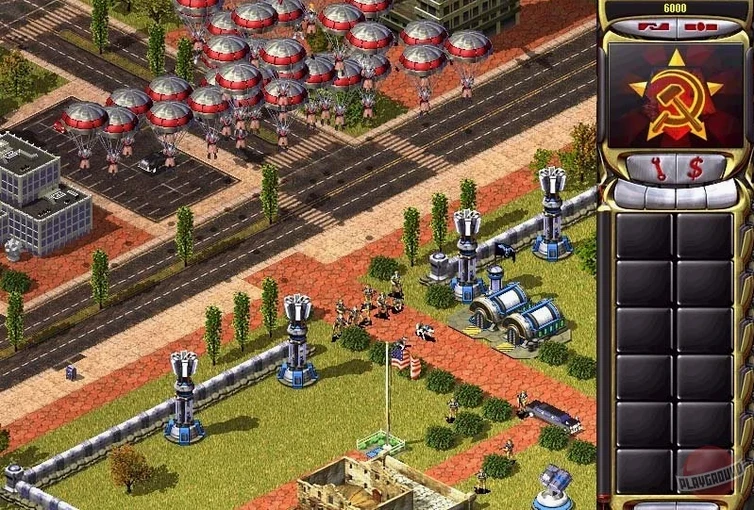
The Soviet Premier Romanov and the psychic Yuri organize the invasion that kicks off Red Alert 2. Set in an alternate 1971–1972, the plot starts with a surprise attack on the United States. Here are three things a newcomer should try first.
Play the Soviet campaign first
The Soviet missions introduce the faction's heavy tanks, conscripts, and Yuri's mind-control units at a steady pace. You learn counters and base-building without the Allies' more advanced tech tree.
Set up a skirmish on a small map
Open Quickmatch or pick a 2-player map against one AI at easy difficulty. This lets you test unit combinations and practice hotkeys without pressure. The game has English and Russian voice acting and text, so you can switch languages if you prefer.
Double-click the Fix file to launch the game
The Wineskin build may need a one-time fix. Inside the disk image there is a file named Fix. Double-click it, then launch the game again. It resolves the common launch error on Apple Silicon and Intel Macs.
Patch 1.006 fixes everyday gameplay issues
The build you are playing is labeled 1.006 [Wineskin] Fix 2, which includes the final official patch Westwood released for Red Alert 2. That patch, 1.006, was a minor update, but it fixed a few things that still affect everyday play. The Quickmatch client bug was cleaned up, so when you open the multiplayer lobby you are less likely to run into a freeze or a blank list. More useful for today: NAT and firewall support were added for Westwood Online. If you are trying to play over the internet with a friend, the game now handles modern routers better. Also, long in-game chat messages transmit and display correctly now. That matters if you chat during a skirmish or a campaign co-op match.
Wineskin build errors and how to solve them
The game launches but the screen is black or stuck
This usually happens because the Wineskin wrapper needs to finish its first-run setup. Close the game, open the disk image again, and run the Fix file once more. Then restart the Mac before launching again. If the black screen persists, try switching your Mac's display to fullscreen mode in the game settings before you start a match.
Multiplayer lobbies show no games or connections fail
Red Alert 2's online system was built for older networking. The 1.006 patch added NAT support, but your Mac's firewall can still block the connection. Go to System Settings > Network > Firewall and allow the Red Alert 2 app. If you are on a school or office network, you might need to ask the IT team to open the port range the game uses. For a quick test, start a skirmish with a friend on the same local network instead.
The mouse cursor disappears or lags
Some Macs, especially those running macOS Sonoma, have trouble with the cursor in Wineskin wrappers. A workaround is to press Command + Tab to switch away from the game and then click back into it. That usually refreshes the cursor. If it keeps happening, run the Fix file from the disk image again. It resets some wrapper settings that can fix the cursor issue.
- macOS version not specified — compatible with both Intel and Apple Silicon Macs
- Architecture: Intel and Apple Silicon
Questions I keep getting
Can I play Red Alert 2 on an M1 or M2 Mac?
Yes, the build works on both Intel and Apple Silicon Macs. The Fix file inside the disk image resolves a startup error common on newer hardware.
What languages does the game support?
The game includes Russian and English voice acting and text. You can switch between them in the settings.
Is the single-player campaign the same as the original?
Yes, the campaign follows the same alternate-history plot: the Soviet Union invades the United States in 1971–1972, led by Premier Romanov and the psychic Yuri.
How to install
1. Mount the downloaded disk image. 2. Drag the app into the Applications folder shortcut. 3. Launch the app from Launchpad after copying finishes. 4. If the game reports an error on launch, run the file named Fix inside the disk image.Similar games

Sign in or join the club to leave a comment.
Nobody has commented yet.