
- Version
- 1.09
- Studio or maker
- Blizzard Entertainment
- Languages
- Russian, English
- Activation
- Not required
- Chip type
- Apple Silicon, Intel 64-bit
- Tried out on
- macOS Sequoia, Mac mini 2024 M4
- First released
- 31.12.1996
- Voice languages
- Russian, English
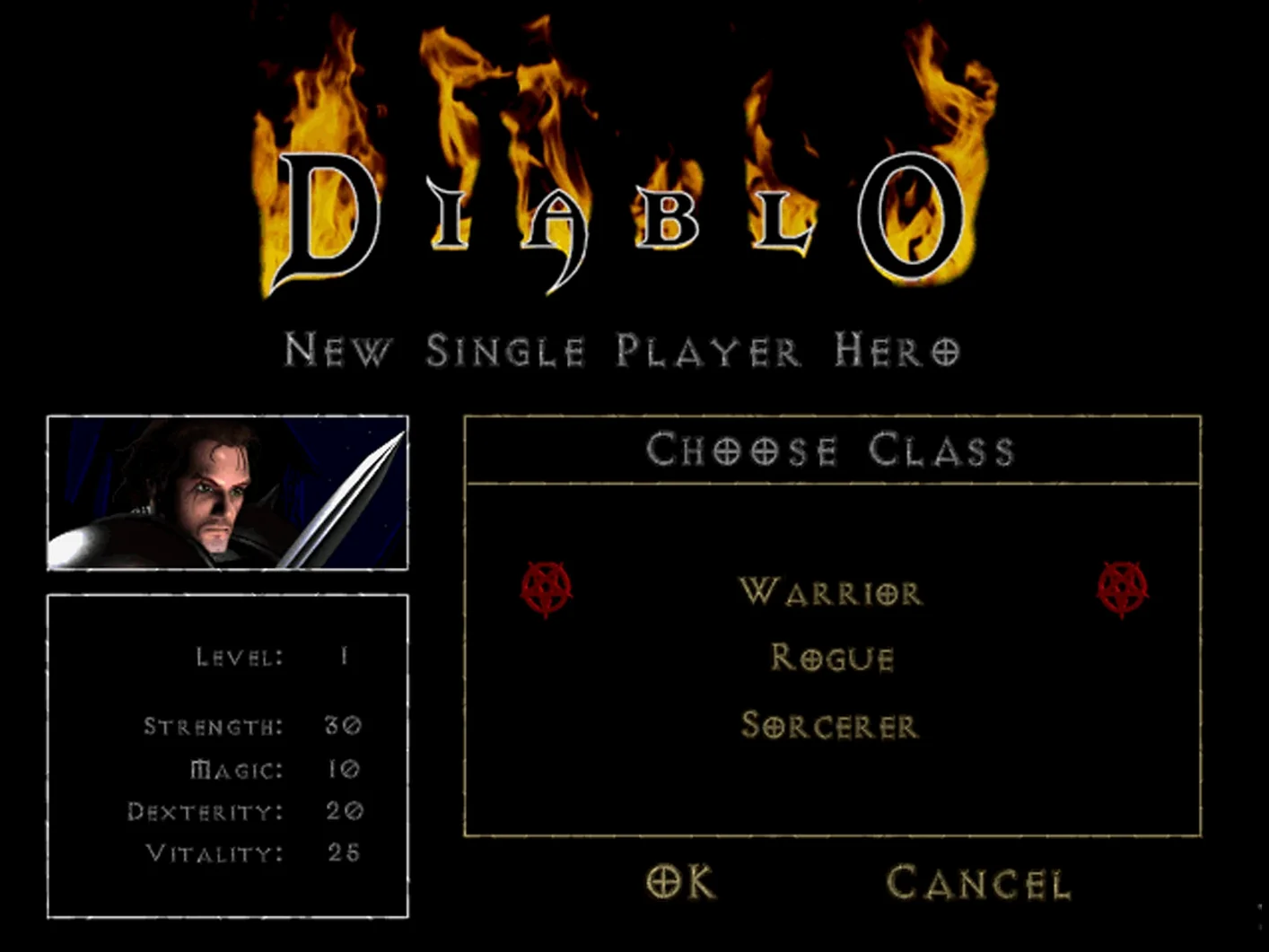
More than 200 monster types wait in a dungeon that rearranges itself every time you enter. That is the core of Diablo on macOS, and it shapes every minute you spend in Sanctuary.
What you do, step by step
- Pick a class. You choose between the Warrior, the Sorcerer, or the Rogue. Each one plays differently, so your first minutes are about learning your character's rhythm.
- Descend into the dungeon. The layout changes with each visit, so you never walk a memorized path. You read the map, check corners, and keep an eye on your health orb.
- Fight monsters. Combat is real-time and direct. You click to attack, cast spells, or fire arrows, then react to what comes out of the dark.
- Loot and equip. Fallen enemies drop gold, weapons, and armor. You compare stats, decide what to keep, and sell the rest in town.
- Return to town to restock. Between runs you buy potions, repair gear, and identify items. This pause is what lets you push deeper next time.
- Repeat with a friend. Up to four players can cooperate over the internet or a local network, which changes the pace completely.
One evening in the cathedral
I spent last Friday with Diablo on the iMac, and the session followed a pattern I imagine many players know. I started in Tristram, the game's hub, with a fresh Sorcerer. Then I clicked the church entrance, and the dungeon generated its new layout.
The early floors are manageable. Skeletons, fallen ones, the occasional zombie. I cleared room by room, watching my mana bar and retreating when things got crowded. Around floor four I found a ring that boosted magic damage by a noticeable amount, which turned a tough pack of brute monsters into a quick cleanup. I kept it, sold the rest of my loot, and decided to push one more floor before stopping for the night. The dungeon's layout meant I had to backtrack a few times to find the stairs, but that is part of the experience.
By the time I saved and quit I had three new items in my inventory, a better sense of the Sorcerer's range, and a clear idea of where I would go next in the dungeon. The game respects your time without rushing you.
More contained than Diablo 2 Resurrected on macOS
If you have played Diablo 2 Resurrected on macOS, the original feels more contained. Fewer skills, no runes, no mercenaries. The focus is on the immediate fight and the loot from that fight. Diablo 2 Resurrected macOS players will find the pacing slower and the dungeon smaller, but the tension is sharper because each step matters more.
Diablo 3 on Mac is faster and more generous with loot. Dropped items are abundant, and your character moves and attacks at a much higher speed. The original Diablo asks you to earn each piece of gear, which makes a good drop feel like a real reward. For players who want variety across the series, the classic game offers a different rhythm entirely.
Crossover Mac Diablo 2 Resurrected works as another route into the Diablo world on modern hardware, but the original runs natively for classic systems and requires no translation layer. That matters if you prefer a straightforward install and a direct connection to the game's original design.
The loop is simple but demanding. Each descent asks you to manage your resources, your position, and your curiosity about what the next floor holds.
- Support for new systems.
- Bug fixes.
- High resolution with preserved aspect ratio.
- macOS System 7.5 or later
- Keyboard and mouse
- Hard drive
- Double-speed or faster CD-ROM drive
- Display support for at least 640 x 480 in 256 colors
Questions I keep getting
Which classes are in the base game?
The base game includes the Warrior, the Sorcerer, and the Rogue. The Hellfire expansion adds a fourth class, the Monk.
Can I play Diablo with other people on macOS?
Yes, the game supports cooperative play for up to four players over the internet or a local network.
Does the current version include the Hellfire expansion?
Yes, the current version includes Hellfire, which adds new quests, locations, dungeons, enemies, and the Monk class.
How to install
- Run the PKG file with a standard installation. The installer places the game where macOS expects it.
- Read the README file for detailed instructions. It covers settings and troubleshooting that the installer does not.
- If the game shows an error at launch, open the disk image and run the Fix file. It addresses common startup problems.
Similar games





Sign in or join the club to leave a comment.
Nobody has commented yet.