- Version
- 1.04 [Wineskin]
- Studio or maker
- Akella
- Languages
- Russian
- Activation
- Not required
- Chip type
- Apple Silicon
- Tried out on
- macOS Sequoia, MacBook Air (M1. 2020)
- First released
- 12.10.2011
- Voice languages
- Music only
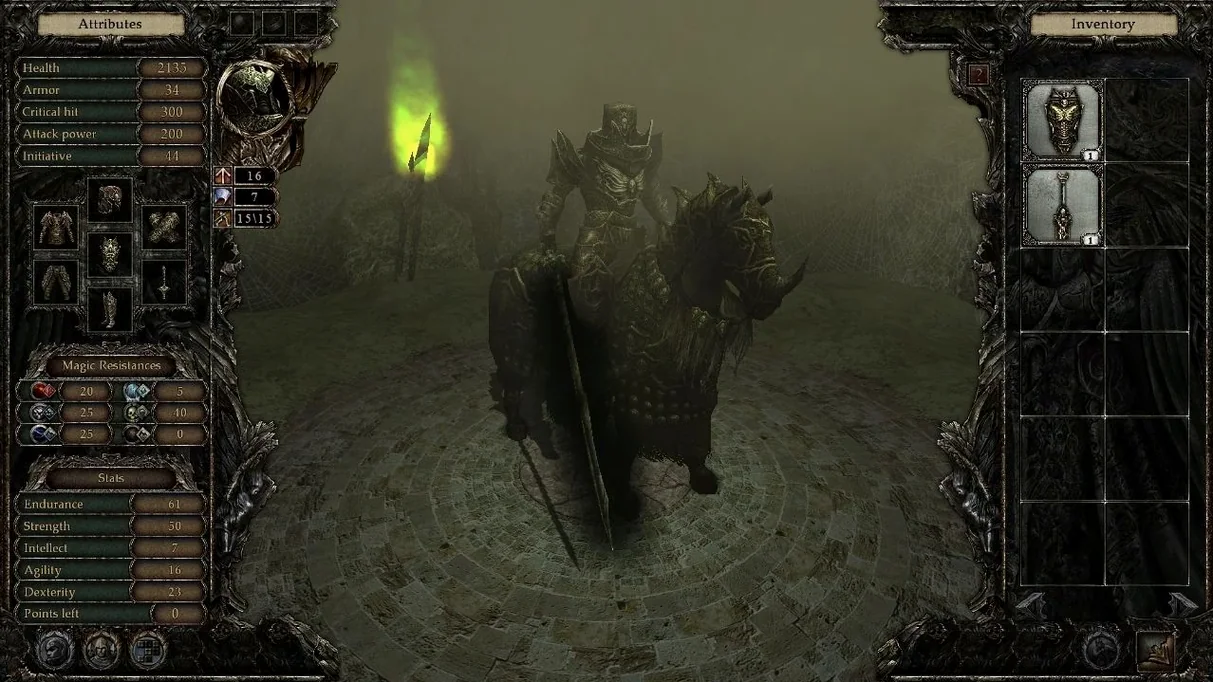
The Undead Hordes take center stage in Disciples III: Resurrection, a turn-based strategy expansion that brings a gothic, detailed world to your Mac. This build, version 1.04, runs on Apple Silicon via Wineskin, and it’s a niche pick for a specific kind of player.
- Lovers of slow, deliberate tactics – turn-based combat rewards planning over reflexes.
- Fans of dark fantasy – the atmosphere is heavy, with crypts and curses on every map.
- Completionists – over 70 hours of gameplay and more than 50 new units offer plenty to explore.
- Players who tolerate older interfaces – this is a 2011 game, so menus feel dated.
- Russian speakers – only the Russian version is included, which limits the audience.
- Those who skip the story – the campaign is deep, but it’s not a fast, arcade-style romp.
If you enjoy methodical conquest and don’t mind the language barrier, this resurrection might be worth a look. If you prefer modern polish or quick sessions, you may want to pass.
Appeals to Disciples fans who want to continue the story
This expansion appeals most to Mac users who already know the Disciples series and want to continue the story on their current hardware. If you played Disciples II back in the day and miss that careful, hex-based pacing, Resurrection will feel familiar rather than foreign. It also works well for players who enjoy single-player campaigns with branching side quests—there is no multiplayer pressure, no leaderboard anxiety, just you against the AI at your own speed.
Mac users with older Apple Silicon machines, like the M1 MacBook Air or Mac mini, will find the Wineskin build reliable enough for a game of this vintage. Because the graphics are not demanding by modern standards, even a base model runs the campaign without the fan noise you might get from a newer 3D title. That makes it a good choice for a laptop session on the couch or during a train ride, as long as you have a mouse or trackpad you trust for precise unit selection.
Teachers and hobbyist modders might also appreciate it. The disk image includes a Fix tool, and the Wineskin wrapper is editable, so if you are comfortable tinkering with Wine settings, you can adjust screen resolution or audio output to suit your setup. That flexibility matters more for this game than for a native Mac title.
Tested on macOS Sequoia with Apple Silicon
Some Mac users hesitate when they see a Wineskin build. The common worry is whether it will launch at all. In this case, the build was tested on macOS Sequoia with an M1 chip, so any Apple Silicon Mac running a recent macOS version should be able to start it. If the game shows an error on first launch, the Fix file on the disk image usually resolves it. You run it once, and the game works afterward.
Another question is about language. Yes, the entire game is in Russian—menus, dialogue, quest text. If you do not read Cyrillic, you will struggle with the campaign objectives and unit descriptions. Some players use a translation app on a phone or tablet beside the screen, but that slows the flow. If you are a Russian speaker or a learner, this is a rare chance to play a full strategy campaign in the language.
People also ask about save files. Disciples III saves locally inside the Wineskin wrapper. You can find them in the drive_c folder, which means backing them up or moving them to another Mac requires a little file hunting. For most players, the default save location works fine—just do not delete the wrapper folder accidentally.
Runs as a standalone Wineskin app in your Applications folder
Because Disciples III runs inside a Wineskin wrapper, it behaves like a standalone app. You do not need Steam or any launcher. The game does not touch your Documents folder or your iCloud drive. It sits in your Applications folder and loads its own settings files inside the wrapper.
macOS features like Mission Control and Stage Manager work normally around it. You can tab out to check a walkthrough or reply to a message without the game crashing. The Wineskin wrapper handles that gracefully, as long as you do not force-quit the process. If you use multiple desktops, you can keep the game on one space and a browser or note app on another.
For recording or streaming, macOS screen capture tools can grab the game window, though the wrapper may not show up in some capture utilities by default. You can set it to record the entire screen if needed. The game does not interfere with audio routing either—it uses standard system sound output, so your usual headphones or speakers work without extra configuration.
Sunday afternoon setup: mount, drag, and play
You sit down on a Sunday afternoon with no plans. The Mac is on, and you mount the disk image from the download folder. You drag the app to Applications, wait for the copy to finish, then close the disk image window. You open Launchpad, find the Disciples III icon, and click.
The game window appears with a gothic menu screen. The music is low and string-heavy. You select the campaign for the Undead Hordes, because that is the new content. The first mission loads after a few seconds—the map is dark greens and grays, with unit icons that look like hand-painted miniatures. You start moving your hero across the terrain, recruiting units at a graveyard, fighting a group of bandits on a bridge. The turn-based combat gives you time to think about which attack to use and whether to retreat a wounded unit.
An hour passes. You complete two side quests and capture a resource tile. The game does not interrupt you with pop-ups or tutorials—it assumes you know how these games work. You save manually, then close the app. The next time you open it, the session resumes exactly where you left off, no cloud sync needed, no updates waiting.
- macOS version: not specified
- Architecture: Apple Silicon
- Other: none
Questions I keep getting
Does Disciples III Resurrection run on Apple Silicon?
Yes, the 1.04 Wineskin build is designed for Apple Silicon, as tested on macOS Sequoia with an M1 MacBook Air.
What language is the game in?
Only the Russian version is included, so you’ll need some Russian to follow the story and menus.
How to install
- Mount the downloaded disk image and drag the app into your Applications folder – this copies the game to your Mac.
- After copying finishes, launch the app from Launchpad – the game should start normally.
- If the game shows an error at startup, run the file named Fix from the disk image – it resolves common issues.
Similar games




Sign in or join the club to leave a comment.
Nobody has commented yet.