
- Version
- 1.3.2
- Studio or maker
- Adisoft Gaming Co.
- Languages
- English
- Activation
- Not required
- Chip type
- Apple Silicon, Intel 64-bit
- Tried out on
- macOS Tahoe, Mac mini 2024 M4
- First released
- 21.04.2025
- Voice languages
- Music only
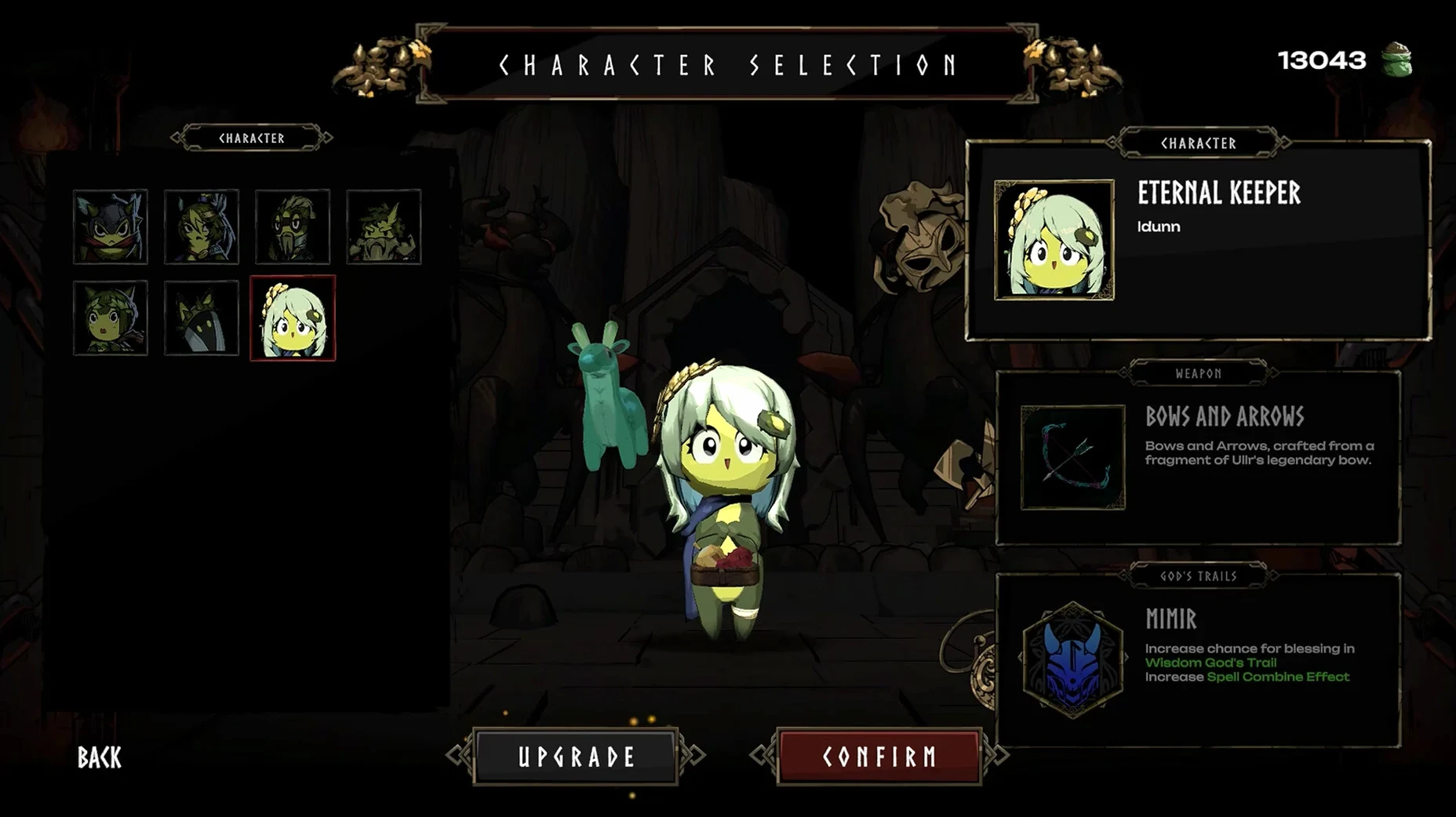
You finish grading the last set of algebra tests and open your iMac to check a game the club members asked about again. Duriano is a 3D roguelite that sits somewhere between Hades and a folk tale told over a school campfire. You control a durian hero (yes, the spiky fruit) through procedurally generated environments filled with mythical weapons and enemies inspired by Norse gods. Each run unlocks new hero variants, Fate Favor options, and weapons, so no two attempts feel the same.
| Detail | Value |
|---|---|
| Version | 1.3.2 |
| Developer | Adisoft Gaming Co. |
| Architecture | Intel and Apple Silicon |
| Language | English |
Version 1.3.2 fixes text display issues and a resolution reset bug that I know would frustrate anyone setting up before class. It also adds two new characters — the Tinkerer and the Serpentine Enchantress — and resizes elite enemies so they are easier to read on screen. The game runs on both Intel and Apple Silicon Macs without extra configuration. For the game club, it fits alongside our usual lineup: short enough for a lunch period, deep enough to keep students curious about Norse mythology and procedural design.
Typical mistakes beginners make with duriano
When students first try Duriano, they usually sprint into enemy packs the same way they would in a platformer. The durian hero can take a few hits, but the roguelite structure punishes reckless moves. I watch them overlook the Fate Favor system entirely for the first several runs because they are focused on mashing the attack button. The Fate Favor options are worth reading before each encounter — they change how loot drops or how enemies behave, and skipping them makes the run harder than it needs to be.
Another common slip is ignoring the God Path system. Beginners pick a weapon that looks strong in the moment without checking which path it belongs to. Combining weapons that share a God Path gives bonuses that stack across the run. I tell my club members to treat the God Path like a class schedule: plan ahead instead of grabbing whatever is closest.
New players also hoard mythical weapons for a perfect moment that never comes. Duriano expects you to swap and experiment. A weapon sitting unused in your inventory is just dead weight. The mobile daily reward notifications in version 1.3.2 are a small nudge to keep coming back, but they work best if you already made the habit of trying different loadouts each session.
Wednesday lunch: three students watch me pick the Serpentine Enchantress
Wednesday lunch period. Three students crowd around my iMac while I start a fresh run. I pick the Serpentine Enchantress, one of the new characters, because nobody has seen her abilities yet. The first environment generates around us — rocky terrain, a few scattered enemies, a chest near the entrance. I open the chest and get a standard axe, nothing special, but it works for clearing the first wave.
I use the Fate Favor option before the first elite fight. The game offers me better loot drops in exchange for reduced health regeneration. I accept it. The elite enemy, which version 1.3.2 resized to be more readable, circles slowly. I dodge, land a few combos, and defeat it. The drop is a mythical spear that belongs to the war God Path. My second weapon comes from a different path, so I hold both for now. After the encounter, I unlock a new Fate Favor option and a small weapon upgrade. Twenty minutes in, I pause the run because the bell rings. The club members already ask if they can try the Tinkerer tomorrow.
The Give Up system introduced in 1.3.2 is useful here. If a run goes badly early, you can reset without closing the game and restart with a different hero. That keeps the session moving even when the procedural generation gives you a rough start.
How duriano fits with other apps and macos features
Duriano runs as a standard macOS application, so you can use the usual window management tools. I keep it in a small window beside a browser tab for the school's Norse mythology wiki when the club wants to compare god names. The game does not force fullscreen, which makes it easier to switch between apps during a research session.
For club organization, I use macOS screen recording to capture short clips of successful runs or tricky enemy patterns. The recordings help when a student misses a session and needs to catch up on strategy. The game's music is the only audio track — no voice lines — so the recordings stay classroom-appropriate without extra editing.
Duriano also works well with macOS virtual desktops. I keep one desktop for game club activities and another for lesson planning. The game remembers your unlocked content between sessions, even when you switch desktops, so you do not lose progress when you pause to check email or update a gradebook.
- macOS: not specified by developer
- Architecture: Intel and Apple Silicon
- Interface language: English
Questions I keep getting
Does Duriano require an internet connection to play?
No, once downloaded and installed, Duriano runs offline. The daily reward notifications in version 1.3.2 are mobile-only and do not affect Mac play.
How many hero variants are available in version 1.3.2?
The update adds two new characters — the Tinkerer and the Serpentine Enchantress — each with unique powers inspired by Norse mythological creatures, on top of the existing roster.
How to install
- Open the downloaded disk image file.
- Drag the Duriano app into the Applications folder shortcut inside the disk image window.
- Once copying finishes, open Launchpad and click Duriano to start the game.
Similar games




Sign in or join the club to leave a comment.
Nobody has commented yet.