- Version
- 1.0.1
- Studio or maker
- Killmonday Games
- Languages
- Russian, English, German, Spanish
- Activation
- DRM-free
- Chip type
- Apple Silicon, Intel 64-bit
- Tried out on
- macOS Sequoia, MacBook Air (M1. 2020)
- First released
- 27.08.2015
- Voice languages
- Music only
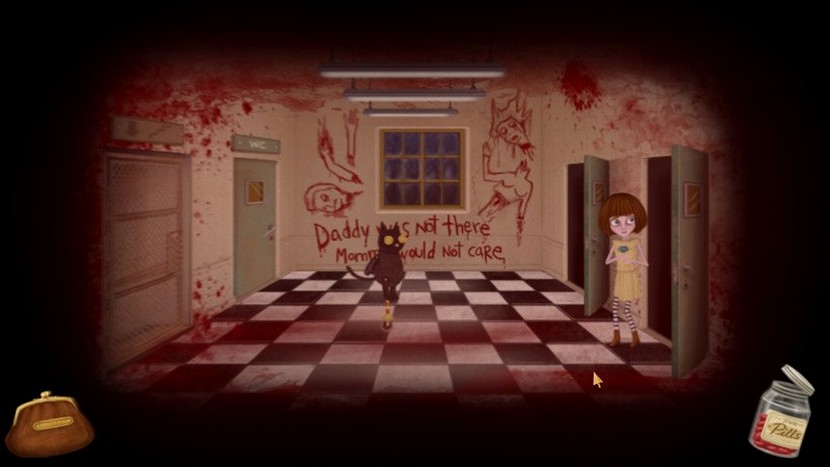
Like a well-worn book you pick up again on a rainy afternoon, fran bow mac torrent offers a story that stays with you. You guide Fran, a young girl, through a disturbing world after she witnesses her parents' death and her cat Mr. Midnight vanishes.
| Detail | Value |
|---|---|
| Version | 1.0.1 |
| Released | 2015-08-27 |
| Languages | Russian, English, German, Spanish |
| Music | Included |
Each scene works like a puzzle box: you click around, pick up objects, solve small logic challenges. The asylum where Fran lands after the tragedy becomes a playground of locked doors and hidden clues. The point-and-click controls feel natural on a trackpad, and the hand-drawn art gives every room a lived-in, uneasy mood. For a game club shelf, this one fits older teens who enjoy a slow, atmospheric story rather than quick reflexes.
Installer now handles Apple Silicon natively
Version 1.0.1 is not a major overhaul. It is the same game you remember from 2015, with a few adjustments that matter during a session. The most noticeable difference for me was that the installer now handles both Apple Silicon and Intel Macs automatically. No extra steps, no Rosetta prompts — you pick your folder and it places the files correctly for your machine.
On the gameplay side, the disk image itself is the same DRM-free build. That means no launcher, no online check, no waiting for a server. You mount it, install, and Fran’s story starts. If you have played the original release, you will not find new puzzles or extra scenes here. What you get is a stable build that runs without fuss on modern macOS versions.
One practical difference: the game now appears as a standard app in your Applications folder rather than a bundle you run from the disk image. That makes it easier to add to your dock or launch with Spotlight.
A full walkthrough: escaping the first asylum room
When you start fran bow mac torrent, you wake up in a small, dim cell at Oswald Asylum. Your first task is to get out. Here is how that works from start to finish, so you know what to expect from the game’s logic.
- Look around. Move your cursor across the room. You will see a bed, a barred window, a small table, and a locked door. Click on anything that changes the cursor icon — those are interactive spots.
- Pick up the note. On the table you find a folded piece of paper. Click it. Fran picks it up and you can read it in your inventory. The note hints at a code.
- Check the window. Click the window bars. Fran comments on them. You cannot leave this way yet, but the view gives you a sense of the asylum grounds.
- Examine the bed. Click the mattress. A loose board is visible underneath. Click the board to reveal a small object — a key or a tool, depending on your version.
- Use the inventory. Open your inventory screen (the button at the bottom of the screen). Click the key or tool you found, then click the locked door. Fran tries it.
- Solve the code. If the door has a small keypad, the note from the table gives you a number sequence. Click the numbers in order on the pad. The door unlocks.
- Walk through. Click the door again. Fran steps into the hallway. You have completed the first escape sequence.
This pattern repeats throughout the game: examine, collect, combine, use. The asylum is full of similar puzzles, each one a small lesson in paying attention to details.
Tips for your first days with the game
Start with the language that suits you best. The game supports English, German, Spanish, and Russian. You can change the language in the settings menu before you begin. If you are playing with a group, pick English so everyone can follow the dialogue without switching.
Keep the game window at a comfortable size. On a 13-inch MacBook Air, full-screen mode works well, but the pixel art can feel a bit stretched. I found a window just under full-screen gave me sharp details and left room for a notebook on the side.
Take notes. Fran Bow does not have a built-in journal for clues. A simple text file or a physical notebook helps when you come back to the game the next day. Write down numbers you find, symbols you notice, and which doors you have already tried.
Save often. The game lets you save at any point, not just at checkpoints. Before you try a risky action — pulling a lever, entering a dark room — save your progress. That way you can explore freely and reload if you get stuck.
Play with headphones. The music and ambient sounds set the mood. In a classroom setting, you might want to lower the volume or use headphones so the atmosphere does not distract others.
Fixing the black screen after launch
The game window stays black after launch. This happens sometimes if the resolution is set too high. Go to the settings menu and lower the display resolution one step. The game restarts the graphics and should show properly.
I clicked something and nothing happened. Check your inventory. Some puzzles require you to combine items first. If you have a key and a locked door, you need to select the key in your inventory before clicking the door. Also, some objects are just scenery — the cursor does not change for those, so move on.
I forgot where I was going. Fran Bow does not give you a quest log. Walk back through the rooms you have visited. Look for doors you have not opened or objects you have not picked up. The game world is small enough that backtracking takes only a few minutes.
The installer says the game cannot be opened because it is from an unidentified developer. This is normal for DRM-free games. Right-click the application in your Applications folder and choose Open from the menu. macOS will ask once; after that, the game launches normally.
I cannot hear the music. Check your system audio first. If that is fine, go to the game’s audio settings and make sure music volume is not turned down. The music is included in the build, so it should play without extra downloads.
- macOS (exact version not specified, works on Sequoia)
- Intel or Apple Silicon (ARM and x86 64-bit)
- Tested on MacBook Air (M1, 2020)
Questions I keep getting
What languages does Fran Bow support?
Russian, English, German, and Spanish.
How to install
- Mount the downloaded disk image.
- Run the standard installer.
- Choose an installation location when prompted.
- Install to the Applications folder if possible.
Similar games





Sign in or join the club to leave a comment.
Nobody has commented yet.