
- Version
- 1.2.0.0002
- Studio or maker
- like Charlie
- Languages
- Russian, English, German, Spanish, Portuguese, French
- Activation
- DRM-free
- Chip type
- Intel 64-bit
- Tried out on
- macOS Tahoe, Mac mini 2024 M4
- First released
- 24.02.2022
- Voice languages
- English
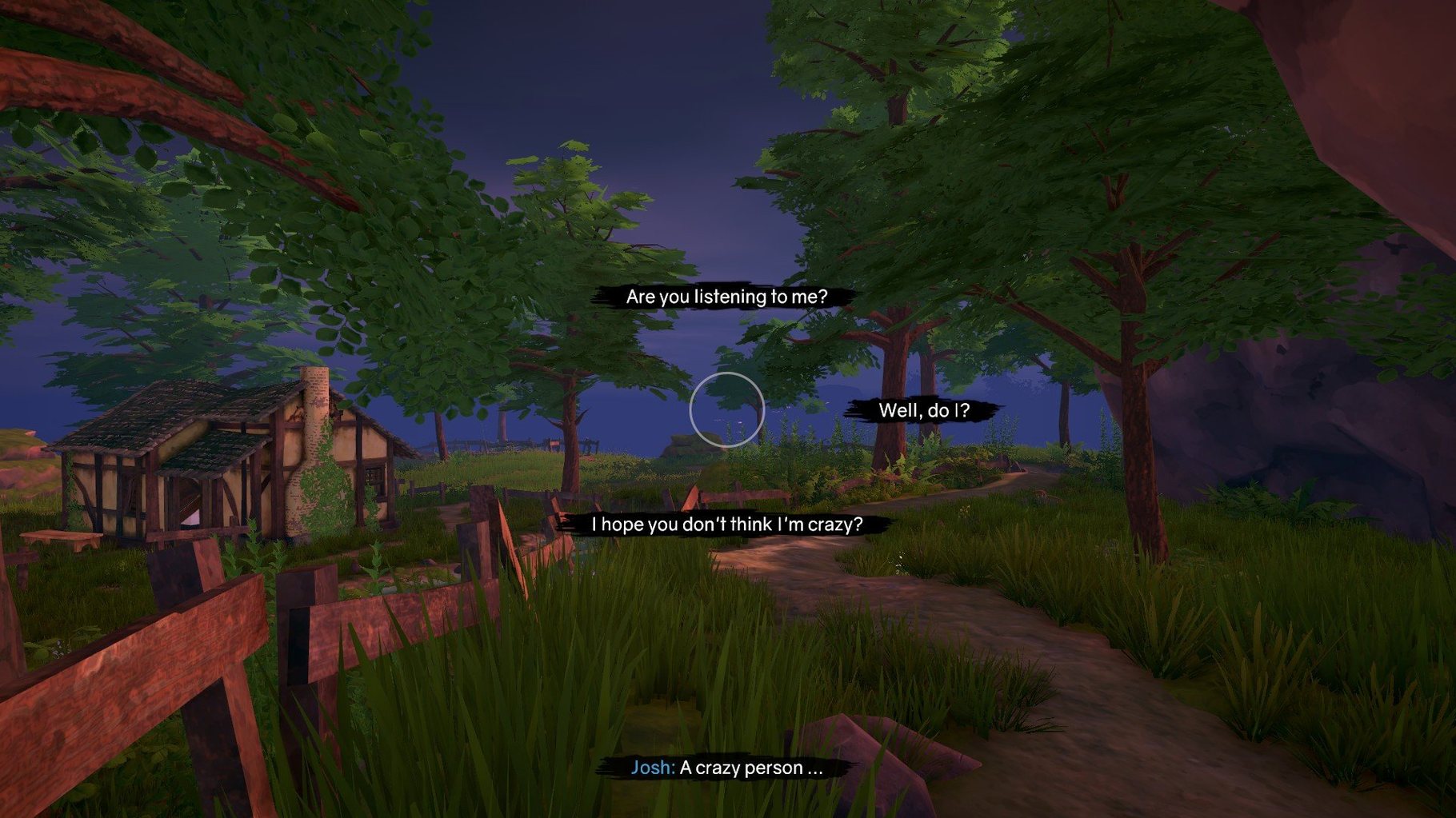
You’ve just downloaded the game and are about to install it. Before you do, here are the answers to the questions people usually ask about Ghost on the Shore mac torrent.
Exploring the island as Riley with Josh's ghost
You play as Riley, who washes up on the Rogue Islands after a storm. A ghost named Josh starts talking to her, and together you explore the island’s history, his memories, and what Riley hopes to do next. It’s a quiet, narrative-driven game about emotional ties that last beyond death.
What about languages and performance?
The interface comes in Russian, English, German, Spanish, Portuguese, and French. Voice acting is English only.
How a typical play session works from start to finish
When you begin, Riley stands on the shore with nothing but the sound of waves and wind. You move her on foot across the islands, and every new area reveals something to look at or interact with. The game doesn't hold your hand with waypoints or task lists. You walk, you look, and eventually you find something that prompts a conversation with Josh.
Each dialog choice appears only once, so there is no going back to pick a different option. This matters because the story branches into four distinct paths, each with its own ending. If you want to see how a different set of choices plays out, you start a new game.
Along the way you find old belongings left behind by the island's former residents. Josh often has something to say about them, and those moments build the backstory of the place and the people who lived there. The environmental storytelling is the main way you learn about the Rogue Islands.
Changing the interface language before you start playing
The interface language is set before you start playing, so you do not need to dig through menus later. If you teach in a multilingual setting like I do, that saves time when letting someone else try the game.
The game's quiet pace works well for the after-class game club. There are no timers, no fail states, and no combat. Students can take their time reading dialog and exploring without pressure. I have found that the lack of urgency makes it easier for players who do not usually pick up adventure games to settle into the story.
Clicking to move Riley and examine objects on an Intel Mac
The build labeled 1.2.0.0002 is the current release, dated February 2022. On a modern Intel Mac, the game runs as expected for a narrative exploration title. You click to move Riley, click objects to examine them, and click dialog options when they appear. There is no complicated control scheme to learn.
Because the game is DRM-free, you do not need an internet connection or an account to launch it. That makes it straightforward to install on a school machine or a personal laptop without extra steps. Just copy the application to the Applications folder and run it.
The process ends with choosing where to put the game. Pick the Applications folder if you can—it keeps things tidy and avoids permission headaches later.
- macOS: not specified
- Architecture: 64-bit Intel
Questions I keep getting
Is Ghost on the Shore a long game?
It’s a story exploration title, so the length depends on how much you want to read and listen. The focus is on the narrative, not on action or combat.
Can I play it without understanding English?
Yes, the interface is available in six languages, including Spanish, French, and German. The voice acting is English only, but subtitles should cover the dialogue in your chosen language.
How to install
- Run the downloaded package and go through the standard installation steps. This copies the game files to your Mac.
- When installation finishes, choose the destination folder. Pick the Applications folder if possible—it keeps the game with your other apps and makes it easy to find later.
- Launch the game from the Applications folder or from Launchpad.
Similar games



Sign in or join the club to leave a comment.
Nobody has commented yet.