
- Version
- 1.18.204
- Studio or maker
- Boneloaf, Rocket Science
- Languages
- English, German, Spanish, Italian, Chinese (Traditional), Chinese (Simplified), Korean, Portuguese, French, Japanese
- Activation
- Not required
- Chip type
- Apple Silicon, Intel 64-bit
- Tried out on
- macOS Sequoia, MacBook Pro (M3 Pro 2023)
- First released
- 12.12.2017
- Voice languages
- Music only
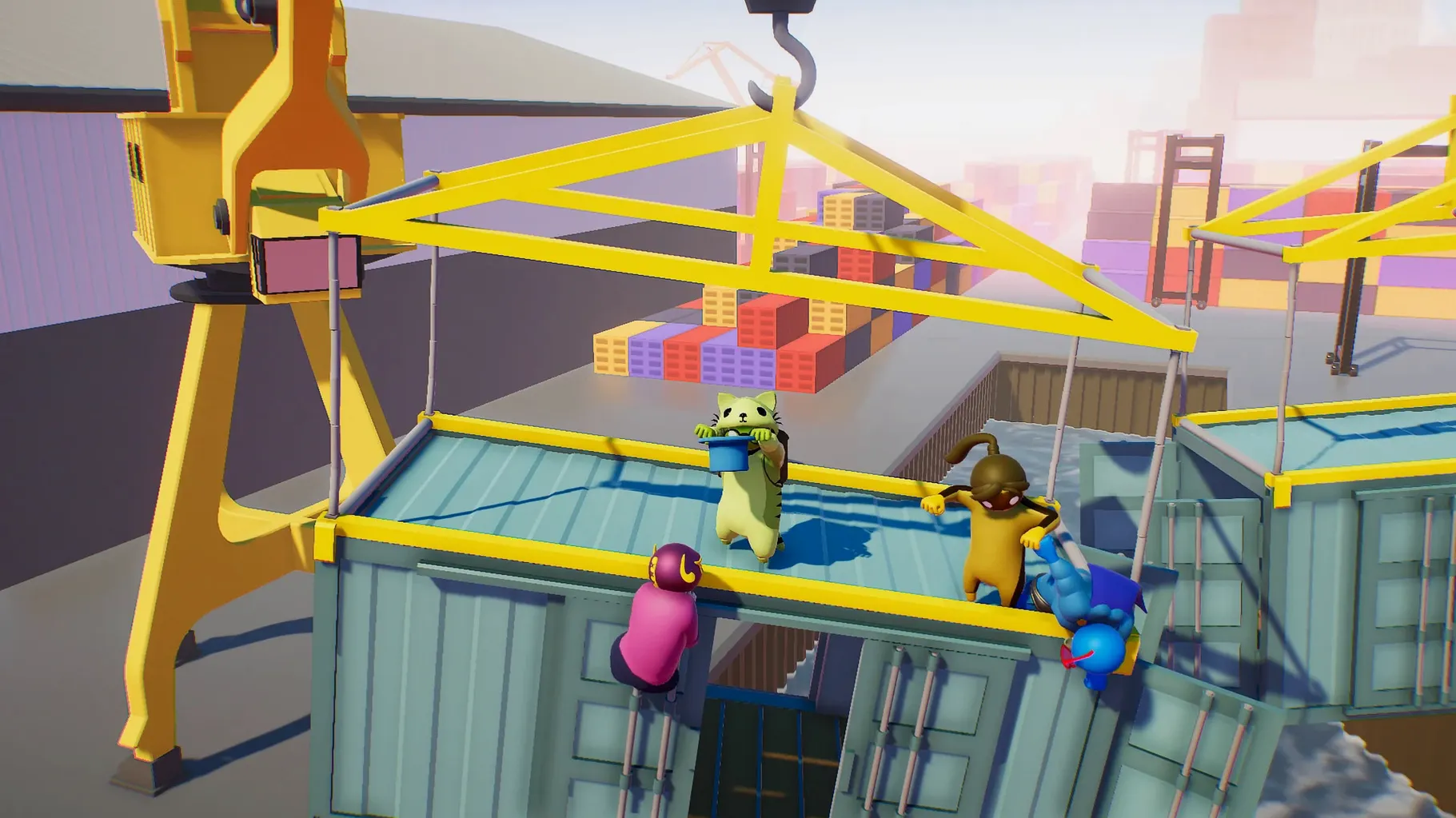
Version 1.26 of Gang Beasts is out, and it is a stability release. The patch fixes controller haptics not firing in online sessions, adds a few more kill volumes to the Trawler stage, and balances the audio on the menu screen. No new content, just a cleaner experience for the gelatinous fights.
- Supports both Apple Silicon and Intel Macs (ARM and 64-bit x86).
- Developed by Boneloaf and Rocket Science, available for macOS and Linux.
- Tested on a MacBook Pro with M3 Pro running macOS Sequoia.
- Interface languages include English, German, Spanish, Italian, Traditional and Simplified Chinese, Korean, Portuguese, French, and Japanese.
- Music is the only listed audio language, so expect a mostly instrumental soundtrack.
- You can grab it from Steam, Humble, or Itch for Mac.
Gang Beasts is a party game first, so bring friends and a controller or two. The physics are the whole point — expect wobbly limbs, accidental throws, and laughter more than precision. If your Mac meets the architecture requirement, you are set for a chaotic evening.
Friday after class with colleagues on an iMac
Friday after my last class, I invited two colleagues from the science department over. We set up on my desk iMac with three Xbox controllers connected via Bluetooth. Gang Beasts was already in the Applications folder, so launching it took about fifteen seconds.
The main menu appears with the usual options. We picked local multiplayer first. Each player presses a button on their controller to join. The character selection screen shows the familiar gelatinous fighters in different colors. I let my friends choose first; they picked the red and blue ones. I took the green. No deep strategy there — the colors matter more than any stats because there are none.
The stage selection lets you cycle through environments. My colleague Sarah wanted a simple stage, so we chose the rooftop. The fight starts, and within seconds everyone is laughing. The physics make every punch look like a slow-motion shove. My character grabbed Sarah's by the leg and dangled off the edge. She let go after a few seconds, and we both fell.
We played about eight rounds. Each round takes maybe two minutes. The highlight was on the girders stage, where my other friend Thomas got knocked into a spinning fan and his character bounced back like a ragdoll. By the end, we were all tired from laughing.
New players grip too tight and mash buttons
New players tend to grip the controller too tight and mash buttons. That works for some games, but not here. Gang Beasts rewards deliberate inputs. Punching and grabbing are the two main actions. If you hold the grab button while moving, your character drags along the ground. I have seen students do this for thirty seconds before realizing they are not hitting anyone.
Another common error is trying to stand up immediately after being knocked down. The recovery mechanic takes a moment. Players who mash jump or punch just flop on the floor longer. The better move is to wait a half-second, then press the jump button once to spring up.
Beginners also ignore the edge of the stage. In Gang Beasts, the environment is the real enemy. Falling off counts as an elimination. New players focus entirely on the opponent and walk backward right into a hazard. It happens every time.
One more mistake: using keyboard controls. The game is built for controllers. Keyboard works, but the movement feels less fluid. If you have a controller, use it. The game supports multiple controllers plugged in at once, so there is no need to share.
Deliberate inputs over button mashing from day one
Calibrate your expectations
The first time you play, you might think the controls are unresponsive. They are not. The characters are deliberately heavy and slow to react. That is the design. Give yourself three rounds to adjust before judging the feel.
Check your controller mapping
Before starting a match, open the controller settings in the main menu. The game supports most modern controllers, but some button layouts vary. Make sure grab and punch are on triggers you can reach easily. I had a guest whose controller had grab mapped to a shoulder button by default, and he kept accidentally grabbing teammates.
Play with at least three people
Two players work fine, but the chaos scales with more bodies. Three or four players create more collisions and accidental eliminations. That is where the fun lives. If you only have one friend, queue online matches to fill the rest.
Learn to dodge before you learn to hit
New players want to attack constantly. The better first skill is dodging. Tap the jump button to hop backward when someone swings. The characters move slowly, so a well-timed dodge gives you a clear opening. Once you can avoid punches, landing your own becomes easier.
Gang Beasts is a silly multiplayer brawler for Mac that suits friends who enjoy chaotic physics-based fights. The install process is straightforward if you follow the code signing steps. A friend of mine skipped that step once and the game refused to launch. Do not skip it.
- Stability release with bug fixes, no new content.
- Fixed controller haptics not triggering in online sessions.
- Added more kill volumes to the Trawler stage.
- Fixed audio levels on the menu screen.
- Architecture: ARM and 64-bit x86 (Apple Silicon and Intel)
- Tested on macOS Sequoia with a MacBook Pro M3 Pro
- Interface languages: English, German, Spanish, Italian, Traditional Chinese, Simplified Chinese, Korean, Portuguese, French, Japanese
Questions I keep getting
Does Gang Beasts run on Apple Silicon Macs?
Yes, the game supports both ARM and 64-bit x86 architectures, so it runs on Apple Silicon and Intel Macs.
How to install
- Mount the downloaded disk image and drag the app into the Applications folder alias. This keeps the game in the usual place for Mac apps.
- Open Terminal and enter the signing command:
sudo codesign --force --deep --sign - /Applications/Gang\ Beasts.app. This re-signs the app locally so macOS will let it run. - Press Enter, then type your Mac account password when prompted. The password entry is hidden, so just type and press Enter.
- Launch the app from Launchpad after signing. It should open without further warnings.
Similar games





Sign in or join the club to leave a comment.
Nobody has commented yet.