
- Version
- e80cbf8 (reVC)
- Studio or maker
- Rockstar Games
- Languages
- Russian, English, German, Spanish, Italian, French
- Activation
- Not required
- Chip type
- Apple Silicon, Intel 64-bit
- Tried out on
- macOS Sonoma, MacBook Pro (M3 Max. 2023)
- First released
- 27.10.2002
- Voice languages
- English
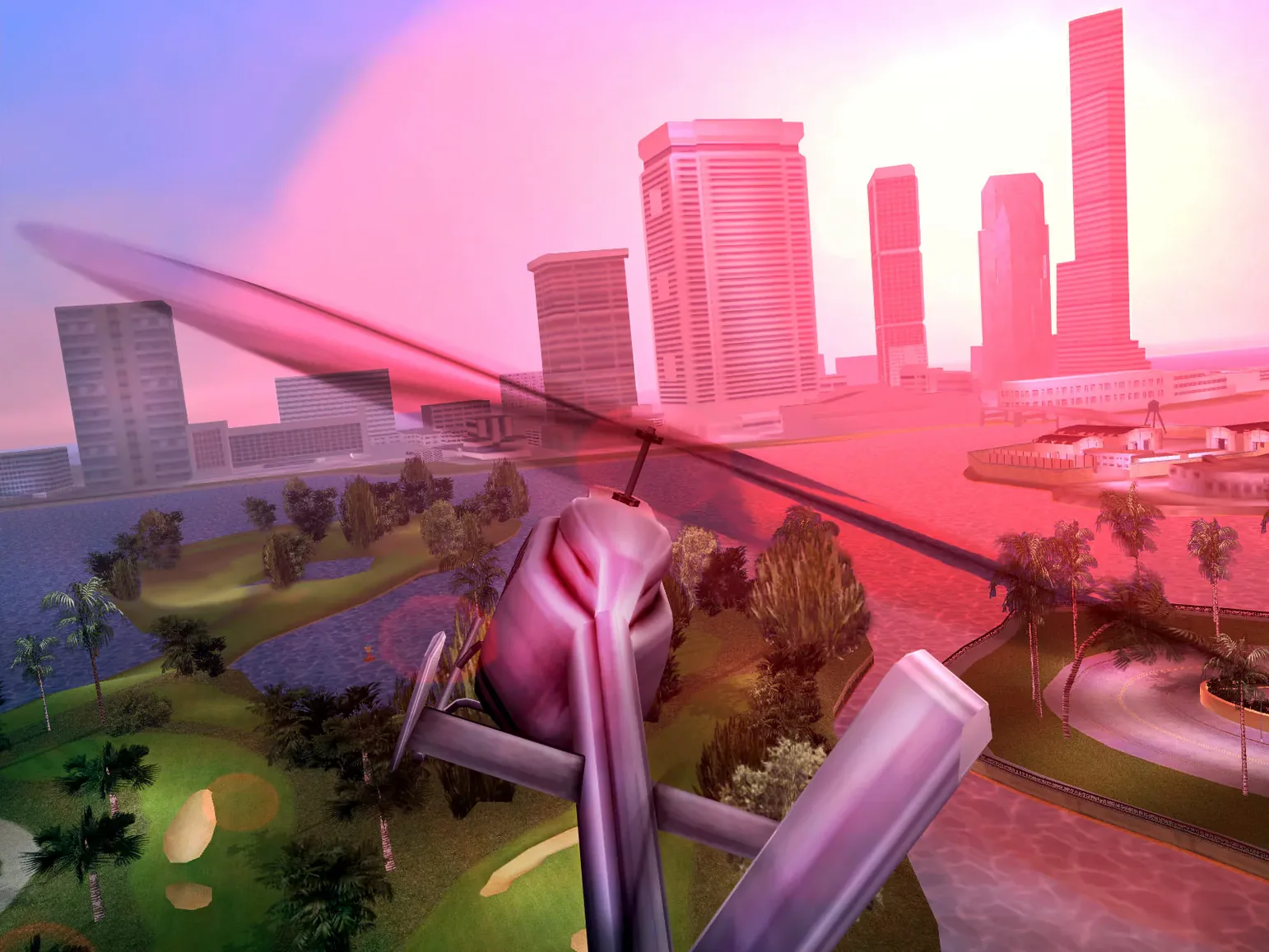
The reverse-engineered build of Grand Theft Auto: Vice City comes with a menu that includes an integrated map and additional options. That map alone makes navigating the 1980s streets of Vice City faster during those after-school club sessions.
What story does the game tell?
The story is set in the 1980s, placing you in a neon-soaked world of crime and betrayal. Voice language is English, with subtitles available in Russian, German, Spanish, Italian, and French.
What new features does this build add?
This reverse-engineered build adds a rotating camera, support for scaled widescreen output, and XInput controller support. It also includes debugging tools and bug fixes that make the game run better on modern systems.
Supports both ARM and x86 architectures via Homebrew
The build supports both ARM and 64-bit x86 architectures. It uses components like OpenAL, mpg123, libsndfile, and glfw, which are installed via Homebrew. The project was started to fix bugs and support mod development, so you get a cleaner experience than the original release.
Set the rendering path to D3D8 or librw with D3D9
When I first run the game, I go straight to the new options menu to set a few things. The most important one is the rendering path. You can choose between the original RenderWare D3D8 path or librw with D3D9, OpenGL 2.1+, and OpenGL ES 2.0+ output. I recommend the OpenGL option for modern Macs because it handles widescreen scaling more naturally.
Next, check the widescreen setting. The build supports scaled output on widescreen displays, so toggle that on. If parts of the screen look cut off, I switch macOS display settings to More Space instead of changing the game's own resolution. That trick works more often than not. Also, enable the rotating camera from the new options. It makes exploring Vice City's beaches and marshland feel less restricted than the original fixed angles.
If you use a controller, the XInput support means most modern gamepads work without extra configuration. I would still open the controls menu once to confirm the button mapping feels right. The debugging tools are there if you run into trouble, but for everyday play you can ignore them.
Open from Launchpad for correct 16:9 full screen on an external display
On a Saturday afternoon, after the game club ends, I sit down to play through a few missions. I open the game from Launchpad, and since I keep an external display connected at 16:9, the full screen fills correctly. If I were using the MacBook's built-in screen, I would need BetterDisplay to create a virtual monitor, but with external displays I skip that step.
I press Ctrl+Cmd+F to enter fullscreen. The game loads to the main menu, where I see the map integrated right there. I check it to remind myself where the next mission marker is. Then I drive a sports car along the oceanfront, listening to the English voice acting and the 1980s soundtrack. The rotating camera lets me look around while driving, which helps when I weave through traffic.
Halfway through a mission, I notice the mouse cursor is stuck. I have run into this before. I minimize the game window by pressing Cmd+Tab, then click back on the game. That usually restores mouse control. If it does not, I restore the default control settings from the options menu and try again. After that fix, I finish the mission and save the game. Then I close it from the menu, no activation required, no login screens to dismiss.
How a modder uses this build
One of the students in my game club loves modifying old games. He picked up this build because the reverse-engineered code, started in 2018, makes modding much easier than the original binary. He explained that the bug fixes alone save hours of troubleshooting. Last week he was testing a physics experiment that changes how vehicles bounce off walls. With the original game he would have had to patch memory addresses manually. With this build, he edits the source directly and recompiles.
He also uses the debugging tools to log what happens when his mod loads. The scaled widescreen output matters to him because his custom interface elements need to line up properly on a modern display. When he searches for grand theft auto vice city mac torrent on his own time, he ends up comparing different builds, but for reliable modding work he sticks with this reverse-engineered version. He tells me the rotating camera was a nice bonus too, since his mod includes a chase sequence where the camera follows the action from above.
- macOS (version not specified)
- Apple Silicon
- Homebrew required
- External display must use a 16:9 aspect ratio
- Required components: OpenAL, mpg123, libsndfile, glfw
How to install
1. Mount the downloaded disk image and drag the game into the Applications folder alias.2. After copying finishes, launch the game from Launchpad.
3. Install Homebrew and the required components.
4. Use Homebrew to install openal-soft, mpg123, libsndfile, and glfw.
5. If the display-ratio limitation causes trouble, use BetterDisplay to create a virtual monitor.
6. Use Ctrl+Cmd+F to enter fullscreen.
7. If part of the screen is missing, change the game setting from "fet gfx missing" to "fem non missing", or switch macOS display settings to More Space.
8. If the mouse does not work, restore default control settings or minimize and return to the game.
Similar games





Sign in or join the club to leave a comment.
Nobody has commented yet.