- Version
- Build 19756066 [Wineskin] Update DLC Fix
- Studio or maker
- Tarsier Studios
- Languages
- Russian, English, German, Arabic, Spanish, Italian, Chinese (Traditional), Chinese (Simplified), Korean, Polish, Portuguese, French, Swedish, Japanese
- Activation
- Not required
- Chip type
- Apple Silicon
- Tried out on
- macOS Tahoe, Mac mini 2024 M4
- First released
- 10.10.2025
- Voice languages
- Music only
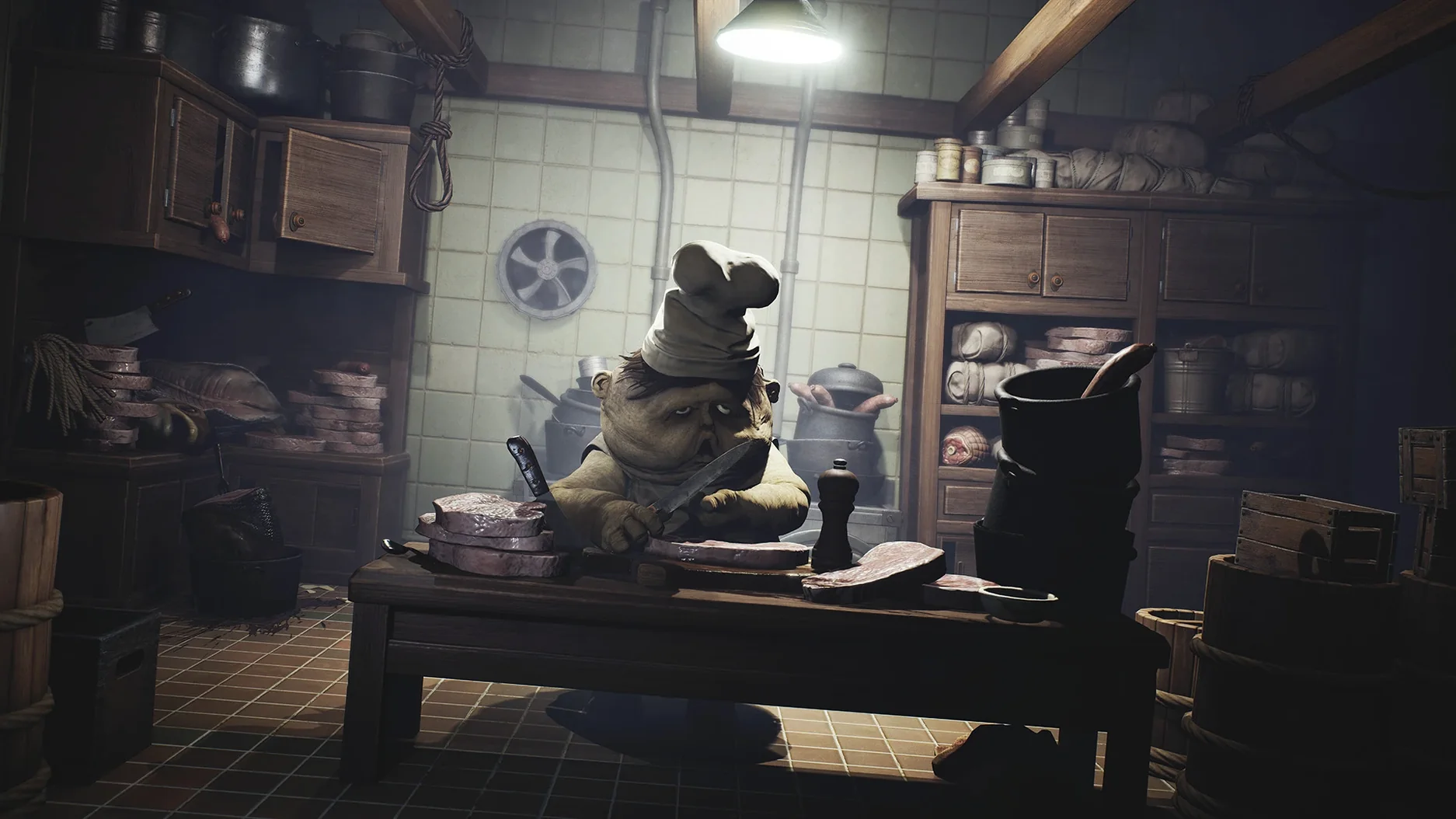
Most horror games rely on jump scares. Little Nightmares Enhanced Edition builds dread differently: you move slowly, hide under tables, and hold your breath while a giant chef searches the room. You play as Six, a small girl trapped inside the Maw, a strange vessel full of distorted adults who want to catch you. The tension comes from not knowing if the next shadow will move.
Sneak, climb, and solve puzzles to escape the adults
You spend most of your time solving environmental puzzles and sneaking. Pull a lever to raise a platform, then run before the patrolling enemy turns around. Climb shelves, crawl through vents, and swing across gaps. When an adult gets close, you crouch behind furniture or slip into a dark corner. There are no weapons — only evasion and timing.
What the Enhanced Edition changes
The original game already looked moody. This version adds volumetric lighting, ray-traced reflections, and improved water effects, all running at 60 frames per second in 4K. The build label includes an Update DLC Fix. Note that save files from the base version of Little Nightmares do not carry over.
Check graphics settings in Quality or Performance Mode
Once you have dragged Little Nightmares Enhanced Edition into your Applications folder and launched it from Launchpad, take a moment to check the graphics settings before you start playing. The game offers two modes: Quality Mode and Performance Mode. Try both in the first hallway to see which feels better to your eyes.
If the game fails to launch and shows an error, mount the disk image again and run the file named Fix before starting the app a second time. This is a one-time step for some configurations. After that, the game should open without trouble.
Your save files live inside the app bundle at AppData/Local/Little Nightmares Enhanced Edition/Saved/SaveGames. If you ever need to back up your progress or move it to another Mac, copy that folder. Because saves from the original Little Nightmares do not transfer, you are starting fresh, which is a good reason to take your time and explore every corner of the Maw.
Enhanced Edition runs at 60 FPS in 4K with new lighting
Will this version feel different from the original Little Nightmares? The core game is the same story and the same levels. What changes is the presentation: the Enhanced Edition runs at 60 FPS with 4K resolution, and the new lighting effects make shadows deeper and reflections clearer. If you already finished the original, the atmosphere will feel richer, but the puzzles and scares are unchanged.
Can I play with a controller? The game supports standard game controllers on macOS. Many players find the platforming sections easier with analog sticks, especially when you need to climb quickly. A keyboard and mouse work too, but a controller gives you finer control during the hiding sequences.
Is the game very long? A first playthrough takes roughly four to six hours, depending on how often you get caught. There is some replay value in finding collectibles you missed and in noticing the environmental details that the enhanced visuals bring out.
Built for Apple Silicon Macs on macOS Tahoe
Little Nightmares Enhanced Edition is built for Apple Silicon Macs and runs natively under ARM architecture. It was tested on macOS Tahoe, so it should work on current versions of the operating system without compatibility layers or extra software. The game runs as a standard Mac app from your Applications folder, and you can launch it from Launchpad or Spotlight.
That is normal. The Game Mode feature in macOS, if your version supports it, can also reduce background activity while you play.
The interface supports fourteen languages, including English, German, Spanish, French, Russian, Japanese, and both Simplified and Traditional Chinese. You can switch the language from the settings menu inside the game without changing your system language, which is handy if you share your Mac with someone who prefers a different language.
- macOS ?
- Apple Silicon
- Tested on macOS Tahoe and Mac mini 2024 M4
How to install
- Mount the downloaded disk image and drag the app into the Applications folder. This keeps the app where macOS expects it.
- Launch the app from Launchpad once copying finishes.
- If the game shows an error on launch, run the file named Fix from the disk image. It resolves a common launch issue.
Similar games



Sign in or join the club to leave a comment.
Nobody has commented yet.