- Version
- 1.16 [Wineskin]
- Studio or maker
- DRAGAMI GAMES, LTD.
- Languages
- Russian, English, German, Spanish, Italian, Chinese (Traditional), Portuguese, French, Japanese
- Activation
- Not required
- Chip type
- Apple Silicon
- Tried out on
- macOS Tahoe, Mac mini 2024 M4
- First released
- 12.09.2024
- Voice languages
- English
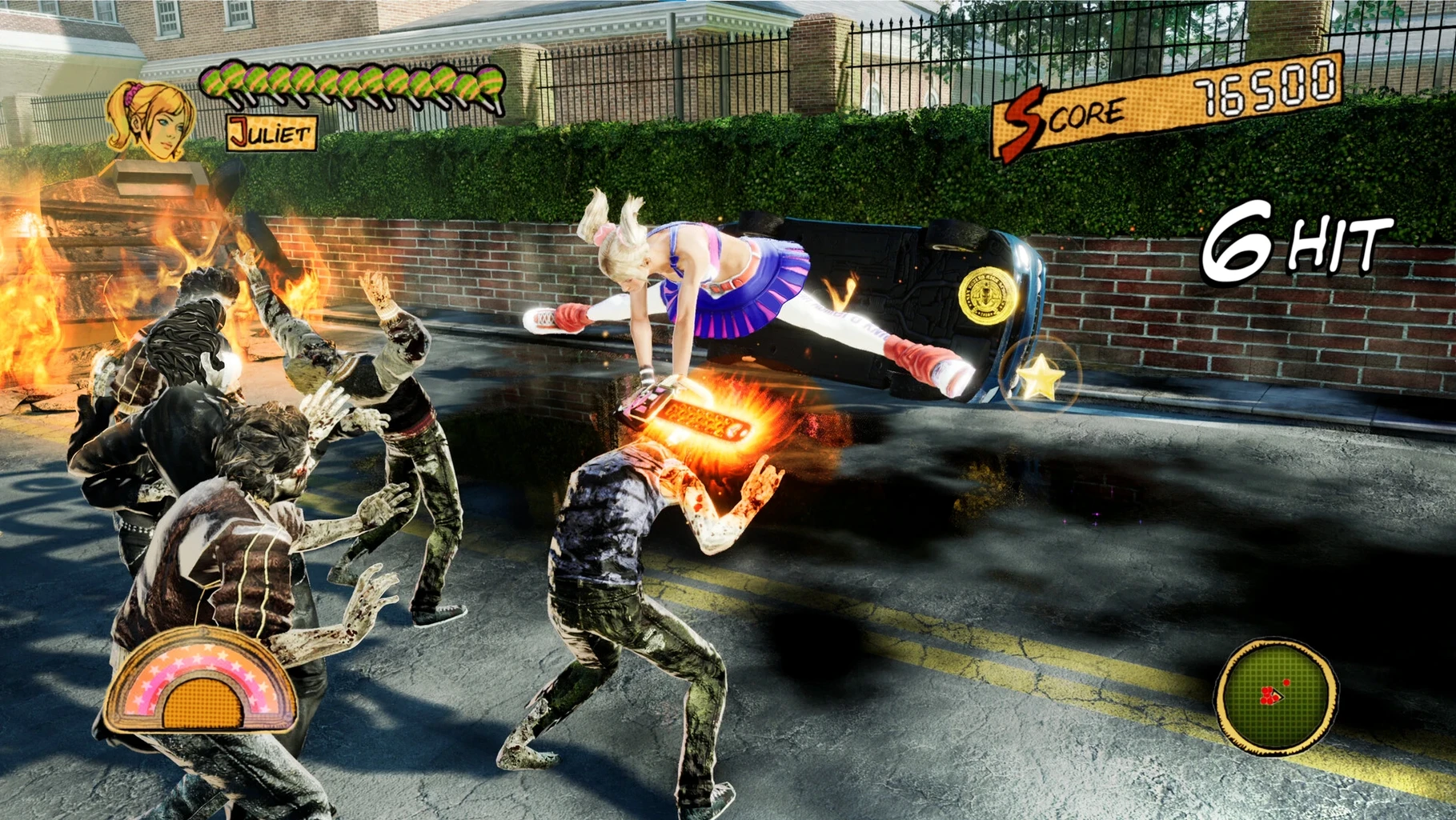
Lolipop Chainsaw RePOP runs on Apple Silicon Macs, including the latest macOS Tahoe. The release we list is version 1.16, packaged with Wineskin, and it was tested on a Mac mini 2024 M4. If you have an M1 or newer Mac, this should be within reach.
It's an action game about Juliet Starling, a cheerleader who fights zombies with her chainsaw. There are also auto-play options for quick-time events, so you can focus on the action instead of button prompts. The improved input response makes dodging and swinging feel tighter than in the original release.
Who is this for? If you enjoy over-the-top hack-and-slash combat with a campy horror-comedy tone, this fits. The classic soundtrack is here, along with updated graphics and 4K support for sharper visuals on capable displays. Difficulty modes have been expanded too, giving both newcomers and veterans a comfortable challenge. Voice acting is in English, with subtitles in several languages including Russian, German, and Japanese.
In short, this is a polished remaster of a cult classic, now playable on modern Macs without fuss. If you missed it the first time, or want to replay it with smoother performance, the Mac version is a solid way to do that.
Run the Fix file if the game does not start
Once you have copied the game to Applications and launched it from Launchpad, take a moment to check that everything works before you get invested. If the game does not start, run the Fix file from the disk image as described in the install instructions. A quick restart of the Mac after applying the fix sometimes helps too.
Open the settings menu and confirm the display resolution matches your monitor. The game supports 4K, but if you are on a smaller screen or want smoother movement, a lower resolution works fine. While you are there, set the language for subtitles and menus. English voice acting is the default, but you can choose from Russian, German, Spanish, Italian, Traditional Chinese, Portuguese, French, or Japanese for text.
Try the first level on the default difficulty. If the combat feels too easy or too punishing, you can switch to one of the new difficulty modes from the main menu. The auto-play for QTEs is turned off by default, so if you prefer to skip those quick button events, enable that option early.
Juliet stands in a hallway of San Romero after Continue
I start a session by opening Launchpad and selecting Lolipop Chainsaw RePOP from the Applications folder. The game loads to the title screen quickly, and I pick Continue from the main menu.
Juliet stands in a hallway of San Romero High School, chainsaw humming. I move forward using the left stick, and the camera follows smoothly — the improved camera control is noticeable from the first turn. A group of zombies shambles into view. I press the attack button and Juliet swings her chainsaw in a wide arc. The input response feels immediate, so combos chain together without lag.
When a quick-time event pops up, I let the auto-play handle it because I set that in the options earlier. The scene plays out without me needing to hit the right button, which keeps the pacing steady. Between fights, I explore lockers and classrooms for collectibles. The classic soundtrack plays in the background, and the 4K graphics make the blood and neon colors pop on my display.
After about thirty minutes, I save manually through the pause menu and close the game.
Set display resolution to native before the first boss
A few options make a real difference when you start. Change them before you fight the first boss.
- Display resolution — Set it to your monitor's native resolution for the sharpest image. The remaster supports 4K and 60 FPS if your display can handle it.
- QTE auto-play — Turn this on if you prefer watching cutscenes over pressing buttons in time. It removes the frustration of missed prompts.
- Difficulty mode — Try the standard mode first. If you want a tougher fight or a more relaxed experience, switch in the main menu before each session.
- Subtitle language — Pick your language from the list. The voice stays in English, but the text will match your choice.
- Updated graphics with 4K support.
- Improved controls and faster action.
- New difficulty modes and quality-of-life improvements.
- Reduced load times and improved camera.
- Enhanced input responsiveness and auto-play for QTEs.
- macOS Tahoe
- Apple Silicon (ARM)
- Tested on Mac mini 2024 M4
Questions I keep getting
Does Lolipop Chainsaw RePOP run on Intel Macs?
No, the Mac version requires Apple Silicon. The Russian page lists ARM architecture, and the release was tested on a Mac mini 2024 M4.
How to install
- Mount the downloaded disk image and drag the app into Applications. This places the game where macOS expects it.
- After copying finishes, launch the app from Launchpad. That's the usual way to start it.
- If the game shows an error at startup, run the Fix file from the disk image. It resolves common Wineskin issues.
Similar games





Sign in or join the club to leave a comment.
Nobody has commented yet.