- Version
- 1.0 fix
- Studio or maker
- 4A Games
- Languages
- Russian, English, German, Spanish, Italian, Dutch, Polish, Ukrainian, French, Czech
- Activation
- Not required
- Chip type
- Intel 64-bit
- Tried out on
- macOS Sequoia, MacBook Air (M1. 2020)
- First released
- 28.08.2014
- Voice languages
- Russian, English, German, Spanish, Italian, Ukrainian, French
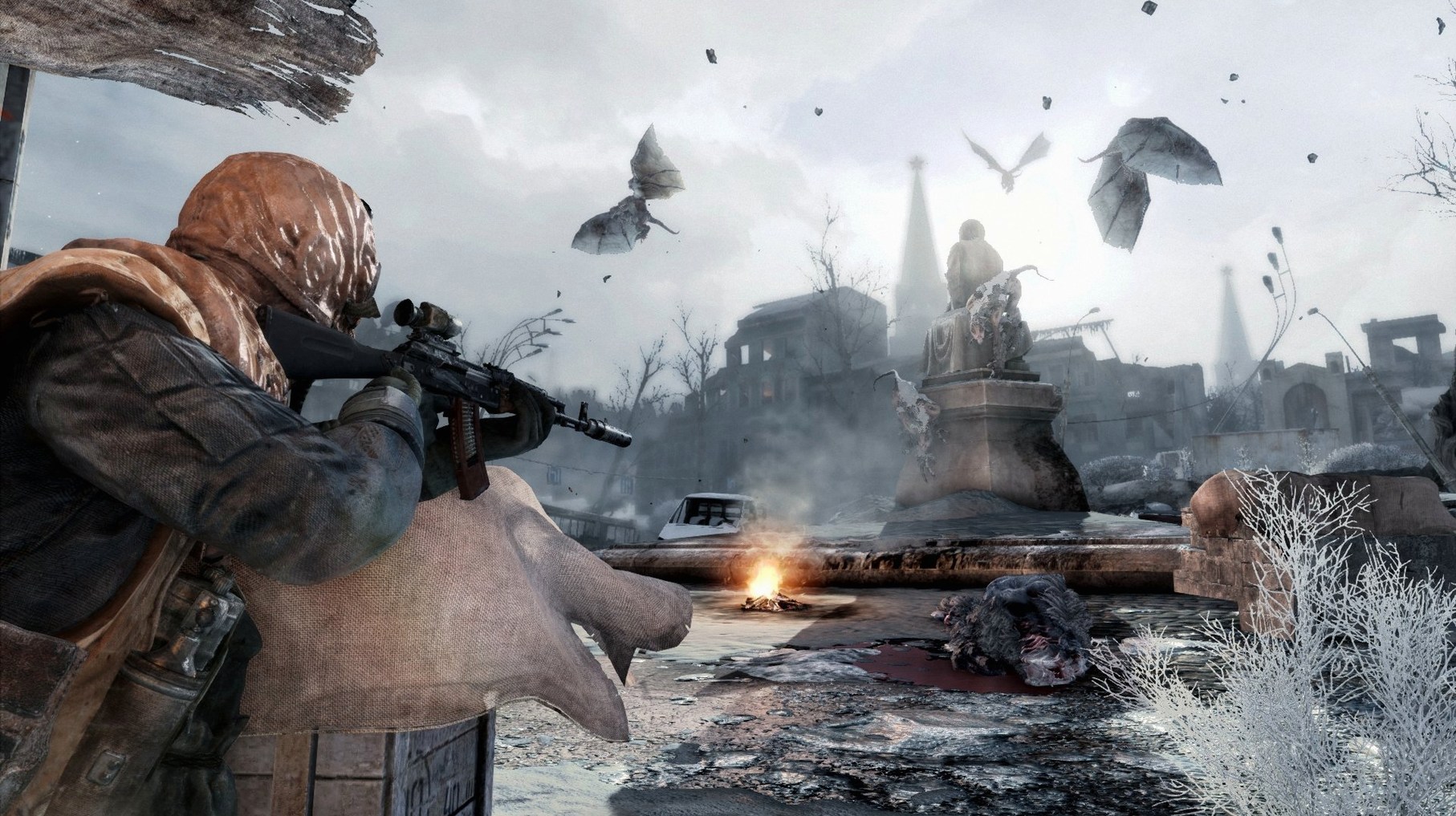
Metro 2033 Redux is a first-person shooter where you fight for survival in the tunnels of the Moscow Metro after a nuclear war.
Scavenging filters, ammo, and light in dark tunnels
Survival-horror — You scavenge for filters, ammo, and light in dark, claustrophobic tunnels. Every resource matters, and the atmosphere keeps you on edge.
Exploration — You move through station hubs and ruined surface levels, talking to NPCs and finding optional paths that reveal story details or extra supplies.
Tactical combat — Gunfights are deliberate. You choose your weapon mods, manage your ammo, and pick your shots against human and mutant enemies.
Stealth — You can avoid many fights by staying in the shadows, using silenced weapons, and taking out enemies quietly.
The Redux version rebuilds the original Metro 2033 on the 4A Engine, carrying over gameplay improvements from Metro: Last Light, such as better AI, interface, animation, and weapon handling.
First days in the metro – what to set up early
When you start a new campaign, take a few minutes to check the audio and display options before you move past the opening station. The game gives you control over brightness and a few other settings, but the key choice early on is your difficulty level. If you are new to the series, I would suggest starting on "Normal" rather than the harder "Ranger" modes, because ammunition is scarce at higher difficulties and you will want to learn the tunnel layouts without running out of bullets.
Another practical step: find the language menu and set your preferred text and voice languages. The game supports ten text languages, so if you want the original Russian voice acting with English subtitles, you can set that combination. Voice options are a separate setting from text, so check both.
Fixing launch failures on Apple Silicon Macs
A few things tend to trip people up during the first few hours, especially on Apple Silicon Macs.
- The game does not launch or shows a black screen. This is the most frequent issue. Metro 2033 Redux is a 64-bit x86 build, so on an M1 or later Mac, it runs through Apple’s Rosetta 2 translation layer. If Rosetta is not installed, the game will not start. The fix: open Terminal and type
softwareupdate --install-rosetta, then follow the prompt. After that, the game should open without trouble. - Performance feels uneven in large outdoor areas. The surface levels are more demanding on the GPU than the tunnel sections, because of the weather effects and open skies. If the game stutters for a moment when you first emerge from a tunnel, that is normal – the engine is loading the larger scene.
- Controls feel sluggish or the mouse sensitivity is wrong. The default sensitivity might not match your usual setup. You can adjust it in the settings menu. I also recommend turning off mouse smoothing if it is available, because that can make aiming feel floaty.
- Saved games do not appear after a reinstall. Save files are stored in your user Library folder, separate from the application. If you remove the game and later reinstall it, your progress is still there unless you manually deleted the save folder. Look inside
~/Library/Application Support/4A Games/Metro 2033 Redux/if you need to back them up before switching systems.
An evening session from opening to action
Let me walk you through an evening session I had not long ago, just so you know what the rhythm feels like.
I opened the game from Launchpad, and after a brief loading screen the main menu appeared. I selected "Continue" because I was in the middle of a chapter set in a station called Market. The game loaded my last checkpoint, which placed Artyom in a dimly lit corridor with a merchant NPC nearby. I checked my inventory: three gas mask filters, a handful of military-grade bullets (which double as currency), and a shotgun with a few shells.
Then I moved forward through a tunnel. The AI sentries at the next checkpoint spotted me before I could get close, so I fell back into a side room and waited for them to stop searching. After their patrol pattern reset, I used the silenced pistol to take out one guard from the shadows, then moved past the checkpoint. That kind of cautious pacing – wait, observe, then act – is typical for a session.
After about twenty minutes I reached a surface level, where a snowstorm reduced visibility. I used my lighter to navigate a collapsed building, found a journal entry that added some backstory, and then headed back into a metro entrance before my filter timer ran out. I saved manually at a bench (the game lets you save at certain spots) and quit for the night.
Why you should not waste military-grade bullets
Because the game does not explain every system up front, a few common errors show up in almost every new player session.
- Wasting military-grade bullets. In the Metro world, pre-war bullets (called military-grade rounds) are both ammunition for certain weapons and the currency used to buy gear. Beginners often fire them in combat because they are powerful, then arrive at a trader with nothing to spend. My advice: keep them for trading unless you are in a desperate fight. Use regular bullets for most enemies.
- Ignoring the gas mask timer. When you go to the surface, a timer shows how much filter life remains. New players sometimes stay outside too long while exploring, then run out of air mid-fight. Keep an eye on the timer and change the filter before it reaches zero – you can do this from the inventory screen. Carrying two spare filters is a safe habit.
- Overlooking optional paths. The main route through each level is usually straightforward, but branching tunnels often contain ammo caches, moral choice moments, or story notes. If you rush through without looking around, you miss resources that make the later chapters easier.
- Fighting every enemy head-on. Ammo is limited on all difficulty settings, and some mutants are tough enough to drain your supply quickly. Stealth is not just an option – it is often the smarter approach. Use darkness, throw knives, and reposition rather than holding down the trigger.
Once you get past these early habits, the game lets you settle into its slower, more deliberate pace, and the story really opens up.
- Rebuilt version of Metro 2033 on the 4A Engine.
- Updated graphics, lighting, physics, and weather.
- Gameplay changes from Metro: Last Light, including improved AI, interface, animation, and weapon handling.
- macOS 10.9.5 Mavericks or newer
- 3.2 GHz Intel Core i5 processor
- 8 GB memory
- Radeon HD7950 3 GB or NVIDIA GeForce GTX 750m 1 GB graphics
- 64-bit x86 build
Questions I keep getting
Does Metro 2033 Redux run on Apple Silicon Macs?
The game is a 64-bit x86 build, so it runs on Intel Macs natively. On Apple Silicon it works through Rosetta 2, as tested on a MacBook Air M1 with macOS Sequoia.
What languages does Metro 2033 Redux support?
It supports Russian, English, German, Spanish, Italian, Dutch, Polish, Ukrainian, French, and Czech text.
What are the minimum macOS requirements?
The minimum specification is macOS 10.9.5 Mavericks or newer, a 3.2 GHz Intel Core i5 processor, 8 GB memory, and a Radeon HD7950 3 GB or NVIDIA GeForce GTX 750m 1 GB graphics card.
How to install
- Open the downloaded disk image to mount it.
- Drag the game to the Applications folder alias to copy it.
- Launch the game from Launchpad after copying finishes.
Similar games



Sign in or join the club to leave a comment.
Nobody has commented yet.